Preview


Description
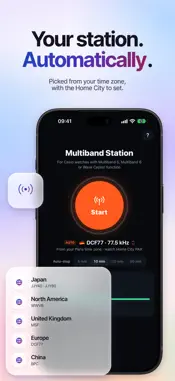
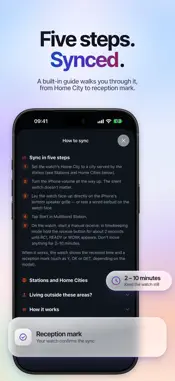
Your radio-controlled watch can't reach its time signal? Multiband Station turns your iPhone into a pocket transmitter, so the watch can sync right on your desk. Made for Casio watches with Multiband 5, Multiband 6 or Wave Ceptor reception. Lay the watch on the iPhone's speaker, tap Start and start a receive on the watch. Within a few minutes it picks up the exact time, as if the real station were nearby. KEY FEATURES • One tap – the big Start button begins transmitting straight away • Auto station – picks JJY, WWVB, MSF, DCF77 or BPC from your time zone, and follows you when you travel • All six stations – JJY 40, JJY 60, WWVB, MSF, DCF77 and BPC, each with its official time-code format • Accurate timing – every pulse follows your iPhone's network-synced clock • Readiness checklist – live volume meter, audio output check and the Home City your watch needs • On-air view – see each second's pulses as they are sent, with a countdown and live signal glow • Hands-off – stops automatically after 5–30 minutes and keeps going with the screen locked • Built-in guide – step-by-step syncing, Home City table and troubleshooting tips WHO IT'S FOR • You live outside a time-signal area, or the signal is blocked indoors • Your watch missed its overnight sync and you want it right now • You're travelling and want to set your watch for a new region HOW TO USE 1. Set the watch's Home City to a city served by the station (shown in the app) 2. Turn the iPhone volume all the way up 3. Lay the watch face-up on the bottom speaker, or rest a wired earbud on it 4. Tap Start 5. Start a manual receive on the watch and keep still for 2–10 minutes FREE TO TRY Your first 10 sessions are free. After that, a one-time purchase unlocks unlimited transmissions. No subscription, no account. PRIVACY Multiband Station works entirely on your iPhone. It collects no data, needs no account, asks for no permissions and makes no network requests of its own. The unlock is bought and restored through the App Store. NOTES • The signal reaches only a few centimetres, so keep the watch right on the speaker or earbud • Reception depends on your iPhone's audio hardware and your watch model. If the speaker doesn't work, wired earphones often do. Bluetooth and AirPlay won't work • Multiband 5 watches receive every station except BPC • Never wear earphones while transmitting: the tone plays at full volume Multiband Station is an independent app and is not affiliated with, endorsed by or sponsored by Casio Computer Co., Ltd. Casio, G-SHOCK, MULTI BAND 6 and Wave Ceptor are trademarks of their respective owners.
What's New
Version 1.1.1 2026-11-22
Multiband Station is now free to try: your first 10 sessions are free. When you're ready, a one-time purchase unlocks unlimited transmissions on every iPhone s...Multiband Station is now free to try: your first 10 sessions are free. When you're ready, a one-time purchase unlocks unlimited transmissions on every iPhone signed in to your Apple Account. No subscription and no account, and Restore Purchase is always on the unlock screen. Technical Analysis
Package Overview Basic metadata
Bundle ID
com.multibandstation.app Current Version 1.1.1
Minimum iOS 16.4
Package Size App Store Size
Package Metadata 0 / 0 version records
Detailed binary, privacy manifest, framework, and Info.plist results have not been indexed for this package yet. The verified App Store and archive metadata above remains available.
Developer Information
Known Version Records
0 version records with stored package metadata
Stored metadata does not guarantee a package is currently available to download.
| Details | Version / IDs | Version date | Action |
|---|