Preview









Description
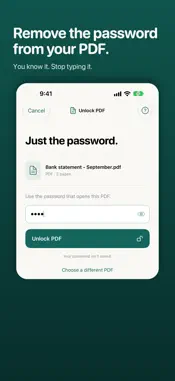
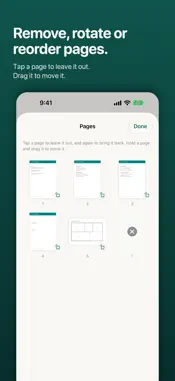
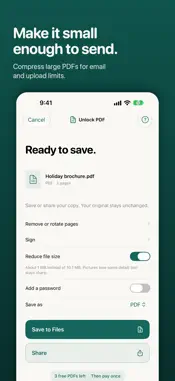
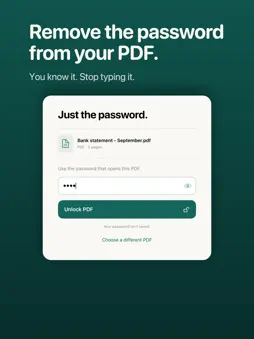
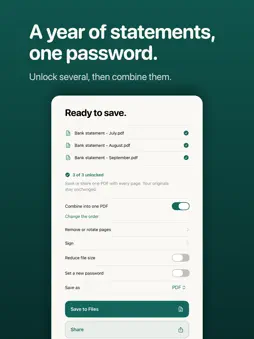
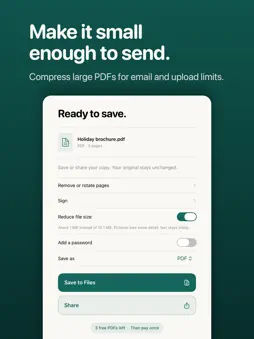
Know the password, but tired of typing it every time? Unlock PDF saves a copy of your PDF that opens without a password. Once it is open, the app does the rest of the paperwork too: fill in the form, sign it, merge it with others, make it smaller and send it. REMOVE A PASSWORD • Enter the password once and keep a copy that opens without it • Bank and credit card statements, pay stubs, tax, insurance and medical documents • A whole year of statements at once: one password is tried on all of them • Straight from the share sheet in Mail, Files or another app REMEMBERED PASSWORDS • Ask the app to remember a password, and the next PDF that uses it unlocks by itself • Made for the statement your bank sends every month • Kept on your device only. Using one takes Face ID, Touch ID or your passcode. • Nothing is remembered unless you ask FILL IN AND SIGN • Fill in a form straight from the share sheet: one tap, from your saved details • Save your name, phone, email and address once. Forms with fields fill themselves in. • Keep a profile for everyone you fill in forms for: yourself, your family, your business. Switch inside any form. • Draw your signature once and place it on any page. Keep several, such as your initials. • Add today's date, a check mark or a line of text next to it COMBINE, SPLIT AND TIDY UP • Combine several PDFs into one, in the order you choose • Remove pages, rotate them or drag them into a new order • Save every page as a PDF of its own • Actions for the Shortcuts app: remove or add a password, combine PDFs, reduce file size MAKE IT SMALLER Reduce the file size of PDFs with large pictures, for email and upload limits. You see how much smaller the copy will be before you save it. PHOTOS, SCANS AND PICTURES • Turn photos into a PDF • Scan paper with the camera • Text in photos and scans becomes searchable • Save PDF pages as JPEG or PNG pictures, or save the text of a PDF ADD A PASSWORD Lock a PDF before you send it, or replace an old password with one of your own. PRIVATE BY DESIGN • Everything is done on your device. Nothing is uploaded. • Works without an internet connection • No account, no ads, no analytics • A password is only kept if you ask the app to remember it. Your details and signatures stay on your device. FREE TO TRY, PAY ONCE Your first 3 PDFs are free, with every tool. After that, a single purchase unlocks unlimited PDFs. No subscription and nothing to renew. If you bought Unlock PDF before it became free, everything is already unlocked for you. GOOD TO KNOW • To remove a password you need the PDF's current password. Unlock PDF cannot guess, crack or recover a forgotten password. • A password you add cannot be recovered either, so keep it somewhere safe. • Your signature is placed on the page as a picture, like a signature on paper. It is not a certificate-based digital signature. • Forms are filled in by the names of their fields. Check a form before you send it. • Reducing the size scales down pictures. A PDF that is mostly text will not get smaller. • Changing a digitally signed PDF can invalidate its signature, so keep your original. • Your original files are never changed. The app always saves a copy.
What's New
Version 2.1.0 2026-11-18
• Sign and mark up without dragging: new size and move buttons • Easier to read, and every screen works at large text sizes • Tools grouped on the home screen; ...• Sign and mark up without dragging: new size and move buttons • Easier to read, and every screen works at large text sizes • Tools grouped on the home screen; batches of PDFs handled more reliably • Fixes and polish throughout Technical Analysis
Package Overview Basic metadata
Bundle ID
com.aviweb.pdfunlock Current Version 2.1.0
Minimum iOS 16.0
Package Size App Store Size
Package Metadata 0 / 0 version records
Detailed binary, privacy manifest, framework, and Info.plist results have not been indexed for this package yet. The verified App Store and archive metadata above remains available.
Known Version Records
0 version records with stored package metadata
Stored metadata does not guarantee a package is currently available to download.
| Details | Version / IDs | Version date | Action |
|---|