
Preview





Description
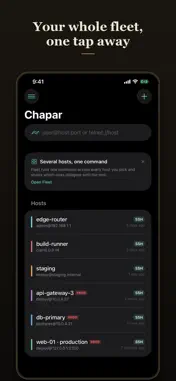
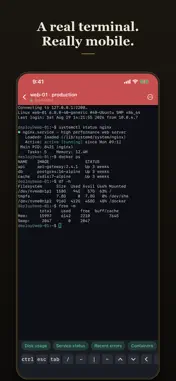
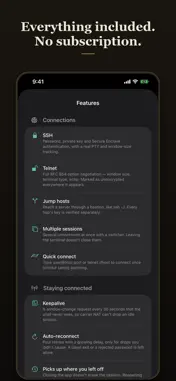
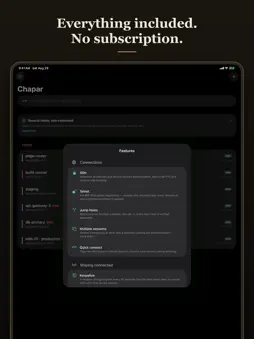
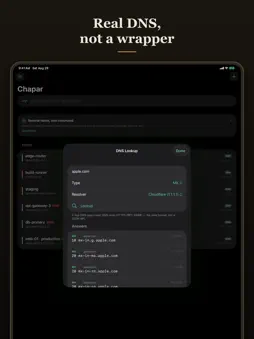
THE TERMINAL Full xterm emulation, so vim, htop, colours and mouse reporting all behave. Five themes, three monospace fonts, pinch to resize. A key bar gives you Ctrl, Esc, Tab, arrows and one-tap ^C, ^D and ^Z — the keys a phone keyboard doesn't have. On iPad, Command shortcuts switch session, close, reconnect and clear. STAYS CONNECTED The part mobile SSH usually gets wrong. A keepalive the shell never sees stops carrier NAT dropping an idle session. Auto-reconnect retries only the drops you didn't cause. Close the app and reopen a host and the previous transcript is still there, marked as history, one tap from reconnecting. A tmux toggle survives iOS suspending the app entirely. COMMAND BLOCKS Add one line to your shell config — standard OSC 133, the same marks iTerm2 and VS Code use — and scrollback becomes a list of commands, each with its own output, exit status and duration. Copy, share or re-run one without selecting text on a phone screen. Record a session and export it as an asciicast that plays in asciinema. FILES AND TUNNELS SFTP browsing, viewing, editing, upload and download. Local port forwards, reverse forwards and a SOCKS5 proxy. All on the same authenticated connection as your shell, not a second login. NETWORK TOOLKIT A live latency graph with min, avg, max, p50, p95, p99, jitter and loss — and the specific reason behind every drop. Compare two targets on one graph to tell a bad link from a bad server. Port scanner that names the software behind each open port. Subnet sweep. TLS inspector showing the full certificate chain, expiry and SANs. DNS lookup speaking real RFC 1035 wire format. HTTP health with a DNS, connect, TLS and time-to-first-byte breakdown. SNMPv2c for gear that has no SSH. An IPv4 and IPv6 subnet calculator. Wake-on-LAN. Plus nmap and tcpdump driven on one of your own hosts, with the results parsed and rendered natively. FLEET AND AUTOMATION Run one command across many hosts and see which ones disagree with the rest. Runbooks with ordered steps that halt on failure. Snippets with placeholders that prompt for values. Shortcuts and Siri. A Home Screen widget. Live Activities for long runs. Scheduled checks that notify you only when something actually changes. ON-DEVICE INTELLIGENCE Explain what a command changes before you run it. Summarise hundreds of log lines into a few. Diagnose a failed command. Search your history by meaning rather than by matching words. Redact keys and tokens before you export anything. All of it runs on the device — server output never leaves your phone, and there is no AI service behind any of it. NOT BREAKING PRODUCTION Hosts you mark as production get a red header and a PROD badge, so you always know where you are. Commands that delete, format, stop services or rewrite history ask first — in the terminal, in fleet runs and in runbooks. Shortcuts refuse them outright. KEYS AND TRUST Host key pinning with SHA256 fingerprints that match ssh-keygen -lf, and a loud warning if a pinned key ever changes. Secure Enclave keys that cannot be exported, backed up or read — not even by this app. Ed25519 generation, OpenSSH key import, CA-signed SSH certificates, and keyboard-interactive two-factor for the bastions that require it. Optional Face ID lock. YOUR DATA Passwords and private keys live in the Keychain marked device-only: no iCloud, no backups, no access while the phone is locked. Optional iCloud sync covers hosts, snippets and history through your own account — never secrets, by construction. Per-host notes can be end-to-end encrypted with a key only your iCloud Keychain holds. Import your existing ~/.ssh/config and known_hosts in one step. Settings, then About, then Included features lists everything Chapar does — including the handful of things that aren't built yet. If it's listed as working, it works.
What's New
Version 1.5 2026-10-17
Chapar now runs on Mac. And it does remote desktop: connect to VNC servers — including a Raspberry Pi, encrypted end to end, and a Mac's Screen Sharing — or tun...Chapar now runs on Mac. And it does remote desktop: connect to VNC servers — including a Raspberry Pi, encrypted end to end, and a Mac's Screen Sharing — or tunnel any VNC server through a saved SSH host. Tap, drag, scroll and pinch to zoom on iPhone and iPad; a real mouse and keyboard on Mac. Technical Analysis
Package Overview Basic metadata
Bundle ID
com.hessam.Chapar Current Version 1.5
Minimum iOS 17.0
Package Size App Store Size
Package Metadata 0 / 0 version records
Detailed binary, privacy manifest, framework, and Info.plist results have not been indexed for this package yet. The verified App Store and archive metadata above remains available.
Developer Information
Known Version Records
0 version records with stored package metadata
Stored metadata does not guarantee a package is currently available to download.
| Details | Version / IDs | Version date | Action |
|---|