
Preview



Description
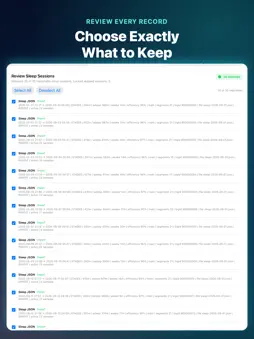
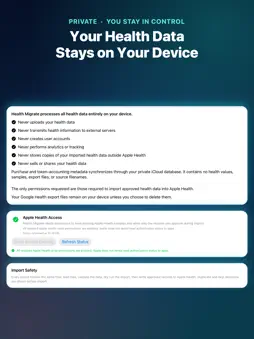
Move your Fitbit and Google Health history into Apple Health. Health Migrate imports your Fitbit history, recorded with Fitbit devices and the Fitbit app, and other supported Google Health data from your Google Health export files into Apple Health. You see exactly what will be written before anything changes. HOW IT WORKS Every importer follows the same guided steps: • Load the CSV or JSON files from your Google Health export • Analyze the records and see any rows that could not be read • Review the records and choose what to keep • Run a Dry Run to see what will be imported, what will be skipped, and why • Import only the records you approved Long imports, such as Energy, Heart Rate, Sleep, and Workouts, show their progress and can be stopped. Run Dry Run again to continue; records already written are skipped. SUPPORTED DATA From JSON export files: • Weight, Body Fat %, BMI, and Lean Body Mass • Steps and Distance • Sleep, including sleep stages • Heart Rate and Resting Heart Rate • Active Energy and Resting Energy • Workouts, with GPS routes when your export includes them • VO₂ Max and Height From CSV export files: • Weight, Body Fat %, Steps, Sleep, Hydration, and Resting Heart Rate Health Migrate reads the specific file layouts used in Google Health exports for these metrics. It is not a general-purpose CSV importer, and other files in your export are not imported. The in-app Resources tab lists every supported file and explains how to request your export. DUPLICATE PROTECTION Before writing, Health Migrate checks Apple Health for matching records and skips them, including records from an earlier Health Migrate import. Interrupted imports can be continued without writing the same records twice. To check against data from your Apple Watch, iPhone, or other apps, Health Migrate needs permission to read those categories in Apple Health; each Dry Run tells you when it cannot see older data. REVIEW AND SHARE Each Dry Run produces a full report that you can save, share, or print with the standard iOS share sheet before you import. PRIVATE BY DESIGN Your export files are read and processed on your device. Health Migrate has no account or login, and your health data is never sent to HELM Coders. Purchase and token records (no health data) are kept in your private iCloud database so your balance works across your devices. PAY ONLY WHEN YOU IMPORT Loading, Analysis, Review, and Dry Run are free. An import uses one token only when it writes at least one record to Apple Health; an import that writes nothing is not charged. If you stop an import after records have been written, continuing later may use another token when additional records are imported. • Token packs: 20, 50, 100, or 500 imports • Unlimited: one purchase, no token tracking ALSO INCLUDED • A time zone setting for exports whose times have no time zone • Weight history cleanup tools with a CSV backup before changes • Templates and troubleshooting help Health Migrate needs Apple Health permission for the categories you import. It does not change or delete existing Apple Health data, except through the optional Weight cleanup, which you start yourself and which only removes weight records Health Migrate wrote.
What's New
Version 1.2 2026-10-25
Health Migrate 1.2 is a reliability release for more accurate, repeatable imports of your Google Health history. SLEEP • An interrupted night can be completed ... Technical Analysis
Package Overview Basic metadata
Bundle ID
com.helmcoders.HealthImport Current Version 1.2
Minimum iOS 17.6
Package Size App Store Size
Package Metadata 0 / 0 version records
Detailed binary, privacy manifest, framework, and Info.plist results have not been indexed for this package yet. The verified App Store and archive metadata above remains available.
Developer Information
Known Version Records
0 version records with stored package metadata
Stored metadata does not guarantee a package is currently available to download.
| Details | Version / IDs | Version date | Action |
|---|