
Preview





Description
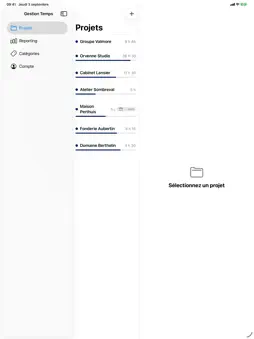
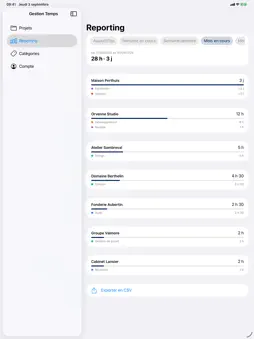
Time Tracking for Projects is a simple work-time tracker and timesheet app, built for consultants, freelancers and small teams who bill by the hour. No spreadsheet to maintain, no timesheet to rebuild from memory at the end of the month. Create a project, start the stopwatch, and the app keeps the count. A STOPWATCH THAT KEEPS RUNNING Start a timer on a project in one tap. It keeps counting in the background: close the app, lock your phone, the time is still recorded. A notification shows which project is running and how long it has been going, and a reminder every 30 minutes makes sure a timer is never left running by mistake. TIME YOU ENTER YOURSELF Forgot to start the timer? Add hours and minutes manually, on any date. Every entry can be edited or deleted afterwards, so a wrong figure never stays in your records. CATEGORIES AND SOLD HOURS Sort your hours by category — meeting, writing, travel, whatever your work is made of. When a project was sold as an envelope of hours, set that envelope and a gauge shows how much of it is consumed. You see a budget overrun coming instead of discovering it at invoicing time. REPORTING THAT ANSWERS THE REAL QUESTION Per project and per category: today, this week, last week, this month, last month. Enough to check a timesheet before you send it, and to know whether a client is taking more time than they are paying for. CSV EXPORT AND CLIENT EMAILS Export your hours as a CSV file sent straight to your own address — open it in any spreadsheet, attach it to an invoice, hand it to your accountant. The app also writes ready-to-send emails for your clients: budget tracking, monthly timesheet, progress update, in English or in French. You read them, you adjust them, you send them. IPHONE, MAC AND BROWSER The same account works everywhere. Start a stopwatch on your iPhone and stop it from your Mac; everything updates in real time. Your projects, your hours and your categories follow you from one device to the next. WORKING WITH OTHERS Invite the people you work with onto a project and their hours join the same reporting as yours. Roles are set project by project: a collaborator sees only their own entries, a manager sees the project totals. Nobody joins a project without being invited. YOUR DATA Your hours belong to your account. They are visible only to you and to the people you invite yourself onto a project. No advertising, and your data is never sold. SUBSCRIPTION Time Tracking for Projects offers a free 2-month trial, then an auto-renewable subscription, Individuel mensuel, at $4.99 per month. The price may vary by region and is always shown in the app before you confirm. Payment is charged to your Apple Account at confirmation of purchase. The subscription renews automatically for the same period unless auto-renewal is turned off at least 24 hours before the end of the current period. Your account is charged for renewal within 24 hours before the end of the current period. You can manage your subscription and turn off auto-renewal in your Apple Account settings after purchase. Any unused portion of a free trial period is forfeited when you purchase a subscription. Terms of Use (EULA): https://www.apple.com/legal/internet-services/itunes/dev/stdeula/ Privacy Policy: https://advisory-temps.com/en/privacy/
What's New
Version 1.1.0 2026-10-22
• Project billing: mark time as billable or not, record the invoices you issue and see what is left to bill. • Sign in with Google on iPhone, iPad and Mac. • "F... Technical Analysis
Package Overview Basic metadata
Bundle ID
com.henri.gestiontemps Current Version 1.1.0
Minimum iOS 17.0
Package Size App Store Size
Package Metadata 0 / 0 version records
Detailed binary, privacy manifest, framework, and Info.plist results have not been indexed for this package yet. The verified App Store and archive metadata above remains available.
Developer Information
Known Version Records
0 version records with stored package metadata
Stored metadata does not guarantee a package is currently available to download.
| Details | Version / IDs | Version date | Action |
|---|