
Preview






Description
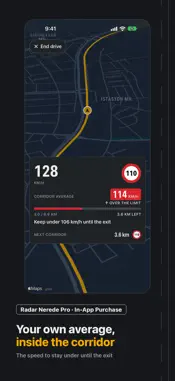
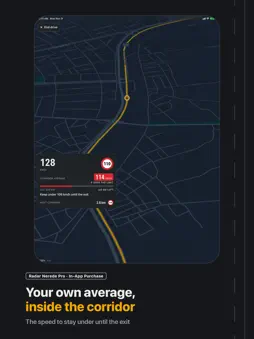
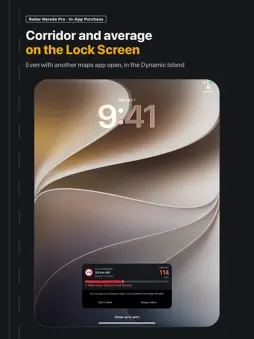
Before you set off, see the average-speed corridors on your route in order; while driving, follow the corridor's limit, the distance left and your own average at a glance, even with the phone locked. No account, no server of ours, no subscription. Road briefing Pick the start and destination district, or start from "My location". The route comes from the Turkish Interior Ministry's public service and is laid out on a vertical strip of road: • Only the corridors in your direction of travel, in the order they appear on the road • Each corridor's speed limit, the kilometres where it starts and ends, and its length • Corridors near the route but not on it, in a separate section • The provinces along the route and the numbers of radar and non-radar checkpoints reported in each province • Tap a corridor and the map moves in on it On the road The driving screen is dark and minimal. It shows the distance to the next corridor and its limit; once you enter a corridor, the limit sign and the kilometres left come to the front. While the phone is locked Once a drive starts, the next corridor, its limit and the distance left stay visible on your locked iPhone and in its Dynamic Island. They stay there even with another maps app open. When you arrive, the drive ends by itself. Siri and Shortcuts Say "Start a drive in Radar Nerede" or "Check the road in Radar Nerede" and your saved route opens. It also works from the Shortcuts app and the Action button. Saved routes, also offline Save the routes you take often. Briefings you open are kept on the device. With no connection, the app offers the last briefing for that route and says how old it is. Radar Nerede Pro (paid once, no subscription) • Corridor average: calculates your average speed from the moment you enter a corridor. If the average goes over the limit, it tells you what speed to stay under until the exit. Your average stays visible with the phone locked, too. • Live speed: your speed and the corridor's limit side by side • Alerts: a spoken phrase, an alert tone and vibration 1 km before a corridor, when you enter it and when the average goes over the limit. The three can be switched on and off separately; you hear them with the phone locked, and your music is lowered only for the length of the alert. • Alternative routes: the other routes suggested by Apple Maps, on the map Privacy No account or sign-in, no ads or tracking, no server of ours. When you ask for a route, the start and destination points are sent to the Ministry's service. If you use "My location", that point is your device's location. Your location and average while driving are processed only on your device. Good to know Radar Nerede is made independently and has no tie to the Interior Ministry or any other public authority. The Ministry's service gives the number of radars and checkpoints, not their individual positions, so the app does not show radar locations. On some routes the service returns no corridors at all; the app says so clearly. The average the app calculates is not a substitute for an official measurement. Obeying traffic rules and speed limits is the driver's responsibility.
What's New
Version 2.1 2026-11-10
Radar Nerede 2.1 • With the phone locked, and in the Dynamic Island: the next corridor, its limit and the distance left while you drive, even with another maps ...Radar Nerede 2.1 • With the phone locked, and in the Dynamic Island: the next corridor, its limit and the distance left while you drive, even with another maps app open. With Pro, your corridor average too. • Siri and Shortcuts: say "Start a drive in Radar Nerede" and your saved route opens. • With Pro, a spoken heads-up 1 km before a corridor. • The drive ends by itself when you arrive, and pauses after a long stop, so location is not left running. • If you join a corridor halfway, the app says the average only counts from there. • An average hovering just over the limit no longer repeats the alert again and again. • Pro alternative routes now also show short detours. • No route from an old location; an offline briefing stays on screen while it refreshes; accessibility and translation fixes. Technical Analysis
Package Overview Basic metadata
Bundle ID
com.radarnerede.app Current Version 2.1
Minimum iOS 17.0
Package Size App Store Size
Package Metadata 0 / 1 version records
Detailed binary, privacy manifest, framework, and Info.plist results have not been indexed for this package yet. The verified App Store and archive metadata above remains available.
Developer Information
Known Version Records
0 version records with stored package metadata • 1 known version records
Stored metadata does not guarantee a package is currently available to download.
| Details | Version / IDs | Version date | Action |
|---|---|---|---|
| Not archived | App Store ID: 884795136 | Unknown | Request Version |