Preview




Description
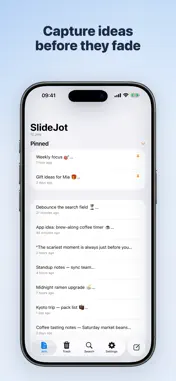
SlideJot is a tiny jot pad for the thoughts you'd otherwise lose — the idea in line at the coffee shop, the sentence you'll want later, the link you don't know where to file yet. A jot is lighter than a note and more durable than the clipboard. Open the app, type, done. No folders to choose, no titles to invent, no formatting decisions. Organize later — or never. CAPTURE FIRST, ORGANIZE LATER • Start a new jot in one tap and just write • Everything autosaves as you type • Pin the jots you keep coming back to • Deleted jots go to Trash, so nothing is lost by accident FIND WHAT YOU PARKED • Fast full-text search across your current jots • The messy fragment you saved becomes useful again when you can actually find it MORE THAN PLAIN TEXT • Choose images with Apple's system Photos picker or take one with the camera • Add code blocks and section blocks from the keyboard toolbar • Undo and redo, right where you type • Adjustable editor font size, plus light, dark, or system appearance BUILT FOR IPHONE AND IPAD • On iPad, a two-column layout keeps your list and editor side by side • Keyboard shortcuts for common actions when a hardware keyboard is attached OPTIONAL ICLOUD SYNC • Flip one switch to sync jots and images across your iPhone, iPad, and Mac • Sync uses your own iCloud account — we never see your data • Local editing works offline; pending changes sync after a connection is available PRIVATE BY DESIGN • No account, no sign-up, no email required • No ads, no analytics, no trackers, no third-party SDKs • Your jots live on your device, and in your own iCloud only if you enable sync FREE, WITH NOTHING TO UNLOCK SlideJot for iOS is completely free: no in-app purchases, no subscriptions, no paywall. SlideJot for Mac — a slide-out jot panel that lives at the edge of your screen — is available separately and syncs with the iOS app through iCloud. Stay draft. Stay messy. Keep the line worth keeping.
What's New
Version 1.1.0 2026-10-18
• New emoji keyboard: tap the smiley on the keyboard toolbar to add emoji, then ABC to get back to typing. It stays open while you tap from line to line, so mar...• New emoji keyboard: tap the smiley on the keyboard toolbar to add emoji, then ABC to get back to typing. It stays open while you tap from line to line, so marking a list of to-dos is quick. • Empty the Trash in one step with Delete All. • Section blocks can now have text on the opening line, like "::::: Ideas". • Code blocks now have square corners, matching section blocks. Technical Analysis
Package Overview Basic metadata
Bundle ID
com.slidejot.app Current Version 1.1.0
Minimum iOS 17.0
Package Size App Store Size
Package Metadata 0 / 0 version records
Detailed binary, privacy manifest, framework, and Info.plist results have not been indexed for this package yet. The verified App Store and archive metadata above remains available.
Developer Information
Known Version Records
0 version records with stored package metadata
Stored metadata does not guarantee a package is currently available to download.
| Details | Version / IDs | Version date | Action |
|---|