
Preview





Description
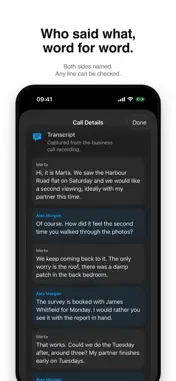
The deal did not die on the call. It died in the follow-up you forgot. The same way the viewing goes unlogged, the candidate detail slips, and the billable call never reaches the invoice. You were busy with the next conversation. Superscribe Phone captures your calls and meetings and turns them into usable notes, decisions, tasks, and follow-ups, so you do not have to reconstruct the work later. CALLS Answer normally on iPhone with your existing number. Every work call is transcribed and summarized, with action items and billing context attached. MEETINGS Tap record for the meeting in the room. Get a transcript with every speaker separated, and when someone introduces themselves, their name appears on their lines. Every meeting gets a title and is filed to the right project. ADD PEOPLE BY PHONE Dial contacts into a meeting or an ongoing call. See who is connected, remove anyone at any time, and everyone ends up in one transcript. STRAIGHT TO YOUR CRM Calls and meetings become Pipedrive notes and activities automatically, in the language the conversation was held in. No copy-paste, no manual logging. WHO USES SUPERSCRIBE Sales teams that close on the phone and hate CRM admin Real estate agents juggling buyers, sellers, and viewings Recruiters running interview after interview Consultants and advisors who bill by the conversation Brokers and agencies where every detail is money Stop relying on memory after calls Capture action items before they disappear Turn client conversations into follow-ups and tasks Keep billing and project context attached to every call and meeting Works on iPhone with your existing number Built for work conversations. Review notes before sharing. Apple Standard EULA: https://www.apple.com/legal/internet-services/itunes/dev/stdeula/ Superscribe Terms of Use: https://superscribe.io/terms.html Privacy Policy: https://superscribe.io/privacy.html
What's New
Version 1.3.17 2026-11-19
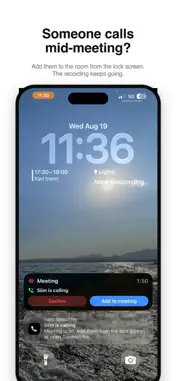
The meeting card on the lock screen and in the Dynamic Island has the new look of the suggested-action cards: glass in your colour theme, with the meeting's clo...The meeting card on the lock screen and in the Dynamic Island has the new look of the suggested-action cards: glass in your colour theme, with the meeting's clock in a ring. When someone calls during a meeting, the card shows Decline and Add to meeting. Settings has a new Themes and icons page. Choose light, dark or the same as your phone, a colour theme (Default, Ink, Harbor or Grove) and a new app icon. The suggested-action cards after a call are redesigned. They now go away on their own: 15 minutes after a meeting starts, or 4 hours after the call. At most three show at once. Sign in with your email address: tap Continue with email. GitHub and the other ways to sign in are under More ways to sign in. For companies whose phone system is connected to Superscribe: calls and call history show which company line was called, Settings lists your company numbers, and with two or more lines you can choose which one a call goes out from. The recording notice can play a soft tone, chime, bell or classic beep, and you can listen to each one in Settings. Technical Analysis
Package Overview Basic metadata
Bundle ID
io.superscribe.phone Current Version 1.3.17
Minimum iOS 26.0
Package Size App Store Size
Package Metadata 0 / 0 version records
Detailed binary, privacy manifest, framework, and Info.plist results have not been indexed for this package yet. The verified App Store and archive metadata above remains available.
Developer Information
Known Version Records
0 version records with stored package metadata
Stored metadata does not guarantee a package is currently available to download.
| Details | Version / IDs | Version date | Action |
|---|