
Preview










Description
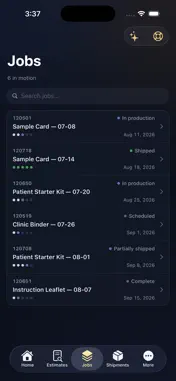
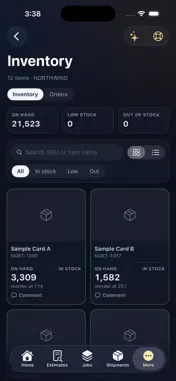
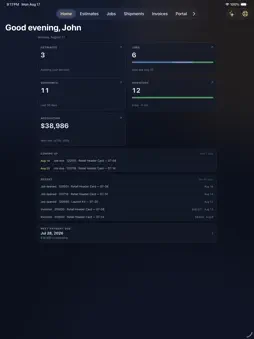
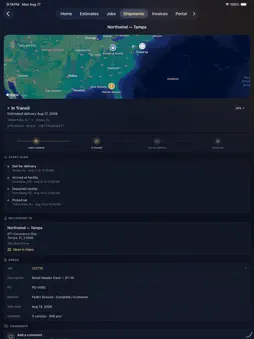
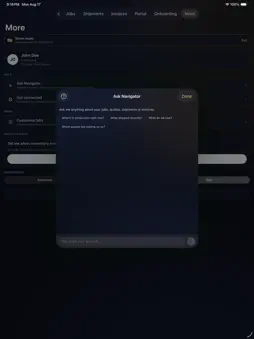
Navigator is the customer portal for Hatteras clients. It answers the questions you'd otherwise send an email to ask — where a job is, what shipped, what's left on the shelf, and what you've been invoiced — without waiting for someone to look it up for you. WHAT YOU CAN SEE Estimates. Every quote we've sent, with the full specification and the quote letter as a PDF. Request a new one from your phone: describe the job, attach a photo or a file, and it reaches the right estimator. Jobs. What's in production, where it is, and when it's promised. Proofs are right there to view — including the contents of a proof archive — so approving artwork doesn't mean finding a laptop. Shipments. Every parcel across every job, with live UPS and FedEx status and a map of the route it took. Multi-package deliveries show each box. Invoices. What's open, what's overdue, and what each one covers, with a printable copy. Your portal. If we hold stock for you, this is your programme: what's on hand, what's below its reorder point, what your people have ordered from your storefront, and what's still to come on a backordered line. Reports show the bins and pallets your stock occupies, six months of ordering, and the items that actually move. Ask Navigator. Where enabled, ask a question in plain language and get an answer drawn from your own account. BUILT FOR THE WAY YOU WORK Sign in once and use Face ID after that. Rearrange the tabs so the section you live in comes first. Add a widget so the figures you check daily are on your home screen. Recent screens keep working when the signal doesn't. ACCESS Navigator is for existing Hatteras customers. Your account decides which sections appear — if a section isn't switched on for you, it isn't shown. Speak to your Hatteras contact if you need access or a section enabled.
What's New
Version 1.2 2026-09-15
Fresh off the press! This update puts more of your job's story in your pocket. Your jobs, start to finish • Every job now follows a simple path: Ordered → Awa...Fresh off the press! This update puts more of your job's story in your pocket. Your jobs, start to finish • Every job now follows a simple path: Ordered → Awaiting Proof Approval → In Production → Shipped. Partial shipments are called out, so you always know which stage your job is at. • See exactly what's on press: items, SKUs, and specs like size, colors and stock. • Job totals and freight are right on the job, and we show the date it ships, not a guess. • Jobs are split into Active and Shipped, with search, so finished work doesn't crowd what's still moving. Shipments you can read at a glance • Each shipment shows its number, who it's going to, what's in the box, and the carrier once it's set. • Tap a "shipped" notification to land right on that shipment. Tap a proof alert to land right on the job. • Storefront orders now show their freight too. New: Reports • PO Lookup: type a PO number (even part of one) to see every job under it, what it cost, what's shipped, plus related invoices and orders. • Destinations heatmap: see where your orders land across the U.S., one state at a time. Invoices, squared away • Total billed, paid, balance and overdue are up top, so the numbers are easy to see. Also in this run • Cleaner quote pricing that shows only what you were quoted. • Lots of polish and small fixes. Questions or ideas? Tap Support in the app and your Hatteras team is on it. Technical Analysis
Package Overview Basic metadata
Bundle ID
us.hatteras.navigator.customer Current Version 1.2
Minimum iOS 17.0
Package Size App Store Size
Package Metadata 0 / 0 version records
Detailed binary, privacy manifest, framework, and Info.plist results have not been indexed for this package yet. The verified App Store and archive metadata above remains available.
Known Version Records
0 version records with stored package metadata
Stored metadata does not guarantee a package is currently available to download.
| Details | Version / IDs | Version date | Action |
|---|