
Preview








Description
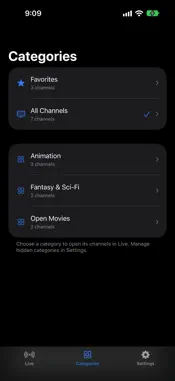
Your television. Your sources. Your Apple devices. neTV brings live television and an interactive programme guide to iPhone, iPad, Mac and Apple TV. Connect to your neTV server or directly to a live TV source you're authorised to use, such as an Xtream account or M3U playlist. PAUSE AND REWIND LIVE TV Pause a live channel and pick up where you left off, or rewind to catch a moment you missed. neTV keeps up to the last hour of the channel you're watching, and the programme bar shows how far back you can go and where live is. Jump back to live whenever you like. CATCH UP ON WHAT YOU MISSED When your Xtream provider keeps an archive, play earlier programmes straight from the guide, or start a programme that's on now from the beginning. CLOSED CAPTIONS Turn on the captions and subtitles your channels carry from the player's caption menu. FIND SOMETHING WORTH WATCHING See what's on now and next, browse by category, and search channels and programme titles. Star favourite channels to keep them close; on iPhone, iPad and Mac they also appear in Spotlight search. The channels you play most rise to the top of each category, and you can turn that off in Settings. Swipe up to return to the channel you were just watching, and swipe down to go forward again. On Apple TV, press up and down; on Mac, use the arrow keys. ALL YOUR SOURCES IN ONE PLACE Save multiple neTV servers, Xtream accounts and M3U playlists, and switch between them in Settings. Each source keeps its own categories, while favourites and channel order sync across your devices through iCloud. PLAYBACK THAT ADAPTS HEVC channels and Dolby Digital audio play directly on your device. With a compatible, configured neTV server, playback can adapt to changing network conditions and use server-powered AI upscaling up to 4K. That processing happens on your server, not your Apple device. MADE FOR YOUR SCREEN Watch with the guide alongside, or expand to full screen without missing a moment. neTV returns to your last-watched channel when you reopen it, and is available in English and Spanish. IMPORTANT REQUIREMENTS - A neTV server account or your own authorised Xtream account or M3U playlist is required. - No television subscription, channels or paid content are included. neTV is a player and does not provide or sell content. - Catchup requires a provider that offers an archive. AI upscaling, adaptive transcoding and handoff between devices require a neTV server. - Streams must be compatible with your device. Captions appear when your source provides them. - AI upscaling requires supported server hardware, an installed model and appropriate server configuration. Available resolution and playback quality depend on your source, server and network connection. - Use only content you own or are authorised to access. DEMO IMAGERY CREDITS Screenshots show a demonstration source playing openly licensed films. Their inclusion does not imply affiliation with or endorsement by their creators. Big Buck Bunny (2008, www.bigbuckbunny.org), Sintel (www.sintel.org), Tears of Steel (mango.blender.org) and Caminandes: Llama Drama (caminandes.com) - Copyright Blender Foundation. Creative Commons Attribution 3.0: https://creativecommons.org/licenses/by/3.0/ Spring - Copyright Blender Animation Studio / Blender Foundation. Creative Commons Attribution 4.0: https://creativecommons.org/licenses/by/4.0/ Elephants Dream - Copyright 2006, Blender Foundation / Netherlands Media Art Institute, www.elephantsdream.org. Creative Commons Attribution 2.5: https://creativecommons.org/licenses/by/2.5/ Sintel English subtitles - Wikimedia Commons contributors. Creative Commons Attribution-ShareAlike 4.0: https://creativecommons.org/licenses/by-sa/4.0/ Film frames and thumbnails are displayed within the app, scaled and/or letterboxed for playback.
What's New
Version 1.9 2026-10-31
Pause and rewind live TV Live channels from Xtream accounts and M3U playlists now buffer up to the last hour on your device, so you can pause, rewind and jump b... Technical Analysis
Package Overview Basic metadata
Bundle ID
com.harvinpaul.netv Current Version 1.9
Minimum iOS 17.0
Package Size App Store Size
Package Metadata 0 / 0 version records
Detailed binary, privacy manifest, framework, and Info.plist results have not been indexed for this package yet. The verified App Store and archive metadata above remains available.
Known Version Records
0 version records with stored package metadata
Stored metadata does not guarantee a package is currently available to download.
| Details | Version / IDs | Version date | Action |
|---|