
Preview


Description
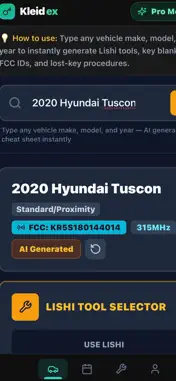
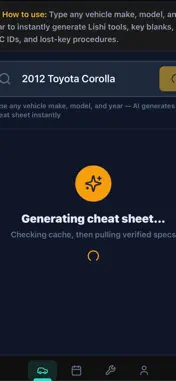
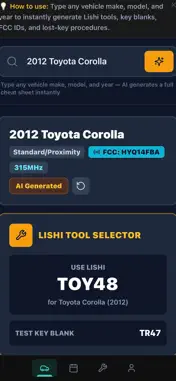
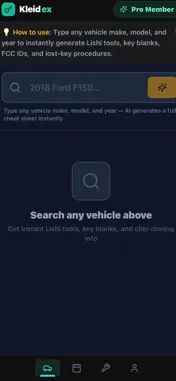
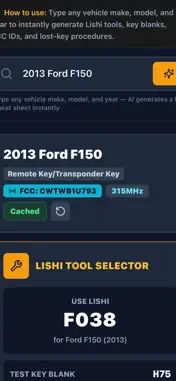
AI-Generated Vehicle Cheat Sheets: Instantly fetch critical technical specifications on-site. Technicians can type any vehicle make, model, and year to automatically pull up accurate Lishi tool requirements, test key blanks, FCC IDs, and operating frequencies, streamlining lost-key procedures effortlessly (as shown during the generation and lookup phases
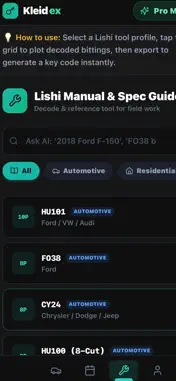
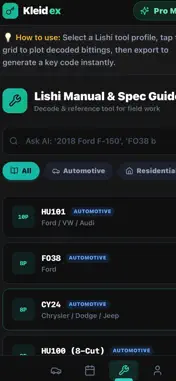
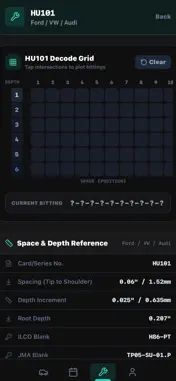
Interactive Lishi Manual & Decode Grid: Turn your smartphone into a digital decoding board. Select from an extensive library of automotive tool profiles (such as HU101, F038, or CY24) to access a live interactive grid. Tap intersections to plot decoded bittings, view real-time space and depth references (including spacing, depth increments, and root depth), and save active bitting cuts straight to your history log
What's New
Version 2.130297.6 2026-08-02
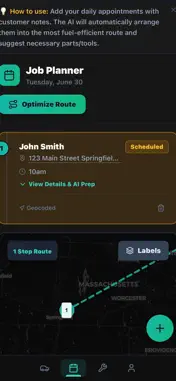
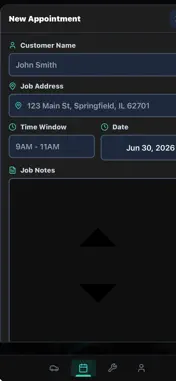
Full-Screen Logo Container during Loading: When the app is initialising/loading on the user's device, display a dedicated full-screen overlay (fixed inset-0 z-5...Full-Screen Logo Container during Loading: When the app is initialising/loading on the user's device, display a dedicated full-screen overlay (fixed inset-0 z-50 bg-black or matching theme background). Inside this overlay, center the Kleidex logo and ensure it scales to fill the parent container screen smoothly (e.g. w-full h-full max-w-md object-contain p-8). Smooth Fade-Out Animation: Keep track of the app's initial loading/readiness state (e.g., when auth status, layout, and core data are ready). When loading completes, apply a CSS transition fade-out effect (opacity-0 transition-opacity duration-700 ease-out pointer-events-none) to the full-screen splash overlay before removing it from the DOM. Seamless Transition to Main App: Ensure the main dashboard/landing page content is rendered smoothly underneath as the splash screen fades out. Make sure there are no horizontal scrollbars or flickering during the splash display or fade transition. Smart Job Planner & Route Optimizer: Organize your entire service day without leaving the app. Input new appointments with customer names, addresses, time windows, and specific job notes. The built-in AI automatically geocodes your stops, arranges them into the most fuel-efficient sequence, and provides an "AI Prep" breakdown suggesting the exact parts and tools needed for each specific location Please upgrade the "Lishi Manual & Spec Guide" (/Import view) to support direct Vehicle Year & Model lookups with dynamic lock mapping and grid generation: Add Model & Year Input Fields: Add explicit "Year" and "Model" (and Make if needed) input fields or a combined vehicle search bar at the top of the Lishi Manual section. Allow users to enter queries like "2018 Ford F-150" or select Year/Make/Model from dropdowns/inputs. Automated Lock Mapping & AI Fallback: When a user inputs a vehicle year and model, first check our local cached catalog (LISHI_PROFILES / local vehicle database) for an exact or fuzzy match. If the vehicle is found in the local cache, automatically map it to the correct Lishi tool, keyway profile, space & depth specs, and bitting cuts. If the vehicle is missing from the local cache, trigger the lishiSearch AI backend function (with web search enabled) to dynamically generate the complete lock mapping specs (cuts, spaces, depths, direction) for that specific year and model. Dynamic Grid Generation: Automatically initialize and render the interactive bitting/decoding grid mapped specifically for that vehicle's Lishi tool specifications (e.g. correct number of spaces/positions and depth values). Display a summary card showing: Selected Vehicle Year/Make/Model Mapped Lishi Tool (e.g. HU101, CY24) Lock positions (Door, Trunk, Ignition) Keyway profile & Space/Depth card reference Allow the user to immediately start plotting bittings on the generated grid to calculate or export the key code. Technical Analysis
Package Overview Basic metadata
Bundle ID
com.base68d1e0fec4d12b579b7248bc.app Current Version 2.130297.6
Minimum iOS 15.1
Package Size App Store Size
Package Metadata 0 / 0 version records
Detailed binary, privacy manifest, framework, and Info.plist results have not been indexed for this package yet. The verified App Store and archive metadata above remains available.
Developer Information
Known Version Records
0 version records with stored package metadata
Stored metadata does not guarantee a package is currently available to download.
| Details | Version / IDs | Version date | Action |
|---|