Preview


Description
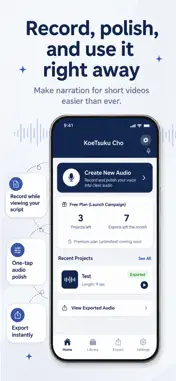
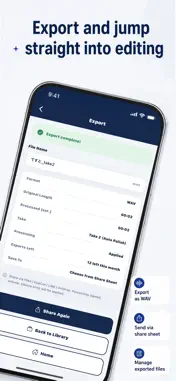
Koetsuku-cho is a voiceover recording and audio preparation app for short-form video creators. When you want to add your own voice to YouTube Shorts, TikTok, Instagram Reels, or other short videos, Koetsuku-cho helps you record while reading your script, compare multiple takes, adjust the audio, and export it for your editing workflow. Key Features - Record while reading your script - Save projects with titles, scripts, and notes - Manage multiple takes for each project - Choose the take you want to use - Adjust pitch, speaking speed, volume, silence, and noise - Use presets for short videos, bright narration, calm narration, commentary, and news-style delivery - Check the approximate duration while preparing your audio - Export audio through the iOS share sheet - Send audio to Files, AirDrop, video editing apps, or other destinations supported by iOS Record With Your Script on Screen Each project can store a title, script, and notes. During recording, your script stays on screen, so you do not need to switch between apps. You can also adjust the script display to make it easier to read. Manage Multiple Takes Record several takes, listen back, compare them, and choose the one you want to use. This makes it easier to keep track of which recording belongs to which script. Prepare Audio for Short Videos Koetsuku-cho provides simple audio controls for creators who want to use their own voice in videos. You can adjust: - Pitch - Speaking speed - Volume - Silence trimming - Noise reduction The app also includes presets designed for common narration styles, such as short videos, bright voice, calm voice, commentary, and news-style narration. Export Through the iOS Share Sheet When your audio is ready, you can export it through the iOS share sheet. You can save it to Files, send it with AirDrop, or pass it to video editing apps and other destinations supported by iOS. On-Device Storage Your recordings, scripts, project information, notes, and settings are saved on your device. Koetsuku-cho does not require login or account registration, and it does not upload your audio or scripts to an external server. No AI Voice Generation or Voice Cloning Koetsuku-cho is not an AI voice generation app. It does not create synthetic voices, clone voices, copy another person's voice, or imitate celebrities, creators, voice actors, or public figures. Record your own voice, prepare it for video, and export it when you are ready.
What's New
Version 1.1.2 2026-11-17
Usability improvements and bug fixes. - Added a "Daily key" button next to the project title. Tap it to fill in a title in the YYYYMMDD_NN format - Added "Clear...Usability improvements and bug fixes. - Added a "Daily key" button next to the project title. Tap it to fill in a title in the YYYYMMDD_NN format - Added "Clear all" to the script editor to erase the whole script at once - Increased the maximum length of a script - Fixed an issue where processing could stall after tapping "Apply" on a long recording - Faster silence trimming Technical Analysis
Package Overview Basic metadata
Bundle ID
com.harveststudio.koetsukucho Current Version 1.1.2
Minimum iOS 15.1
Package Size App Store Size
Package Metadata 0 / 2 version records
Detailed binary, privacy manifest, framework, and Info.plist results have not been indexed for this package yet. The verified App Store and archive metadata above remains available.
Developer Information
Known Version Records
0 version records with stored package metadata • 2 known version records
Stored metadata does not guarantee a package is currently available to download.
| Details | Version / IDs | Version date | Action |
|---|---|---|---|
| Not archived | App Store ID: 887028234 | Unknown | Request Version |
| Not archived | App Store ID: 886937259 | Unknown | Request Version |