
Preview


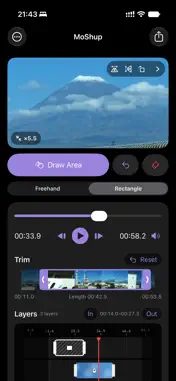

Description
MoShup is a simple editor that lets you hide private parts of videos and photos by drawing directly on the preview. Apply mosaic, blur, or blackout effects to faces, addresses, license plates, documents, names shown on screen, bystanders, and anything else you do not want to share. 【Main Features】 • Mosaic, blur, and blackout effects • Apply effects only where you draw freehand or drag a rectangle • Pinch to zoom in to check details and draw precisely • Works with photos (HEIC, JPEG, and PNG), saved at their original size • Remove a video's sound before exporting • Export just the audio of a video (M4A) • Trim the start and end of a video • Choose which 10 minutes of a long video to export by dragging a frame • Edit with multiple layers • Set a start and end time for each video layer • Move and resize layer clips on the timeline • Adjust effect strength and brush size • Change the blackout color • Flip horizontally or vertically and rotate 90° • Supports portrait, landscape, and square formats and preserves the original aspect ratio • Removes location and recording-device information during export • Saves to your photo library • No watermark • No ads 【How to Use】 1. Select a video or photo from your photo library 2. Create a new layer 3. Choose Mosaic, Blur, or Blackout 4. Draw over the area you want to hide, or drag a rectangle around it 5. For videos, adjust the effect's time range on the timeline 6. Export and save the result to your photo library (audio-only exports are saved to the Files app) You can create multiple layers to apply different effects to different areas and time ranges. In videos, effects can appear only while the private content is visible, so you do not need to obscure the entire video. All processing takes place on your device. Your videos and photos are never uploaded to an external server. During export, MoShup does not carry over the original location or recording-device information, helping protect your privacy before sharing on social media. 【Current Limits】 • Videos longer than 10 minutes can be imported; up to 10 minutes of your choice can be exported • Video exports preserve the source aspect ratio at up to 720p (4K videos can be imported) • Photos are saved at their original size as HEIC, JPEG, or PNG • Live Photos are saved as still photos • Audio-only exports use the M4A format • Requires iOS 18 or later on iPhone or iPad 【PRO (One-Time Purchase, No Subscription)】 • Export videos longer than 10 minutes • Export at a short-edge length you choose, up to the original size (the long edge follows the aspect ratio) • Depending on the device and video, it may not be possible to export at the selected size or with sufficient quality Use MoShup to protect privacy before posting to social media or when organizing family, work, and school videos and photos.
What's New
Version 1.3.2 2026-11-13
Introducing PRO, a one-time purchase. • Export videos longer than 10 minutes • Export at a short-edge length you choose, up to the original size. Pick 720, 108...Introducing PRO, a one-time purchase. • Export videos longer than 10 minutes • Export at a short-edge length you choose, up to the original size. Pick 720, 1080, 1440, or 2160, or enter any number • No subscription. Buy once and keep it • All existing features remain free Technical Analysis
Package Overview Basic metadata
Bundle ID
com.haruyukimouri.MoShup Current Version 1.3.2
Minimum iOS 18.0
Package Size App Store Size
Package Metadata 0 / 0 version records
Detailed binary, privacy manifest, framework, and Info.plist results have not been indexed for this package yet. The verified App Store and archive metadata above remains available.
Developer Information
Known Version Records
0 version records with stored package metadata
Stored metadata does not guarantee a package is currently available to download.
| Details | Version / IDs | Version date | Action |
|---|