
Preview
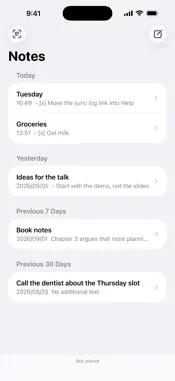


Description
Sill is a small notepad for things you want to put down quickly and find again later. Notes are plain Markdown and stay plain. No smart quotes, no auto-capitalization, no hidden formatting: what you type is what is stored, and you can copy any note out as text at any time. Everything lives on your iPhone in a single local database. There is no account to create and no server in between, so Sill opens instantly and works the same with or without a network. If you also use the free Sill app for Mac, pair the two once by scanning a QR code. From then on they sync directly whenever they are near each other, over your local network or peer-to-peer Wi-Fi, with mutual TLS between the two devices. Nothing passes through the internet. The Mac app is optional: Sill on iPhone is a complete notepad on its own. A formatting bar above the keyboard adds headings, bold, italic, code, lists and checklists, all as plain Markdown. Return continues bullets, numbers and checkboxes. Copy as Markdown pastes as real lists and emphasis into Slack, Mail, Notes and Docs, and as the exact text everywhere else. Quiet: no analytics, no ads, no notifications, no third-party SDKs. Sill collects no data at all. Sill is free and open source under the MIT license. Source code, issue tracker and the Mac app: github.com/mrskiro/sill
What's New
Version 0.3.0 2026-09-21
A formatting bar above the keyboard: headings, bold, italic, code, bulleted and numbered lists, checklists and indentation, written as plain Markdown. Notes re... Technical Analysis
Package Overview Basic metadata
Bundle ID
com.mrskiro.sill Current Version 0.3.0
Minimum iOS 26.0
Package Size App Store Size
Package Metadata 0 / 0 version records
Detailed binary, privacy manifest, framework, and Info.plist results have not been indexed for this package yet. The verified App Store and archive metadata above remains available.
Developer Information
Known Version Records
0 version records with stored package metadata
Stored metadata does not guarantee a package is currently available to download.
| Details | Version / IDs | Version date | Action |
|---|