
Preview





Description
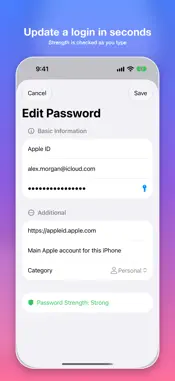
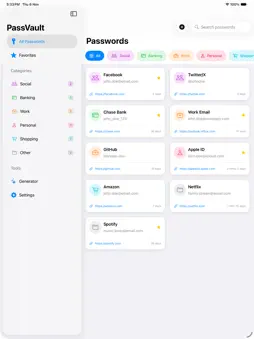
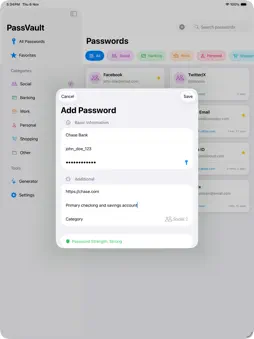
PassVault stores your passwords on this iPhone or iPad. The vault is encrypted on the device. There is no PassVault account and no iCloud sync. A forgotten master password cannot be recovered. SECURITY • AES-256 encryption for the vault on this device • Master password required to unlock • Optional Face ID or Touch ID • Auto-lock after a timeout you set • Weekly reminder on this device, with an on/off switch ORGANIZE • Categories: Social, Banking, Work, Personal, Shopping, and Other • Favorites for logins you open often • Search by title, username, or notes • Sort by saved order, name, or recently updated PASSWORDS • Generator with length and character types • Option to skip similar characters such as 0, O, 1, and l • Passphrase mode • Strength check when you create or edit a password VAULT TOOLS • Vault Health on this device: reused passwords, weak passwords, and items not updated in 12 months • Trash keeps a deleted login for 30 days, then removes it • Share an encrypted backup file • Copy unprotected JSON. That clipboard copy clears after 30 seconds • Import JSON, CSV, or an encrypted PassVault file. New items are added. Existing items are not replaced WHAT YOU CAN SAVE • Website and app logins • Banking and other accounts • Email and work accounts • Wi-Fi passwords • Notes stored with a login GOOD TO KNOW • No subscription inside the app • No iCloud vault and no PassVault account • Works on iPhone and iPad
What's New
Version 1.4 2026-11-05
- Bug fixes and improvements Thank you to everyone who provided feedback about the app. Your supports helps me to make better app. Technical Analysis
Package Overview Basic metadata
Bundle ID
com.iosapps.PassVault Current Version 1.4
Minimum iOS 16.0
Package Size App Store Size
Package Metadata 1 / 3 version records
Detailed binary, privacy manifest, framework, and Info.plist results have not been indexed for this package yet. The verified App Store and archive metadata above remains available.
Developer Information
Known Version Records
1 version record with stored package metadata • 3 known version records
Stored metadata does not guarantee a package is currently available to download.
| Details | Version / IDs | Version date | Action |
|---|---|---|---|
| 4.12 MB | v1.2 App Store ID: 887245143Build: 1.2 | 2026-06-22 00:45:34 | Paid / Arcade |
| Not archived | App Store ID: 882049587 | Unknown | Paid / Arcade |
| Not archived | App Store ID: 879552797 | Unknown | Paid / Arcade |