
Csv File Editor with Import Option from Excel .xls, .xlsx, .xml Files
(8 App Store ratings)
IPA Analysis Preview




Description
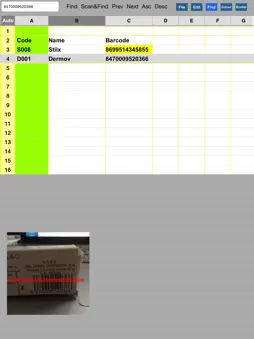
* Create/Update Excel .csv (comma separated text) files which could have unlimited rows ( 77 columns each row, 12 columns in one page). * Open any Excel .xls , .xlsx, .xml, .csv file and edit that file on table view, * Edit/copy files from/to dropbox as well as documents folder on your device , * Barcode/QRCode scanner to easy collect data, * Scan&Find to scan barcode and find it in the .csv file, * Convert Excel XLS, XLSX, XML files to CSV, * Set column width or column width will be calculated auto, * Cut,Copy,Paste,Hide,Unhide row/column, * Add,Delete row/column, * Set background colour of cell/row/column, * Search a word in the csv file, * Set private folder password to protect private files, * AirPrint function to print csv/html/xls/xlsx file, * Send your file with E-Mail, * Convert your spreadsheet to xml format. That xml file can be edit with Excel or any compatible application. * Convert your spreadsheet to html format and send it with e-mail. * Edit any .csv file as form, as spreadsheet or notepad view. (Form view is using first 2 rows of the file as column label. ) * Flexible button panel design for all versions, and easy access buttons for iPad spreadsheet viewer, * Copy files between documents folder and private folder. * Transfer files thru iTunes into the application documents folder or open it from e-mail attachment, * Change any row/column/cell colour (spreadsheet view), * When you convert .xls file to .csv file our application is keeping cell's background colour, borders, alignment details while it is converting file contents, * Keyboard has been extended with Cursor Right,Left,Up,Down buttons to easy navigate and easy data entry, * When you save .csv file , this application is going to keep row and column position on the screen. You could re-start from same point when you re-open. * Column header is keeping on the top of the table so whatever your row number is you could see column labels. * You can swipe your finger on the table to scroll columns. You could use this application for a lot of reasons such as sales price list, sales order, product list, etc. So, You can create an order form file and you could enter customer orders on the file then send that to your company. * Open csv file attached with e-mail (When you open attached file (you need to hold your finger onto attached file name and choose Csv file editor to copy ) it will copy itself into this application.) , List seperator parameter is in iPhone/iPad settings menu. All functions of this application has been tested several times with different devices. This application is compatible with iPod Touchs, iPads, iPhone 3gs,4,4s,5,6. * You do not need to connect internet to edit your files. All files will be on your iPhone/iPad. *** Do not worry about how to use this application ! Detailed help file included with this application. *** Direct e-mail button to dedicated customer service advisor. Note : if you have any problem or if you could not find out how to use function could you please send us your concern(with your e-mail address) .
What's New
Version V4.1 2015-10-10
This app has been updated by Apple to display the Apple Watch app icon. Csv application has been updated for iOS 9. Technical Analysis
Package Overview Basic metadata
Bundle ID
csvfileeditor Current Version V4.1
Minimum iOS 8.4
Package Size App Store Size
Package Metadata 1 / 39 version records
1.3 / 5.0 (8 ratings)
Detailed binary, privacy manifest, framework, and Info.plist results have not been indexed for this package yet. The verified App Store and archive metadata above remains available.
Known Version Records
1 version record with stored package metadata • 39 known version records
Stored metadata does not guarantee a package is currently available to download.
| Details | Version / IDs | Version date | Action |
|---|---|---|---|
| 1.68 MB | vV4.1 App Store ID: 841402314Build: V4.1 | 2015-10-10 03:39:18 | Paid / Arcade |
| Not archived | App Store ID: 812298558 | Unknown | Paid / Arcade |
| Not archived | App Store ID: 811595703 | Unknown | Paid / Arcade |
| Not archived | App Store ID: 810957803 | Unknown | Paid / Arcade |
| Not archived | App Store ID: 657342642 | Unknown | Paid / Arcade |
| Not archived | App Store ID: 593442998 | Unknown | Paid / Arcade |
| Not archived | App Store ID: 536792649 | Unknown | Paid / Arcade |
| Not archived | App Store ID: 339412644 | Unknown | Paid / Arcade |
| Not archived | App Store ID: 260053093 | Unknown | Paid / Arcade |
| Not archived | App Store ID: 109872638 | Unknown | Paid / Arcade |
| Not archived | App Store ID: 64162632 | Unknown | Paid / Arcade |
| Not archived | App Store ID: 16751006 | Unknown | Paid / Arcade |
| Not archived | App Store ID: 15948054 | Unknown | Paid / Arcade |
| Not archived | App Store ID: 15537820 | Unknown | Paid / Arcade |
| Not archived | App Store ID: 15262651 | Unknown | Paid / Arcade |
| Not archived | App Store ID: 15063618 | Unknown | Paid / Arcade |
| Not archived | App Store ID: 14757015 | Unknown | Paid / Arcade |
| Not archived | App Store ID: 14314506 | Unknown | Paid / Arcade |
| Not archived | App Store ID: 13201447 | Unknown | Paid / Arcade |
| Not archived | App Store ID: 12418648 | Unknown | Paid / Arcade |
| Not archived | App Store ID: 11875851 | Unknown | Paid / Arcade |
| Not archived | App Store ID: 11166281 | Unknown | Paid / Arcade |
| Not archived | App Store ID: 10423038 | Unknown | Paid / Arcade |
| Not archived | App Store ID: 9805491 | Unknown | Paid / Arcade |
| Not archived | App Store ID: 9069971 | Unknown | Paid / Arcade |
| Not archived | App Store ID: 8682074 | Unknown | Paid / Arcade |
| Not archived | App Store ID: 8160639 | Unknown | Paid / Arcade |
| Not archived | App Store ID: 7589041 | Unknown | Paid / Arcade |
| Not archived | App Store ID: 7426584 | Unknown | Paid / Arcade |
| Not archived | App Store ID: 7225361 | Unknown | Paid / Arcade |
| Not archived | App Store ID: 6874091 | Unknown | Paid / Arcade |
| Not archived | App Store ID: 6265242 | Unknown | Paid / Arcade |
| Not archived | App Store ID: 5922540 | Unknown | Paid / Arcade |
| Not archived | App Store ID: 5801630 | Unknown | Paid / Arcade |
| Not archived | App Store ID: 5714381 | Unknown | Paid / Arcade |
| Not archived | App Store ID: 5341771 | Unknown | Paid / Arcade |
| Not archived | App Store ID: 5024769 | Unknown | Paid / Arcade |
| Not archived | App Store ID: 4921423 | Unknown | Paid / Arcade |
| Not archived | App Store ID: 4779239 | Unknown | Paid / Arcade |