
Preview





Description
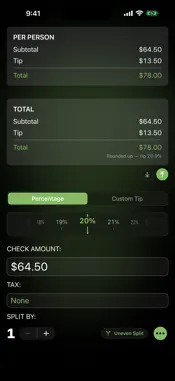
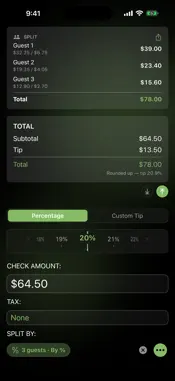
Say goodbye to the awkward math at the dinner table. Tip In is a beautifully designed, fast, and easy-to-use tip calculator that makes splitting any bill a breeze. Built for travelers and anyone who loves dining out — no ads, no distractions, just the tools you need. CALCULATE YOUR WAY Fast Entry: Enter any bill total with our fast, auto-formatting numpad. Scan Your Bill: Take one photo and Tip In reads the whole bill to find your total — no typing required. It finds the pre-tax subtotal too, so you can tip on either — or enter the tax yourself on any bill. Flexible Tip Options: Drag the slider, tap one of four customizable presets, or spin the Dial — a snapping wheel that turns like a coin, one tick per percent. Switch styles anytime in Settings. Round It Up: Land your total on a whole amount with one tap — up or down. The tip adjusts, never the bill, and you always see the tip percentage you actually left. Smart Feedback: Enter a custom tip amount and see the equivalent percentage in real time. Equal or Uneven Splits: Split equally between up to 100 guests, or go uneven. Assign each guest a percentage of the total or an amount of the subtotal — the tip follows each guest's share. Split by Item: Itemize your receipt from the same photo and tap each dish to whoever ordered it. Everyone pays for exactly what they had — tax and tip follow each person's order, or split them evenly if you prefer. Birthday? Covered: Mark the birthday guest and the rest of the table absorbs their share automatically — their total reads $0. REMEMBER EVERY BILL Bill History: Save any bill with a single tap. Tip In automatically tags your location so you always know where you dined. Synced with iCloud: Your bills, notes, and receipt photos sync privately across your devices through your own iCloud. Insights: Once you've saved five bills, see your average tip, what you spend each month, and the places you visit most. Tap a favorite spot to see every bill you've saved there. Search, Sort & Filter: Find any past bill by place, date, or note. Sort by date or total, and filter by time or place. Receipt Photos: Your scan is saved with the bill as its receipt and shows right in your history list. Tap it to view it full screen. Bill Notes: Add a personal memo to any saved bill — great for work lunches, special occasions, or who owes what. Full Breakdown: Tap any saved bill for the complete breakdown — per-person totals or each guest's share. Text the Table: Send everyone their share, tip included, in a short message — for equal or uneven splits, right from the calculator or any saved bill. Export Your Way: Share your history as plain Text, a CSV spreadsheet, or a PDF. Receipt photos are included in PDF exports. TIP IN, EVERYWHERE Siri and Shortcuts: Say “Calculate a tip with Tip In” or “Scan a receipt with Tip In,” or run New Bill, Scan Bill, or Split Bill from Spotlight and the Shortcuts app. Widgets and Controls: Start or scan a bill in one tap from your Home Screen, Lock Screen, Control Center, or the Action button. Any Currency: Traveling? Switch currencies in Settings, or let Tip In follow your iPhone's region. Currencies without cents, like the yen, are entered in whole units. Every Bill Keeps Its Currency: Each saved bill remembers its currency — nothing is ever converted — and Insights keeps them separate. A PREMIUM EXPERIENCE New to Tip In? A guided walkthrough opens automatically on your first launch. Tap Guide anytime from the menu to revisit it. Personalize Your Experience: Choose your tip input style, set your own preset percentages, and make Tip In yours in Settings. iPhone & iPad: A sleek single-column view on iPhone and a powerful multi-column layout on iPad. Clean & Focused: No ads, no pop-ups, no clutter. Light or Dark: A stunning glass-and-glow interface in both looks — follow your device, or pick your favorite in Settings. Download Tip In today and make every dining experience simple and stress-free.
What's New
Version 4.5.0 2026-10-23
SIRI AND SHORTCUTS Say “Calculate a tip with Tip In” or “Scan a receipt with Tip In,” and Tip In opens ready to go. New Bill, Scan Bill, and Split Bill are in S... Technical Analysis
Package Overview Basic metadata
Bundle ID
anderstabell.iTipAlot Current Version 4.5.0
Minimum iOS 26.0
Package Size App Store Size
Package Metadata 0 / 8 version records
Detailed binary, privacy manifest, framework, and Info.plist results have not been indexed for this package yet. The verified App Store and archive metadata above remains available.
Known Version Records
0 version records with stored package metadata • 8 known version records
Stored metadata does not guarantee a package is currently available to download.
| Details | Version / IDs | Version date | Action |
|---|---|---|---|
| Not archived | App Store ID: 889240350 | Unknown | Request Version |
| Not archived | App Store ID: 887257458 | Unknown | Request Version |
| Not archived | App Store ID: 886349264 | Unknown | Request Version |
| Not archived | App Store ID: 886245636 | Unknown | Request Version |
| Not archived | App Store ID: 885718670 | Unknown | Request Version |
| Not archived | App Store ID: 885239073 | Unknown | Request Version |
| Not archived | App Store ID: 884678635 | Unknown | Request Version |
| Not archived | App Store ID: 871946995 | Unknown | Request Version |