Preview




Description
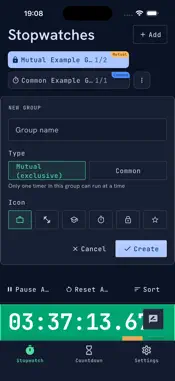
KsBatchTimer is an efficient time management tool focused on "multi-task timing". Organize your stopwatches and countdowns into groups, use batch controls to start, pause, or reset with a single tap, and keep track of all your ongoing timers at a glance. 【Stopwatch · Grouping & Batch Control】 · Custom Organization: Create multiple stopwatches, group them as needed, and customize their order. · Batch Operations: Start, pause, or reset an entire group of timers with just one tap. · Smart Exclusive Mode: In an "Exclusive Group," starting one timer automatically pauses the others—perfect for focused, single-tasking. "Normal Groups" allow independent running. · Gestures: Double-tap a card to start/pause, or swipe left for details and deletion. 【Countdown · Exact Durations & Target Dates】 · Quick Countdown: Set hours, minutes, and seconds for everyday tasks. · Target Dates: Countdown to exams, anniversaries, birthdays, and important events. · Progress Tracking: Real-time progress bars show remaining time. One tap to restart. · Gestures: Double-tap to start/pause, or swipe left to edit. 【Looping Countdowns · Build Good Habits】 Supports daily, weekly, monthly, and yearly recurring countdowns with two flexible modes: · Start Immediately: Always counts down to the nearest upcoming target. · Cycle Start: Automatically begins the next cycle right after the current one ends, ideal for taking medication, habit tracking, and routines. 【Alerts & Live Activities】 · On iPhone: view your countdown progress in real time via Live Activities (Dynamic Island & Lock Screen). · Multiple Alerts: Receive push notifications and vibrations when time is up. Choose from Radar, Beep, Ringtone, or Bell sound effects, or switch to mute. · iCloud Sync: Your timers stay in sync between your iPhone and Mac through your own iCloud account. 【More Great Features】 · Dark mode for a clean, focused, and eye-friendly interface. · Supports 10 languages including English, Japanese, and Chinese. · Data is saved locally on your device—available offline and safe after reboots; turn on iCloud Sync to keep them in sync across your Apple devices. · No account registration required. Ready to use out of the box with built-in tutorials. Use Cases: Circuit training, multi-dish cooking, Pomodoro studying, multi-tasking at work, event counting—KsBatchTimer handles any situation requiring multiple timers simultaneously. Privacy: Your timers are stored locally on your device. The iPhone version includes banner ads served by Google AdMob — Google and its partners may collect device identifiers and usage data for advertising purposes. See our privacy policy for details. Feedback & Support: [email protected] Terms of Use: https://kasoolabs.com/ksbatchtimer/terms?lang=en Privacy Policy: https://kasoolabs.com/ksbatchtimer/privacy-policy?lang=en License Agreement: https://www.apple.com/legal/internet-services/itunes/dev/stdeula/
What's New
Version 1.0.4 2026-11-02
Now with a small banner ad to keep the app free. Everything else — timers, Live Activities, iCloud Sync — works just as before. Technical Analysis
Package Overview Basic metadata
Bundle ID
com.kasoolabs.batchtimer Current Version 1.0.4
Minimum iOS 26.0
Package Size App Store Size
Package Metadata 0 / 0 version records
Detailed binary, privacy manifest, framework, and Info.plist results have not been indexed for this package yet. The verified App Store and archive metadata above remains available.
Developer Information
Known Version Records
0 version records with stored package metadata
Stored metadata does not guarantee a package is currently available to download.
| Details | Version / IDs | Version date | Action |
|---|