
Preview



Description
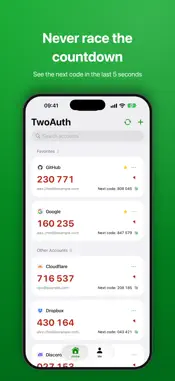
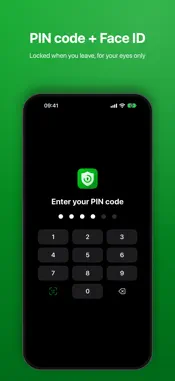
TwoAuth is a clean, secure and fully offline authenticator that generates verification codes for two-factor (2FA) and multi-factor (MFA) authentication — a drop-in replacement for Google Authenticator and Microsoft Authenticator. WHY TWOAUTH • Fully offline: no sign-up, no servers, ever • Keys stay private: secrets are stored only in the local system Keychain and never uploaded • Zero data collection: no ads, no analytics, no third-party SDKs • Standards-based: a faithful implementation of RFC 4226 (HOTP) and RFC 6238 (TOTP), compatible with every website, enterprise system and service that supports two-factor or multi-factor authentication MOVE IN SECONDS • Scan the "Transfer accounts" QR codes from Google Authenticator to import everything at once • Add accounts by scanning a website QR code, reading a QR code from your photo library, or entering the secret key manually BUILT FOR SPEED • All codes on one screen, refreshed at the same instant • Codes flash red for the final 5 seconds, with the next code previewed and ready to copy • Tap a card to copy; pin favorites to the top • Brand logos for well-known services help you find accounts at a glance, with manual icon override BACKUP & TRANSFER • Bulk export as migration QR codes (Google Authenticator compatible) • Bulk export as a JSON file • Export any single account as a standard otpauth QR code THE DETAILS • Light / dark themes — follow the system or set your own • English, Simplified Chinese and Traditional Chinese • SHA1 / SHA256 / SHA512, 6–8 digit codes, custom periods and counters IMPORTANT Before deleting an account, disable two-factor authentication on the website or switch to another authenticator first, or you may be locked out.
What's New
Version 1.0.29 2026-10-17
- Fix bugs and optimize user experience. Technical Analysis
Package Overview Basic metadata
Bundle ID
com.appsea.twoauth Current Version 1.0.29
Minimum iOS 16.0
Package Size App Store Size
Package Metadata 0 / 0 version records
Detailed binary, privacy manifest, framework, and Info.plist results have not been indexed for this package yet. The verified App Store and archive metadata above remains available.
Known Version Records
0 version records with stored package metadata
Stored metadata does not guarantee a package is currently available to download.
| Details | Version / IDs | Version date | Action |
|---|