
Preview


Description
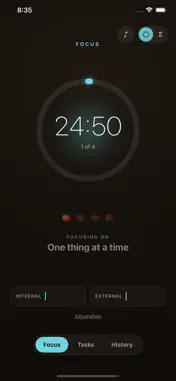
Tomato is a focus timer built on the Pomodoro Technique — the simple habit of working in 25-minute sprints with short breaks in between. No setup, no clutter, no learning curve. Just start, focus, and let the tomatoes add up. WORK IN SPRINTS Tap Begin and settle into 25 minutes of focus. Watch the time on a calm, dark screen — choose a glowing progress ring or a draining hourglass, whichever keeps you in flow. After four sprints you earn a longer break; the app tracks the rhythm so you don't have to. LOG DISTRACTIONS WITHOUT BREAKING FLOW When something pulls at your attention, don't chase it — just tap to log it as internal (a thought of your own) or external (someone or something else) and keep going. Over time you'll see exactly what keeps interrupting your focus. TAKE BREAKS THAT ACTUALLY REST YOU Between sprints, a guided break screen suggests a quick way to recharge — look away from the screen, stretch, drink water, breathe — and counts you down to the next round. TRACK TASKS AND REVIEW YOUR DAY Add tasks and estimate them in tomatoes, then compare your estimate to what it actually took. The History tab shows today's completed sprints, your interruptions, and a rolling 7-day chart of your focus. STAYS OUT OF YOUR WAY • A Live Activity keeps the countdown on your Lock Screen and Dynamic Island. • A Home Screen widget shows today's tomato count at a glance. • The ring sounds even in Silent Mode, so you never miss it. FAITHFUL TO THE METHOD Tomato follows the technique honestly: a sprint is all-or-nothing — there's no pause, and the long break is something you earn, not skip to. It sounds strict, but that's the whole point, and it's what makes the habit stick. An in-app "How Tomato works" guide explains the why behind every rule. PRIVATE BY DESIGN No account. No ads. No tracking. Your tasks and history live on your device and sync only through your own private iCloud — we never see your data. Focus, one tomato at a time.
What's New
Version 1.1 2026-09-28
Timer screen: the gear button sits top-left. On the right, the bell now just turns focus music on or off, next to the clock-style switch. Settings page: it s... Technical Analysis
Package Overview Basic metadata
Bundle ID
com.ooasis.tomato Current Version 1.1
Minimum iOS 17.0
Package Size App Store Size
Package Metadata 0 / 1 version records
Detailed binary, privacy manifest, framework, and Info.plist results have not been indexed for this package yet. The verified App Store and archive metadata above remains available.
Developer Information
Known Version Records
0 version records with stored package metadata • 1 known version records
Stored metadata does not guarantee a package is currently available to download.
| Details | Version / IDs | Version date | Action |
|---|---|---|---|
| Not archived | App Store ID: 888208172 | Unknown | Request Version |