
Preview



Description
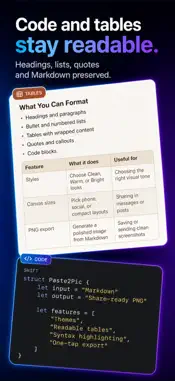
AI answers are easy to copy—but hard to share. Paste2Pic turns copied Markdown and structured text into polished, share-ready PNG images on iPhone. Paste your content, preview it instantly, choose a reading style, and export one clean long image that keeps headings, lists, tables, quotes, and code easy to read. KEEP THE FORMATTING Copied content often loses its structure when moved into messages, email, notes, or social apps. Paste2Pic preserves the parts that make long answers readable: • Headings and paragraphs • Bold and inline formatting • Ordered and unordered lists • Quotes and dividers • Markdown tables • Fenced code blocks • Common math and symbol notation MADE FOR LONG CONTENT Normal screenshots are not built for long, structured answers. Paste2Pic renders the full result as one continuous image, so you can share explanations, study notes, technical steps, comparisons, plans, and summaries without stitching multiple screenshots together. PREVIEW BEFORE YOU EXPORT Edit the pasted Markdown and see the rendered result before generating the image. Choose Clean, Warm, or Bright reading styles, then select a device-aware, compact, or social-friendly canvas width. SHARE OR SAVE—YOUR CHOICE Generate a PNG, then send it through the iOS share sheet or save it to Photos. Sharing does not automatically create an extra copy in your photo library. BUILT FOR STRUCTURED CONTENT Paste2Pic is made for students, writers, engineers, consultants, creators, and anyone who regularly shares long AI-generated content. COPY. PASTE. SHARE. No complicated editor. No screenshot stitching. Just one readable image, ready to send.
What's New
Version 1.04 2026-08-25
• Added Settings with export and layout options. • Extra-long answers can now export as multiple clear pages. • Improved wide table readability with card-style ...• Added Settings with export and layout options. • Extra-long answers can now export as multiple clear pages. • Improved wide table readability with card-style layout option. Technical Analysis
Package Overview Basic metadata
Bundle ID
com.hanzhu.paste2pic Current Version 1.04
Minimum iOS 18.6
Package Size App Store Size
Package Metadata 0 / 0 version records
Detailed binary, privacy manifest, framework, and Info.plist results have not been indexed for this package yet. The verified App Store and archive metadata above remains available.
Developer Information
Known Version Records
0 version records with stored package metadata
Stored metadata does not guarantee a package is currently available to download.
| Details | Version / IDs | Version date | Action |
|---|