Preview




Description
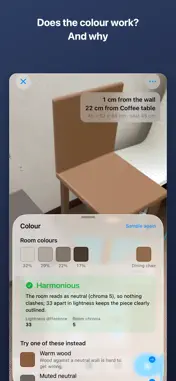
Mesura puts furniture in your room at its real size, so you can decide before you buy. Measure a piece in the shop, save the numbers, and place it on your own floor at home. Mesura then tells you the things a tape measure cannot: • How far it stands from the wall • The width of the walkway left between two pieces — measured edge to edge, not corner to corner • How high a pendant lamp hangs above a table • Whether its color works with your wall, and why Every number is a decision, not decoration. When a gap gets tight, Mesura says so; when two colours sit in a relationship that works, it tells you which one and by how much. WHAT YOU CAN DO • Save the pieces you measured — 30 ready-made shapes, or your own dimensions • Place them on the floor at true size and walk around them • Snap a piece flat against a wall, or nudge it a centimetre at a time • Put small things on shelves and tabletops, real or virtual, with clearance readings • Measure a room with a scan, or a chair's seat height with the camera • Import a USDZ model, or scan a real piece into one • Save an arrangement and bring it back later • Share a card with the photo and every measurement on it FREE AND PRO Everything is free, including scanning, importing, colour advice and the share card. The free tier places two pieces in the room at once — enough to see the gap between them, which is the point. Mesura Pro is a one-time purchase that lifts that limit and lets you save and restore arrangements. No subscription, no ads, no tracking, no account. WHAT NEEDS A LiDAR SENSOR On iPhone Pro models, Mesura finds walls and ceilings by itself, measures rooms by scanning, and can turn a real piece of furniture into a model. On other iPhones everything still works, but walls and ceilings are set by hand: you tap the floor twice along a wall, or type the ceiling height. The numbers are just as exact — what you type is what it uses. Metric and imperial. English, Japanese, Simplified and Traditional Chinese.
What's New
Version 1.1 2026-09-17
You can now compare two pieces in the same spot. Select a piece you have placed, open the ⋯ panel and pick "Compare with another piece" — Mesura swaps it and sh... Technical Analysis
Package Overview Basic metadata
Bundle ID
net.promisecode.placely Current Version 1.1
Minimum iOS 18.0
Package Size App Store Size
Package Metadata 0 / 0 version records
Detailed binary, privacy manifest, framework, and Info.plist results have not been indexed for this package yet. The verified App Store and archive metadata above remains available.
Developer Information
Known Version Records
0 version records with stored package metadata
Stored metadata does not guarantee a package is currently available to download.
| Details | Version / IDs | Version date | Action |
|---|