
Preview




Description
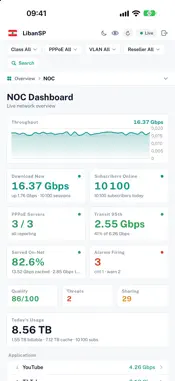
NetSec Intelligence — DeepView puts your whole ISP network in your pocket: every subscriber, every line, every application, live. Connect to your DeepView console and see what your subscribers are doing, how well their lines work, where your traffic goes and what needs a look right now — in a fast native app built for network operators and resellers. INSIGHTS AT A GLANCE • Insights — online subscribers, download and upload, line health, fair use, mass disconnects, CPE ping and connection quality on one screen • Smooth traffic and path-quality charts over 6 hours, 24 hours or 7 days, with live, peak and 95th percentile • Watch List — who is at the plan limit, reconnecting, idle, on a poor line, on slow home Wi-Fi, below their rate or scanning • Candidates by service and reseller — who should move up or down a plan • NOC dashboard with live throughput, on-net offload, top applications, networks, VLANs per active subscriber and top download and upload EVERY SUBSCRIBER, DIAGNOSED • Subscriber page with a plain-language diagnosis: Line Problem, Home Wi-Fi Slow, Below Rate, Fair Use or Line OK • The path PPPoE → CPE → devices → internet, with the delay on each hop • Line history for the last 24 hours, enforced rate, fair-use step and speed overrides, and a timeline of every connect and reconnect • NAT connections and public address, live rate by application and the session's RADIUS details SESSIONS AND EVENTS • Sessions with one-tap filters: plan limit, reconnects, packet loss, poor connection, bad home Wi-Fi, below rate, fair use, VPN, gamers and more • Download per user and per active subscriber; sort by download, CPE ping or plan use • Events — mass disconnects with their VLANs and reasons, MAC and VLAN changes, and who keeps reconnecting • Plan Fit — who outgrows their rate and who uses a fraction of it VLANS, QUALITY AND APPLICATIONS • Access VLANs with search, per-user and per-active download, and each VLAN's interface config: the allowed PPPoE service names and any session outside the allowlist • Connection Health — unanswered handshakes, obsolete TLS and insights by PPPoE and reseller • Gaming — who plays, how well, and gamers without the gaming service • Applications, networks and peering — cache, CDN, domestic peering and international transit • QoE Report — timed deep reads of VLANs or single subscribers with a written conclusion FOR OPERATORS AND RESELLERS • Each reseller sees only their own subscribers • NAT, IX and PPPoE servers, uplink capacity and corporate customers • Admin: users online now, sign-in activity, site profile, rules and a read-only config generator • Native SwiftUI — not a web wrapper; light and dark themes; layouts that use the full width of every iPhone and iPad • Secure by design — TLS certificate pinning, two-factor sign-in, credentials in the Keychain, no third-party tracking • White-label — point it at any DeepView install TRY IT Have a demo account? Tap "Explore Demo" on the sign-in screen to walk the whole console with live-looking data.
What's New
Version 2.4.4 2026-11-11
What's new in 2.4.4 • Fixes the app staying on "Connecting" after it is reopened with a saved sign-in. • If a console cannot be reached, the app now opens offl...What's new in 2.4.4 • Fixes the app staying on "Connecting" after it is reopened with a saved sign-in. • If a console cannot be reached, the app now opens offline after 30 seconds so you can retry or sign out. Technical Analysis
Package Overview Basic metadata
Bundle ID
net.novalb.PhoenixDeepView Current Version 2.4.4
Minimum iOS 17.6
Package Size App Store Size
Package Metadata 0 / 0 version records
Detailed binary, privacy manifest, framework, and Info.plist results have not been indexed for this package yet. The verified App Store and archive metadata above remains available.
Developer Information
Known Version Records
0 version records with stored package metadata
Stored metadata does not guarantee a package is currently available to download.
| Details | Version / IDs | Version date | Action |
|---|