
Preview

Description
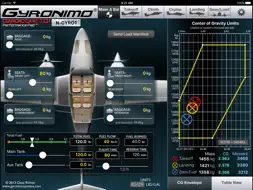
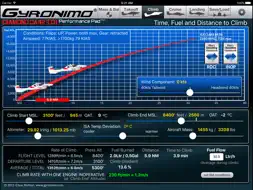
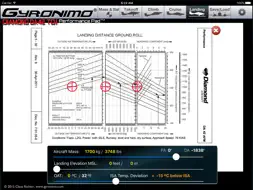
Gyronimo Performance Pad -Diamond DA42 TDI- (for Engine: TAE 125-01 Centurion 1.7, 99kW max takeoff power) The ultimate computer for Mass & Balance and Performance. Calculate and interpolate performance data using the actual values from the Diamond DA42 TDI Pilot's Operating Handbook (POH). Finish your complete fight planning in just a few seconds. Performance planning has never been easier and quicker. Results are updated immediately and displayed in high resolution graphics, enhanced for the iPad Retina screen. Change all important values using sliders. Experiment with the results and create "what if" scenarios in no time. Find your optimal cruise altitude, takeoff ground roll, landing distance, and climb rate. The Performance Pad Diamond DA42 TDI has seven main pages: 1. The Mass & Balance (or Weight & Balance) Page Calculates Center of Gravity, Moments, Takeoff and Zero Fuel Mass. Set person and baggage weights in seconds using the convenient sliders. Check if the CG is within limits using three graphical displays - Moment Envelope - CG envelope - Aircraft axis or see a complete load manifest that you can send to your email address to quickly prove that you have completed the Weight & Balance for you flight. - Send a Mass & Balance Summary to your email address. 2. The Takeoff Page Using the actual data from the Operating Handbook the Performance Pad calculates and displays Ground Roll and Landing Distance based on: - Aircraft Mass - Takeoff Elevation in MSL (Pressure Altitude and Density Altitude will be computed) - Outside Air Temperature (OAT) - Altimeter Setting - Runway Conditions (i.e. paved dry to long grass or snow) - Runway Slope - Wind Conditions Wind Components Computer - Use the Wind Components page to determine your headwind or tailwind component. Rotate the wind dial to set wind direction, set windspeed and the results will be transferred to your takeoff computations automatically! 3. The Climb page Calculates time, fuel and distance based on - Difference between Takeoff Elevation and intended Flight Level - Altimeter Setting - Outside Air Temperature (OAT) - Altimeter Setting - Headwind or Tailwind Component Also the Rate of Climb and Climb Speed will be displayed. 4. The Cruise Page Using the actual data from the Pilot's Operating Handbook you can determine the optimal cruise altitude based on - Trip Distance - Flight Level - Engine RPM - Temperature - Wind and Altimeter Setting and calculate Break Horse Power (% BHP), Fuel Flow and True Airspeed The Max Range and Range including Reserve will be displayed graphically. The Fuel Management allows to enter Reserve Time for Contingency, Alternate and Final Reserve. The Fuel Usage is displayed graphically. Fuel Efficiency is computed in Miles per Gallon and Liter per 100km to set set results in a perspective. 5. Landing Page Calculates Ground Roll and Landing Distance based on wind, elevation, altimeter setting etc. Like on the Takeoff Page you can use the Wind Components Computer to quickly determine head- or tailwind components 6. Load / Save. - Load and Save up to five Aircraft Settings and Scenarios. 7. Setup - Visit our video channel and watch tutorials and video manuals. For iPad 2, iPad 3 and newer (iOS8 or newer recommended) DISCLAIMER: The author disclaims any liability for any direct, indirect, incidental, or consequential losses or damages in connection with your access to or use of this software. The information contained in this software is for general information purposes only.
What's New
Version 2.0 2026-05-05
Update to latest iOS version, general bug fixes Technical Analysis
Package Overview Basic metadata
Bundle ID
com.gyronimosystems.DA42NTDI Current Version 2.0
Minimum iOS 9.1
Package Size App Store Size
Package Metadata 1 / 9 version records
Detailed binary, privacy manifest, framework, and Info.plist results have not been indexed for this package yet. The verified App Store and archive metadata above remains available.
Known Version Records
1 version record with stored package metadata • 9 known version records
Stored metadata does not guarantee a package is currently available to download.
| Details | Version / IDs | Version date | Action |
|---|---|---|---|
| 41.26 MB | v2.0 App Store ID: 885292351Build: 2.0 | 2026-05-06 00:27:39 | Paid / Arcade |
| Not archived | App Store ID: 845493916 | Unknown | Paid / Arcade |
| Not archived | App Store ID: 828800691 | Unknown | Paid / Arcade |
| Not archived | App Store ID: 827668360 | Unknown | Paid / Arcade |
| Not archived | App Store ID: 824927884 | Unknown | Paid / Arcade |
| Not archived | App Store ID: 816771290 | Unknown | Paid / Arcade |
| Not archived | App Store ID: 816393386 | Unknown | Paid / Arcade |
| Not archived | App Store ID: 813900357 | Unknown | Paid / Arcade |
| Not archived | App Store ID: 813656156 | Unknown | Paid / Arcade |