Preview






Description
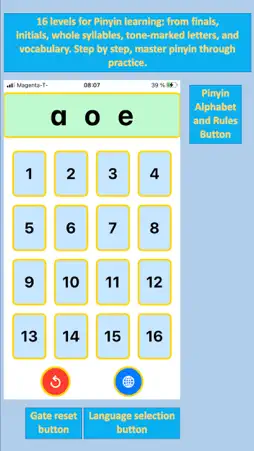
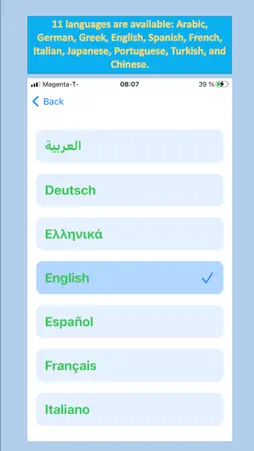
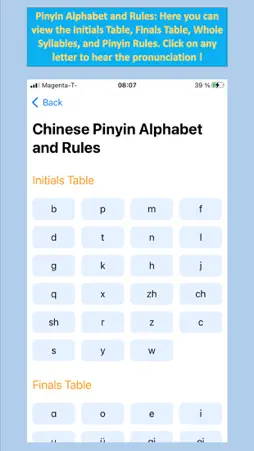
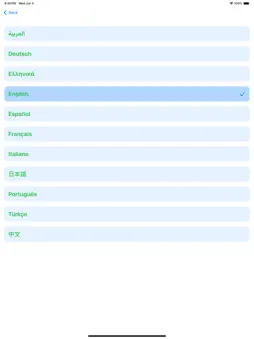
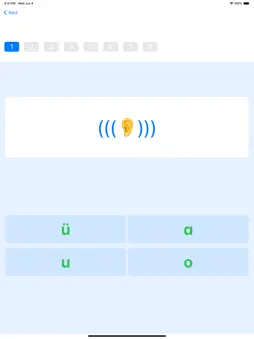
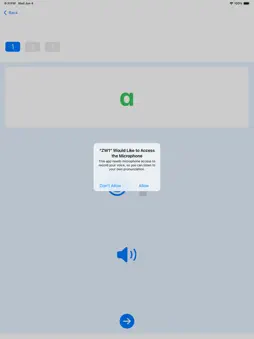
This app is designed for learning Chinese Pinyin: 1. Target Users: Absolute beginners with no prior knowledge Learners with inaccurate pronunciation Middle-aged and elderly individuals who want to stay mentally active by learning Chinese 2. Goal: To master the pronunciation and reading of Chinese Pinyin, enabling learners to accurately read words and sentences based on Pinyin letters. 3. What is not the goal: The app does not aim to teach direct recognition or writing of Chinese characters corresponding to the Pinyin. How to use this app: 1. Language Selection Tap the app icon to open the main screen. Then tap the blue circular icon at the bottom right corner to enter the language selection page, where 11 languages are available: Arabic, German, Greek, English, Spanish, French, Italian, Japanese, Portuguese, Turkish, and Chinese. Tap the back button in the top-left corner to return to the main page. 2. Pinyin Alphabet and Rules Tap the light green bar at the top of the screen (containing letters like “ɑ o e”) to enter the Chinese Pinyin Alphabet and Rules page. Here you can view the Initials Table, Finals Table, Whole Syllables, and Pinyin Rules. It is not recommended for beginners to start with rules; learning them around Level 10 is more appropriate. 3. Pinyin Levels The main screen displays 16 light blue vertical boxes, which represent the 16 levels designed for Pinyin learning. 4. Level 1 – Listening and Visual Recognition Tap number 1 to begin. You will hear and see the pronunciation of a letter (e.g., “ɑ”). Four different letters will appear at the bottom; choose the one you just heard and saw to move on. Tapping any letter will play its pronunciation again for listening practice and memorization. Incorrectly selected letters will reappear in the next round for reinforcement. 5. Level 2 – Listening Practice Only Tap number 2 to begin. You will hear the pronunciation of a letter (e.g., “ɑ”), but the letter is not shown. Instead, an ear icon appears. Choose the correct letter from the four options below. Tapping any letter or the ear icon will play the pronunciation. Incorrect choices will reappear later for reinforcement. 6. Level 3 – Listening, Seeing, and Pronouncing Tap number 3 to begin. The first time you use this level, a popup will request microphone access. Please tap “OK/Allow”. You will hear and see a letter. Tap the blue microphone icon below it — it will turn red. Speak the letter clearly into the microphone. Tap the mic again to stop, and it turns blue. Tap the speaker icon to play back your recording and compare it with the standard pronunciation. If you're not satisfied, repeat: tap the letter to hear the standard sound, mic to record, speaker to listen. Tap the arrow icon at the bottom to proceed to the next letter. 7. Levels 4–15 – Continued Practice These levels follow the same formats as Levels 1–3, but with different content: finals, initials, whole syllables, tone-marked letters, and vocabulary. In Levels 13–15, an additional panel appears below the Pinyin showing the meaning of the letter. 8. Level 16 – Listening, Pronouncing Words/Sentences with Feedback Tap number 16 to begin. On first use, a microphone access prompt will appear — please tap “OK/Allow”. You will hear and see a word. Tap the blue microphone icon — it turns red. Speak clearly into the microphone, then tap the mic again to stop. The app will analyze your pronunciation and display the recognized word with a match score. To retry, tap the Pinyin or reverse arrow icon at the bottom left to hear the standard pronunciation again, then re-record. Tap the arrow at the bottom to continue. 9. Progress Tracking After completing a level, the corresponding box on the main page will turn light green. Tap the red reverse arrow at the bottom left to reset it back to light blue. 10. Encouragement Practicing every day ! 11. Supports system speech recognition and can be used offline (requires prior download of language packs)
Technical Analysis
Package Overview Basic metadata
Bundle ID
Pcycle.HappL.ZW1 Current Version 1.0
Minimum iOS 16.0
Package Size App Store Size
Package Metadata 0 / 1 version records
Detailed binary, privacy manifest, framework, and Info.plist results have not been indexed for this package yet. The verified App Store and archive metadata above remains available.
Known Version Records
0 version records with stored package metadata • 1 known version records
Stored metadata does not guarantee a package is currently available to download.
| Details | Version / IDs | Version date | Action |
|---|---|---|---|
| Not archived | App Store ID: 875084186 | Unknown | Paid / Arcade |