Preview



Description
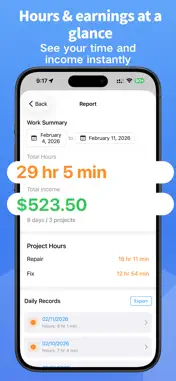
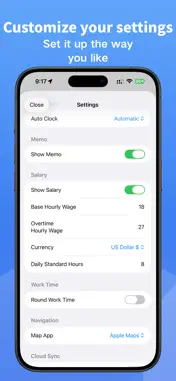
WorkHours is a clean and easy-to-use time tracking app designed to help you clearly record your daily working hours, manage different projects, and automatically calculate your income. With a simple and intuitive interface, WorkHours makes time tracking smooth and efficient, suitable for long-term daily use. Core Features: Quick Clock In & Out • One-tap clock in and clock out • Manual time entry supported • Automatic calculation of daily working hours Project Management • Categorize working hours by project • Set different hourly rates for each project • Independently track hours and income per project Automatic Statistics & Reports • Automatically summarize daily, monthly, and total hours • Automatic income calculation • View historical records by date • Clear display of total hours and total income Product Highlights: Automatic Clock-In Automatically detects arrival and departure from your workplace using location, and completes clock-in or clock-out accordingly. Widget Support Home Screen and Lock Screen widgets allow you to clock in quickly without opening the app. Notes Feature Add daily notes to record special situations or work details for more complete tracking. Light & Dark Mode Supports system appearance switching for comfortable long-term use. Perfect For: • Hourly employees (full-time or part-time) • Freelancers and contractors • Users who need long-term time tracking • Anyone who wants a clear overview of time investment and income WorkHours Track your time. Value every minute.
What's New
Version 1.1.3 2026-09-24
What’s New in 1.1.3 - In Project Work Hours Statistics, tap a project to view all work records for that project. - Overnight shifts are now saved as a single re... Technical Analysis
Package Overview Basic metadata
Bundle ID
com.lele.workHours Current Version 1.1.3
Minimum iOS 17.0
Package Size App Store Size
Package Metadata 0 / 6 version records
Detailed binary, privacy manifest, framework, and Info.plist results have not been indexed for this package yet. The verified App Store and archive metadata above remains available.
Developer Information
Known Version Records
0 version records with stored package metadata • 6 known version records
Stored metadata does not guarantee a package is currently available to download.
| Details | Version / IDs | Version date | Action |
|---|---|---|---|
| Not archived | App Store ID: 886403980 | Unknown | Request Version |
| Not archived | App Store ID: 884699746 | Unknown | Request Version |
| Not archived | App Store ID: 883477072 | Unknown | Request Version |
| Not archived | App Store ID: 882919408 | Unknown | Request Version |
| Not archived | App Store ID: 882664926 | Unknown | Request Version |
| Not archived | App Store ID: 882090842 | Unknown | Request Version |