
Preview




Description
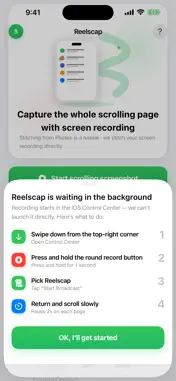
Stop taking 20 screenshots and assembling them by hand. Reelscap captures a single broadcast recording of your scroll, then stitches every frame into one clean, full-length image automatically. Works with any app — chat threads, web articles, lists, notes — anything you can scroll. HOW IT WORKS 1. Open Control Center → long-press the Screen Recording button → choose Reelscap 2. Go to any app and scroll from top to bottom at a natural pace 3. Stop the recording → open Reelscap → your long screenshot is ready 4. Save to Photos, share, or copy to clipboard WHY REELSCAP - System-level integration: Uses ReplayKit broadcast capture, so it works inside any app with no special permissions needed - Automatic: Detects scroll motion and discards idle frames; you get only the content, not the pauses - Any app: Chat logs, Safari pages, email threads, to-do lists, news feeds — if it scrolls, Reelscap captures it - Full resolution: No compression, no quality loss - 100% on-device: Nothing is uploaded anywhere. Your screenshots stay yours. PERFECT FOR → Saving full chat histories from messaging apps → Capturing entire web articles for offline reading → Archiving long comment threads or social posts → Sharing complete lists, receipts, or documents Download Reelscap and scroll your way to the full picture.
What's New
Version 1.2 2026-09-26
New “Start scrolling screenshot” button on the home screen: • One tap opens the system broadcast sheet — no more hunting in Control Center • Fixes Reelscap miss... Technical Analysis
Package Overview Basic metadata
Bundle ID
dev.pages.scrollshot.app Current Version 1.2
Minimum iOS 16.0
Package Size App Store Size
Package Metadata 2 / 2 version records
Detailed binary, privacy manifest, framework, and Info.plist results have not been indexed for this package yet. The verified App Store and archive metadata above remains available.
Developer Information
Known Version Records
2 version records with stored package metadata
Stored metadata does not guarantee a package is currently available to download.
| Details | Version / IDs | Version date | Action |
|---|---|---|---|
| 5.77 MB | v1.1 App Store ID: 889575007Build: 1.1 | 2026-08-11 18:08:00 | Get Version |
| 5.77 MB | v1.1 App Store ID: 884611067Build: 1.1 | 2026-08-11 18:08:00 | Get Version |