
Preview



Description
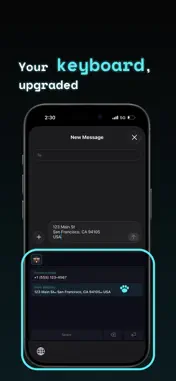
Copy & Paste, Faster. copipi for iPhone/iPad saves words/phrases as templates for one-tap copy. Unlike iOS Text Replacement, it supports line breaks. Use folders or insert from the keyboard. Simple to use, for everyone. USES Messages; AI prompts; addresses/emails; social posts/replies/hashtags; marketplace listings/replies; work/sales/reports; customer support/inquiries. HOW TO USE 1. Top “+”: make a folder. 2. Bottom “+”: enter “Text”, then “Add”. 3. Tap a template to copy. 4. Hold a text field in another app; choose “Paste”. FEATURES & SETTINGS • Main App Settings > Main App: List display fields (Both/Title/Text), Haptic Feedback. Main list/Favorites/search. Title: one title line, no text and protected content in the app switcher; no title → Untitled. Copy/edit as usual. Haptics apply to copy/settings; device haptics off overrides the app setting. Keyboard display is separate. • Custom Keyboard (Recommended) Settings > Custom Keyboard: New here? > Open Settings to enable. Hold the globe key to select copipi and insert templates in other apps. Action key position (delete/space/return): Left/Bottom/Right. Columns: 1 Column/2 Columns. Display Fields: Both/Title/Text. Title: no text; no title → Untitled. • Shared App/keyboard display. Theme Color: color/mascot/icon. Appearance: Light/Dark (default Dark), separate from theme; icon follows. Text Size and Language. • Folder Add/edit/delete/duplicate/reorder folders; favorite templates. Name/nest folders by use. Folder > Subfolders enables Parent Folder/None. Favorites first when a template is favorited. Folder > Manage custom emoji adds image icons. • Data Create Backup/Import Backup: JSON export for restore/transfer; append or replace. Reset deletes folders, templates and custom emoji together. • Support Settings > Support: How to Use/Contact us/Rate the App. • Manage and Copy Templates Add/edit/delete/duplicate/reorder/favorite/search; one-tap copy. Titles aid finding; favorites stand out. “Text” character count during add/edit. • Share Add text from Safari, Notes and other apps via Share Sheet. • iCloud Sync Sync and back up data across devices. • Placeholders {{name}} asks for values on copy: same name, one value; different names, separate values. Date placeholders insert today in your format. Add via the text field’s bottom-right icon. Keyboard: date supported, {{name}} unsupported. • Integrations Widgets: templates/Recent Copies. Siri, Shortcuts, Spotlight, Control Center (iOS 18+). Run Add Clipboard from Shortcuts/Control Center/Spotlight, review text/folder and tap Add to save. No background capture from other apps; add manually in the app, Share Sheet or Add Clipboard. ACCESSIBILITY VoiceOver; voice button control; device Larger Text; Light/Dark; non-color state cues; contrast; Reduce Motion (shorter/hidden animations); device-aware haptics. copipi Pro No ads. All features free for up to 20 templates; Pro removes this limit. Family Sharing. PRIVACY & SECURITY No copied text, analytics or usage data collected. Only Apple (iCloud/App Store), no other servers. On-device data; iCloud backup. Works offline; sync/subscriptions need internet. App Store: Data Not Collected. Terms of Use (EULA): https://gu-c.com/copipi/terms
What's New
Version 5.20.0 2026-10-28
- You can now choose “Both”, “Title”, or “Text” for lists in the main app. Change this in Settings > Main App. - “Title” now hides the text in both the main app... Technical Analysis
Package Overview Basic metadata
Bundle ID
com.guc.copipi Current Version 5.20.0
Minimum iOS 17.0
Package Size App Store Size
Package Metadata 0 / 27 version records
Detailed binary, privacy manifest, framework, and Info.plist results have not been indexed for this package yet. The verified App Store and archive metadata above remains available.
Developer Information
Known Version Records
0 version records with stored package metadata • 27 known version records
Stored metadata does not guarantee a package is currently available to download.
| Details | Version / IDs | Version date | Action |
|---|---|---|---|
| Not archived | App Store ID: 888693462 | Unknown | Request Version |
| Not archived | App Store ID: 888533012 | Unknown | Request Version |
| Not archived | App Store ID: 888210905 | Unknown | Request Version |
| Not archived | App Store ID: 887982409 | Unknown | Request Version |
| Not archived | App Store ID: 887847995 | Unknown | Request Version |
| Not archived | App Store ID: 887766889 | Unknown | Request Version |
| Not archived | App Store ID: 887725782 | Unknown | Request Version |
| Not archived | App Store ID: 887612585 | Unknown | Request Version |
| Not archived | App Store ID: 887448920 | Unknown | Request Version |
| Not archived | App Store ID: 887348382 | Unknown | Request Version |
| Not archived | App Store ID: 887125087 | Unknown | Request Version |
| Not archived | App Store ID: 886775981 | Unknown | Request Version |
| Not archived | App Store ID: 886480928 | Unknown | Request Version |
| Not archived | App Store ID: 886290786 | Unknown | Request Version |
| Not archived | App Store ID: 886152134 | Unknown | Request Version |
| Not archived | App Store ID: 886006773 | Unknown | Request Version |
| Not archived | App Store ID: 885903307 | Unknown | Request Version |
| Not archived | App Store ID: 885762197 | Unknown | Request Version |
| Not archived | App Store ID: 885731321 | Unknown | Request Version |
| Not archived | App Store ID: 885690540 | Unknown | Request Version |
| Not archived | App Store ID: 885650717 | Unknown | Request Version |
| Not archived | App Store ID: 885620575 | Unknown | Request Version |
| Not archived | App Store ID: 885505512 | Unknown | Request Version |
| Not archived | App Store ID: 885480665 | Unknown | Request Version |
| Not archived | App Store ID: 885412393 | Unknown | Request Version |
| Not archived | App Store ID: 885384566 | Unknown | Request Version |
| Not archived | App Store ID: 885251822 | Unknown | Request Version |