
Preview




Description
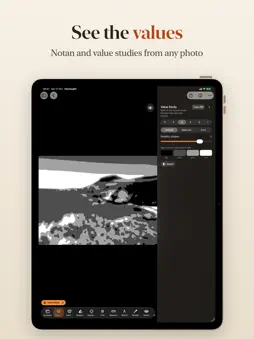
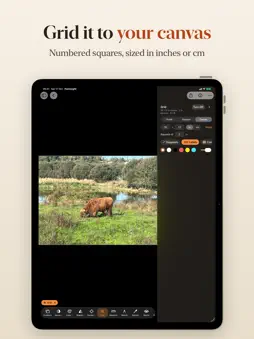
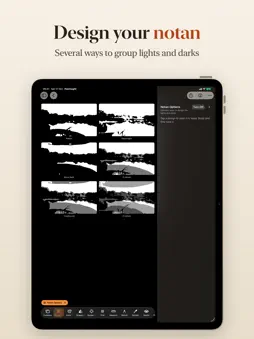
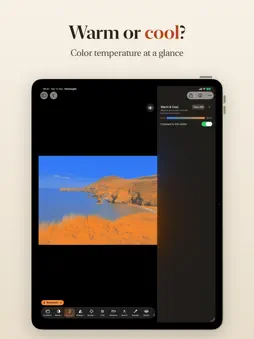
Paint from photos with a painter's eye. Paintsight keeps your reference photos in one place and gives you the studio tools to read them: notan and value studies, grids, color palettes, design tools, and a way to check your painting against the reference. SEE THE VALUES • Notan and value study: simplify any photo into 2 to 7 values, then tap a value to highlight it • Notan options: several ways to design the lights and darks, side by side • Thumbnail: see the design at postage-stamp size, where only the big shapes count • Squint and grayscale views, to judge light and dark without detail or color in the way • Sample: tap any spot to read its value on a 0 to 10 scale, its color and whether it reads warm or cool READ THE COLOR • Palette: the main color masses with their share of the picture, value, hex and RGB. Tap one to see everywhere it appears • Color blocks: flat color masses for the block-in • Warm and cool map, and a chroma map of where the most intense color sits • Gamut wheel: the palette on a color wheel, with its color scheme named SEE THE DESIGN • Planes: the photo as flat facets, finer where the form turns • Silhouette: check that the subject reads as a single shape • Focal point, big lines and flow: where the eye goes first, the main directions, and the direction of form for planning brushstrokes • Hard and soft edges: see how sharply shapes meet • Contours: clean lines for drawing in or transferring DRAW IT IN PROPORTION • Drawing grid with numbered and lettered squares, sized to your canvas (such as 16x20 in) so you can scale up square by square • Rule of thirds, golden section, diagonals and harmonic armature guides • Measure angles and proportions, with a plumb line • Sketch over a reference with Apple Pencil. The sketch is saved with the photo • Mirror, rotate, and crop to your canvas shape or a standard ratio CHECK YOUR PAINTING • Photograph your painting, straighten it, and compare it with the reference: overlaid, flicking between the two, or side by side • Compare in any view, such as values or color blocks, to see where the painting has drifted KEEP YOUR REFERENCES ORGANIZED • Import from the camera or your photo library, one at a time or in bulk • Tag photos, such as hands, skies, fabric or portraits, and filter in a tap • Add notes to each reference: palette ideas, mixes, what to try next time • Syncs with iCloud, so the same library is on your iPhone and iPad BUILT FOR iPAD • Library sidebar, and tool options in a side panel so the photo stays full size • Open a reference in its own window beside your painting app in Split View or Stage Manager • Drag a reference straight into Procreate, Files or another app • Keyboard shortcuts for the main tools MADE FOR PAINTERS For oil, acrylic, watercolor, gouache and plein air painters, and for anyone drawing from reference. Plan a painting at the kitchen table, then prop your iPad or iPhone by the easel while you work. The screen stays awake while a reference is open. SIMPLE PRICING Try Paintsight free with up to 3 reference photos and every tool. One payment unlocks unlimited photos for life. No subscription, no account, no ads. Questions or ideas? Get in touch from Settings. Paintsight is made by an independent developer.
What's New
Version 2.1 2026-10-23
• Perspective: Paintsight finds the vanishing points and draws your eye level with guide lines. Drag the points to adjust, in one-point or two-point perspective...• Perspective: Paintsight finds the vanishing points and draws your eye level with guide lines. Drag the points to adjust, in one-point or two-point perspective • Planes, much expanded: fill them in color, gray, value bands or notan, draw them as lines on paper or over the photo, and choose triangles or rounder facets • Planes can grow with distance, get finer on the main subject, and join similar neighbors into big, simple shapes • Favorites and collections: keep your best references together, and group them into collections such as Ready to Paint • Can't decide what to paint? Tap the dice to open a random reference • The eye button now shows the original photo with a tap, or while you hold it Technical Analysis
Package Overview Basic metadata
Bundle ID
com.gruff.Reference-Photos Current Version 2.1
Minimum iOS 26.0
Package Size App Store Size
Package Metadata 1 / 4 version records
Detailed binary, privacy manifest, framework, and Info.plist results have not been indexed for this package yet. The verified App Store and archive metadata above remains available.
Known Version Records
1 version record with stored package metadata • 4 known version records
Stored metadata does not guarantee a package is currently available to download.
| Details | Version / IDs | Version date | Action |
|---|---|---|---|
| 17.4 MB | v1.3 App Store ID: 884823894Build: 1.3 | 2026-04-23 19:02:08 | Get Version |
| Not archived | App Store ID: 884389375 | Unknown | Request Version |
| Not archived | App Store ID: 881969989 | Unknown | Request Version |
| Not archived | App Store ID: 881402366 | Unknown | Request Version |