
Preview




Description
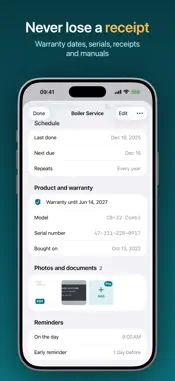
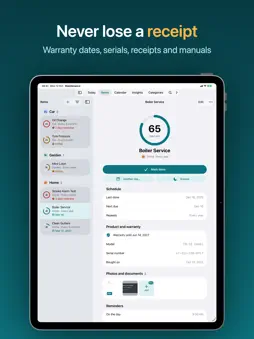
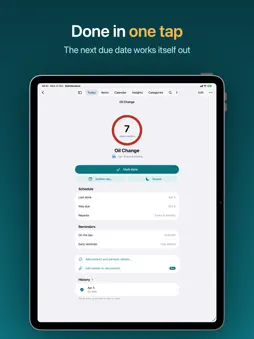
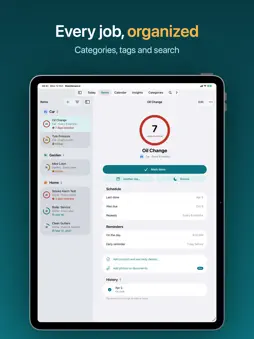
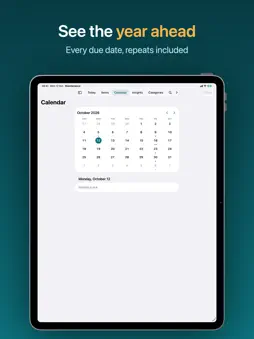
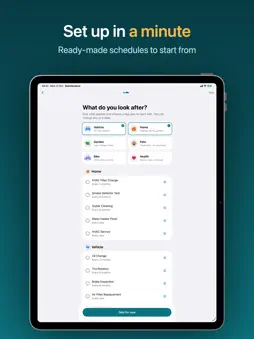
Know what needs doing, and when. Maintenance Schedule keeps track of everything that needs regular care: the HVAC filter, the car's oil change, the smoke alarm test, the gutters, the lawn, the dog's flea treatment. Each job gets a ring that fills as it comes due, so one look tells you what's overdue, what's due this week and what can wait. GET STARTED IN A MINUTE Pick what you look after (home, car, yard, pets, bike, health) and choose from ready-made schedules. Adjust how often, or when it was last done, and you're set. Or add anything else that repeats, every few days, weeks or months. ONE TAP TO MARK IT DONE Mark jobs done from the app, a notification, a Home Screen widget or Siri. The next due date works itself out, and if you tap by mistake, undo is right there. REMINDERS THAT FIT YOUR DAY Get a nudge a day or more before something is due, at the time you choose, with a follow-up if it slips. Snooze it to tomorrow or next week right from the notification. NEW: PRODUCT AND WARRANTY Keep the model, serial number, purchase date, store and warranty end for each appliance. You'll get a reminder a month before the warranty ends, in time for a repair or a claim. NEW: PHOTOS AND DOCUMENTS (PRO) Scan receipts and invoices, photograph the rating plate and keep the manual as a PDF, on the item and on each completion. Everything's at hand when the technician comes out or the shop asks. SEE WHAT'S COMING • Today: overdue, this week and later, with a summary ring • Calendar: every due date, including the repeats ahead • Insights: your on-time rate, streaks, a 12-month chart and a full history you can edit EVERYWHERE YOU ARE • Widgets for the Home Screen and Lock Screen, with a Done button • Control Center controls to add a job or see what's due • Siri and Shortcuts: "What's due in Maintenance?" • iPhone, iPad and Mac, kept in sync with iCloud • A menu bar list of what's due on Mac ORGANIZED YOUR WAY Categories with colors and symbols, tags, notes, archived items, search across everything, and CSV export. FREE AND PRO The free plan includes 2 active items with every feature except attachments. Maintenance Schedule Pro removes the limit and adds photos and documents. Pro is a monthly or yearly subscription with a free trial for new subscribers. Payment is charged to your Apple Account at confirmation and renews automatically unless canceled at least 24 hours before the end of the period. Manage or cancel in your App Store account settings. Terms of Use: https://www.apple.com/legal/internet-services/itunes/dev/stdeula/ Privacy Policy: https://maintentance-website.vercel.app/privacy
What's New
Version 2.1 2026-11-05
• The category buttons are back at the top of Items: tap one or more to see just those jobs • Fixes a crash when opening the Calendar on iPad • Small fixes and ...• The category buttons are back at the top of Items: tap one or more to see just those jobs • Fixes a crash when opening the Calendar on iPad • Small fixes and improvements Technical Analysis
Package Overview Basic metadata
Bundle ID
com.gruff.Maintenance-Schedule Current Version 2.1
Minimum iOS 26.0
Package Size App Store Size
Package Metadata 0 / 4 version records
Detailed binary, privacy manifest, framework, and Info.plist results have not been indexed for this package yet. The verified App Store and archive metadata above remains available.
Developer Information
Known Version Records
0 version records with stored package metadata • 4 known version records
Stored metadata does not guarantee a package is currently available to download.
| Details | Version / IDs | Version date | Action |
|---|---|---|---|
| Not archived | App Store ID: 880784330 | Unknown | Request Version |
| Not archived | App Store ID: 880571285 | Unknown | Request Version |
| Not archived | App Store ID: 879882191 | Unknown | Request Version |
| Not archived | App Store ID: 879720421 | Unknown | Request Version |