Biblio Times: RSS Newspaper App Icon

Biblio Times: RSS Newspaper

12+ v1.6 Recorded price: Free App Store →
★★★★★
★★★★★
(9 App Store ratings)
🏆 Best: #3 Top Grossing (RUS)
IPA Analysis
Technical Specs
Bundle ID GROOV.BiblioTimes
Version 1.6
App Store Size 52.6 MB
Minimum iOS 18.0
Devices iPhone, iPad, iPod touch
Catalog release date 2026-10-15
Latest recorded version date 2026-11-09
Features & Support
Advisory 12+
Infrequent/Mild Alcohol, Tobacco, or Drug Use or References Infrequent/Mild Horror/Fear Themes Infrequent/Mild Medical/Treatment Information Infrequent/Mild Profanity or Crude Humor Infrequent/Mild Mature/Suggestive Themes Infrequent/Mild Realistic Violence
Languages (1)
EN
Top In App Purchases
No In App Purchases Listed

Preview

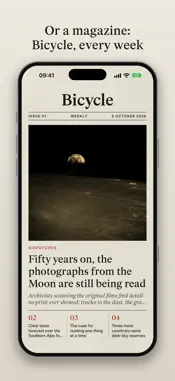
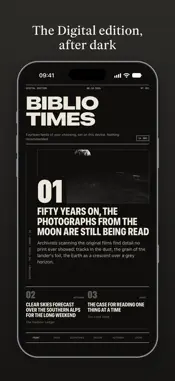
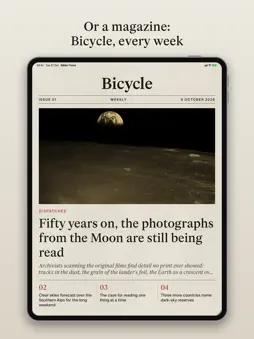
Biblio Times: RSS Newspaper screenshot 1 Biblio Times: RSS Newspaper screenshot 2 Biblio Times: RSS Newspaper screenshot 3 Biblio Times: RSS Newspaper screenshot 4 Biblio Times: RSS Newspaper screenshot 5 Biblio Times: RSS Newspaper screenshot 6 Biblio Times: RSS Newspaper screenshot 7 Biblio Times: RSS Newspaper screenshot 8 Biblio Times: RSS Newspaper screenshot 9 Biblio Times: RSS Newspaper screenshot 10 Biblio Times: RSS Newspaper screenshot 11 Biblio Times: RSS Newspaper screenshot 12 Biblio Times: RSS Newspaper screenshot 13 Biblio Times: RSS Newspaper screenshot 14 Biblio Times: RSS Newspaper screenshot 15 Biblio Times: RSS Newspaper screenshot 16 Biblio Times: RSS Newspaper screenshot 17 Biblio Times: RSS Newspaper screenshot 18 Biblio Times: RSS Newspaper screenshot 19 Biblio Times: RSS Newspaper screenshot 20

Description

Biblio Times sets the feeds you choose as a morning newspaper. Each morning your device collects the public feeds of the publications you pick and lays them out as a paper: a front page, sections, columns, headlines in a proper serif, and photographs screened as halftones. On iPhone the paper arrives folded in half; pull it open to read below the fold. On iPad and Mac it opens as a spread. YOUR SOURCES Tick from starter feeds for your country and for Ideas, Dispatches and Design, or add any site or feed address of your own. Nothing is ticked for you. Change the mix at any time; the next edition prints it. THREE EDITIONS The Biblio edition is set in Fraunces and Timeless on paper stock. The Digital edition is a tight grotesk. The Dystopian edition is printed on pulp. Choose the paper, the picture style, and the size of the type. OR A MAGAZINE A paper can come as a magazine instead, set from the same feeds on the days you choose: Bicycle, a serif on cream; Signal, a grotesk on grey; Plate, a magazine of photographs on white or black. READ IT AS A PAPER Tap a headline to read the story where it was published, or print it on the page in the paper's own type. Clip stories to keep. Back issues stay on the rack for a fortnight. Send a story to Biblio as a book, or share it as a clipping. Ask for a morning call when the paper is ready. YOUR DEVICE IS THE PRESS The paper is made on your device from the publishers' own feeds. Nothing is routed through Biblio's servers, there is no account, and Biblio keeps no copy of what you read. The stories remain their publishers'; the paper is for your own reading. THE PRESS PASS Your first three papers are on the house. After them the press runs for holders of the Press Pass, bought once from Apple for every device signed in with your Apple Account. A Press Founder holds the pass for their family too, and has their name printed on their paper. Biblio Times is a craft by agenti.nz, from the same press as Biblio, the 3D bookshelf, and Atelier.

What's New

Version 1.6 2026-11-09
Plate, a magazine of photographs. Choose Plate under New magazine: it starts you off with design, architecture and photography sources, and prints each story's ...Plate, a magazine of photographs. Choose Plate under New magazine: it starts you off with design, architecture and photography sources, and prints each story's photographs where the publisher set them, with their captions. It comes on white or black paper. - Tap any picture to see it whole, then swipe through the rest of the story's. Spread two fingers, or tap twice, to look closer; swipe up or down to put it away. - A magazine's cover takes a photograph only when it is big enough to print sharp. - Bicycle and Signal print a story's photographs in its pages too. Bicycle can print them in colour. - On iPad, where a story is set in two columns, wide photographs run across both, as a printed magazine sets them. - Your paper is one paper on all your devices. The first to print the day's edition shares which stories it printed through your iCloud, so a story is where you left it. Pick a story up on another device with Handoff. - On iPad the paper folds as it does on iPhone. On its side, an iPad mini or 11-inch iPad opens the paper as a spread. - Share sends a clipping of the story, pinned up like a cutting from the paper: its headline, a few lines and the link to the publisher. It takes the place of To Kindle. - Send a picture to Atelier, Biblio's gallery app. - A Plate icon for your Home Screen, under App icon in the menu or Settings. It follows dark and tinted Home Screens. - The Press Pass and Press Founder have a page of their own in Settings, beside a new Questions page. - Taiwan has a page in Sources: Central News Agency, Liberty Times and The Reporter in Chinese, New Bloom and Taiwan Insight in English. - Headings stay with their text, numbered lists keep their numbers, and the grid of other stories some sites put after a story is left out. - From any page, the menu under the paper's name takes you back to the front page, or to any section. - Email support, in Settings and in the menu under the paper's name, starts an email with your version and device already written in. - Pictures of people are cut around their faces. - A short post in a subscriber's own feed, like The Verge's quick posts, now prints instead of sending you to the publisher's site. - Fixes: an open story now stays open when you fold or open an iPhone Duo; All Papers no longer blinks as you turn your iPhone or iPad; a magazine printed again after its sources changed no longer keeps stories from the sources taken out; and dragging Settings or What's New over the paper no longer leaves it stuck.

Technical Analysis

Package Overview Basic metadata
Bundle ID GROOV.BiblioTimes
Current Version 1.6
Minimum iOS 18.0
Package Size App Store Size
Package Metadata 0 / 0 version records
Detailed binary, privacy manifest, framework, and Info.plist results have not been indexed for this package yet. The verified App Store and archive metadata above remains available.

Developer Information

Known Version Records

0 version records with stored package metadata

Stored metadata does not guarantee a package is currently available to download.

Details Version / IDs Version date Action