
Preview









Description
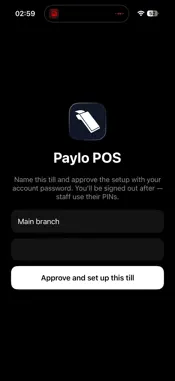
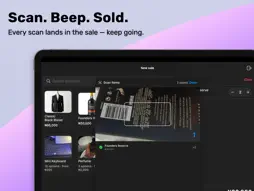
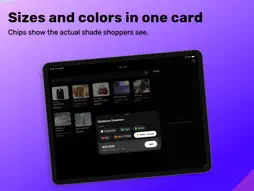
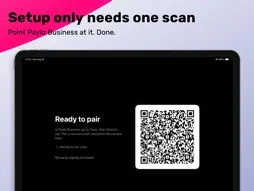
Paylo POS turns a spare device into a proper till for your store. No browsing, no feeds, no distractions. Just your products, your team, and the next sale. It is built for Paylo merchants. Set up your store in the Paylo Business app, then point its camera at this screen. The till lights up with your store's name and it is ready to sell. A REAL REGISTER Search-first product grid, so the fast path on a big catalog is typing three letters. On iPad and Mac, a running order rail keeps the sale visible while you keep picking. One deliberate hold-to-confirm action records the sale, captures how the customer paid (cash, transfer, or card), and chimes. Stock comes straight out of your Paylo inventory, so your storefront always shows the truth. VARIANTS DONE RIGHT Products with sizes and colors collapse into one card. Tap it, pick the options, and every color chip shows the actual shade your shoppers see in the Paylo app. SCAN TO SELL Tap the barcode button in the search bar and point the till at a product. Every recognized item beeps, lands in the sale, and joins a running list on screen, so you can keep scanning without looking down. Unknown or sold-out codes buzz and say why. A scan can never sneak past your stock rules. BUILT FOR SHIFTS When a shift ends, the till returns to the team picker. The next person taps their profile, enters their PIN, and sells. New team members set their own PIN right at the till on their first day. Changing a PIN later needs the owner's approval from Paylo Business, so nobody can prank a colleague out of their login. The till itself never holds anyone's account. SECURE BY DESIGN The till proves itself with a key created inside the device's secure hardware that can never leave it. Setting up a terminal, removing one, or resetting a PIN all require the owner's approval, and the owner gets an email the moment any of them happen. If a device is lost, revoke it from Paylo Business and it goes back to being a brick. MADE FOR COUNTERS Text, tiles, and keys scale up on iPad and Mac so the screen reads from arm's length. Works beautifully as a fixed till on a stand or a phone in a pocket. Paylo POS requires a Paylo Business account with at least one store. Download Paylo Business to create yours in minutes.
What's New
Version 1.0.6 2026-11-12
Improved - Keep selling even if the till wasn't opened: A sale rung up before the drawer is opened for the day is no longer blocked. You can also pull a running...Improved - Keep selling even if the till wasn't opened: A sale rung up before the drawer is opened for the day is no longer blocked. You can also pull a running total for the current shift at any time. - Edit the basket on iPhone: While reviewing a sale, you can now reduce the quantity of any line or remove it. - Faster help when something goes wrong: The till now tells Paylo which app version it is running whenever it syncs, so support can pinpoint and fix issues more quickly. Fixed - Clearer sign-in and payment errors: When a sign-in or a sale can't go through, the till now shows the real reason instead of a generic "try again": a PIN that didn't work is told apart from a till that was removed and needs setting up again, and a payment the server turns down now explains why. Technical Analysis
Package Overview Basic metadata
Bundle ID
com.greylineinnovations.paylo-pos Current Version 1.0.6
Minimum iOS 17.0
Package Size App Store Size
Package Metadata 0 / 0 version records
Detailed binary, privacy manifest, framework, and Info.plist results have not been indexed for this package yet. The verified App Store and archive metadata above remains available.
Developer Information
Known Version Records
0 version records with stored package metadata
Stored metadata does not guarantee a package is currently available to download.
| Details | Version / IDs | Version date | Action |
|---|