Preview










Description
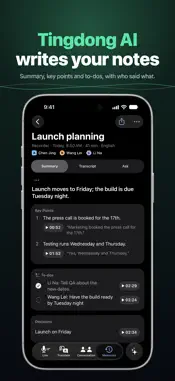
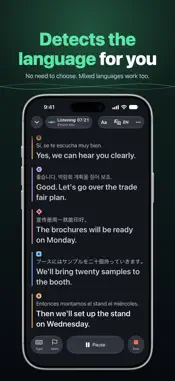
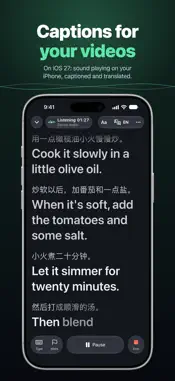
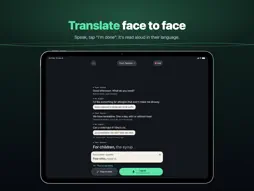
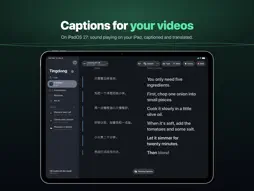
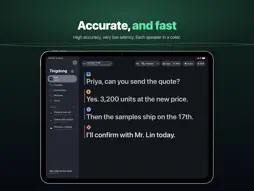
Meetings, classes and lectures, videos (iOS 27 and iPadOS 27), face-to-face talks: Tingdong shows what people say as captions on your iPhone or iPad and translates it into your language. High accuracy and very low latency: words appear while people are still talking. Tingdong detects 60 languages on its own, even when they're mixed in one sentence. Recorder: record on your iPhone, even with the screen locked, or on Apple Watch, or import an audio file. Tingdong turns it into a memory with a title, a summary, key points with times, to-dos, decisions, open questions and, for long recordings, chapters. Organizing needs a connection and uses credits, like captions. Search your memories, ask about one in its Ask section, or tap Ask AI in Memories to ask across all of them: Apple Intelligence (where available) or Tingdong AI answers and shows the lines it used. Once you allow it on your iPhone, Claude or another AI assistant can read your memories too. When someone speaks another language, turn on translation and read the original and your language together. To talk face to face, open Conversation: tap “I speak” and talk, then tap “Done · Their turn”. Tingdong reads it aloud in their language, a tone tells them to answer, and their reply appears in yours. Tingdong can also show you how to pronounce the translation. If you prefer reading along, make the text large and turn the screen toward the other person. In Live and Translate, captions keep running when you lock the screen or switch apps. Turn on Lock Screen captions and the Lock Screen and the Dynamic Island show the latest lines; tap them to go back to the session. On iOS 27 and iPadOS 27, Live and Translate can also caption sound playing on your iPhone or iPad, such as a video (Device Audio). Every session and recording is saved on your device as a memory. Search it, copy it, or share it as Markdown, text or SRT subtitles. Live and Translate can keep the audio with the transcript (Tingdong asks when a session ends), so you can play it back from any line; conversations are not recorded. New users get 60 free credits of High Accuracy captions. After that, subscribe to Standard (1,000 credits a month) or Pro (5,000 credits a month), or buy credits with the one-time purchase (once per Apple Account). Subscribers can also buy credit packs, which never expire. The free credits never turn into a paid plan by themselves. When a subscriber's monthly credits run out, captions continue with on-device recognition using Apple's models; it may be less accurate. Tingdong can't caption phone calls as they happen; a call recording saved on your iPhone can be imported. Privacy: Not stored. Not used for training. Memories, transcripts and recordings stay on your device and aren't stored on our servers. Sound or text is sent only when a feature needs it, such as captions, organizing a recording, reading aloud or a Tingdong AI answer. AI assistants read your memories only with your OK. No ads, no tracking. Tingdong is an everyday communication aid. It is not a replacement for sign language interpreters, CART or medical devices, and it shouldn't be relied upon in emergencies. Tingdong's interface is available in 19 languages, including English. PLATFORMS Tingdong for iPhone and iPad is one app: a subscription or credits bought here work on every iPhone and iPad signed in with your Apple Account. Tingdong is also on Mac and Windows, for what plays on your computer and for phone calls on the Mac. Terms of Use: https://www.apple.com/legal/internet-services/itunes/dev/stdeula/
What's New
Version 1.1.2 2026-11-07
• Fixed: with On-device chosen for recordings, a recording could still be transcribed in the cloud and use credits. It now always stays on your device, and the ... Technical Analysis
Package Overview Basic metadata
Bundle ID
app.tingdong.ios Current Version 1.1.2
Minimum iOS 26.1
Package Size App Store Size
Package Metadata 0 / 0 version records
Detailed binary, privacy manifest, framework, and Info.plist results have not been indexed for this package yet. The verified App Store and archive metadata above remains available.
Developer Information
Known Version Records
0 version records with stored package metadata
Stored metadata does not guarantee a package is currently available to download.
| Details | Version / IDs | Version date | Action |
|---|