
Preview




Description
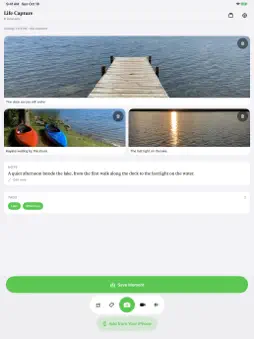
Capture the moment. Keep the story. Life Capture Pocket brings photos, video, spoken words, and written notes together on your iPhone. Capture what happened and add the details a camera cannot remember: who was there, what was said, and why it mattered. MAKE MOMENTS YOUR OWN Take a photo or video, record a voice note, or write a thought while it is fresh. Your original captures stay on your iPhone. Capture works offline and requires no Life Capture account. ADD FROM YOUR IPHONE Choose details from Apple's Journaling Suggestions, review them, and decide what to save. Nothing becomes a Moment until you choose it. Optional Road Mode uses Apple's low-power Visits service to keep a Private Place Trail of approximate stops. It is off by default and needs Always Location to receive visits while the app is closed. It does not record a continuous route. Unselected trail records stay on your iPhone, are excluded from backup, and are never transferred or exported. Choose stops and add your own words before saving them as ordinary Moments. Pause Road Mode or delete the private trail in Settings. SEND TO YOUR MAC Pair with Life Capture Studio on the same local network to deliver new saved Moments automatically. Studio brings your photos and words together into a searchable archive and journal on your Mac. With Life Capture 1.5 on both devices, you can separately enable remote receiving in Studio and attach the connection in Pocket to send away from home. Capture content is encrypted between paired devices before it passes through a Cloudflare Tunnel. Studio must be open and the Mac awake; keep Pocket open while sending. This is a connection to your Mac, not an offline cloud inbox or archive sync. Interrupted remote transfers retain their original destination for retry or resumption. Sent means Studio confirmed the import; your original stays on the iPhone. Local transfer and sharing a portable export, including by AirDrop, remain available. YOUR LIFE, YOUR HARDWARE No required account, tracking, advertising, or analytics. Optional remote setup uses Life Capture's connection service to authorize and manage the Mac's route; that service receives no capture payload or paired content key. See the Privacy Policy for the remote service and network metadata details. Pocket is the capture companion to Life Capture Studio for Mac. Capture now, remember more later.
What's New
Version 1.5.1 2026-10-19
• More reliable transfer retries and clearer recovery options for incomplete transfers. • Preserve photo and file origins so Studio can show where your moments ...• More reliable transfer retries and clearer recovery options for incomplete transfers. • Preserve photo and file origins so Studio can show where your moments came from. • Compatibility improvements for Life Capture Studio 1.5.1. Technical Analysis
Package Overview Basic metadata
Bundle ID
com.gregstoltz.lifecapture Current Version 1.5.1
Minimum iOS 18.0
Package Size App Store Size
Package Metadata 0 / 0 version records
Detailed binary, privacy manifest, framework, and Info.plist results have not been indexed for this package yet. The verified App Store and archive metadata above remains available.
Developer Information
Known Version Records
0 version records with stored package metadata
Stored metadata does not guarantee a package is currently available to download.
| Details | Version / IDs | Version date | Action |
|---|