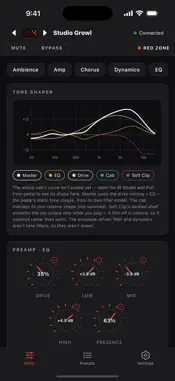
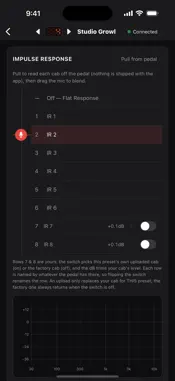
SansApp is a free, open-source editor for the Tech 21 SansAmp Programmable Bass Driver DI Elite — the desktop-only editor, now in your pocket. Connect over Bluetooth MIDI (or USB) and: • Edit every control live — Drive, three-band parametric EQ, the Red Zone functions, Compressor, Auto Filter, Ambience and Chorus — with a live tone graph and hardware-calibrated units. • Work with cabs the way the pedal does: browse your pedal's own cabs with real frequency curves, then design your own — bake a high-pass into a cab so you can drop a standalone HPF pedal, blend two cabs, or build a filter from scratch — and upload it straight to a user slot. • Manage all 128 presets: recall, step through, and back up / restore / share your whole pedal. You'll need the pedal plus a Bluetooth MIDI adapter (a CME WIDI Jack is recommended) or a USB MIDI interface. SansApp keeps everything on your device — no account, no sign-in, no data collection. SansApp is an independent, community project and is not affiliated with, authorized, or endorsed by Tech 21 USA, Inc. "SansAmp", "Bass Driver", and "Tech 21" are trademarks of their owner, used here only to describe compatibility. Open source (GPL-3.0): github.com/mckelveygreg/sansapp
What's New
Version 1.2.0 2026-08-18
Adds support for pedal firmware 1.2. One build now talks to firmware 1.0, 1.1 and 1.2 — SansApp detects which one your pedal is running and adapts to it, includ...Adds support for pedal firmware 1.2. One build now talks to firmware 1.0, 1.1 and 1.2 — SansApp detects which one your pedal is running and adapts to it, including firmware 1.2's change to how the red footswitch's Red Zone state is worked out. If you have updated your pedal to 1.2, you need this version: older builds of SansApp cannot connect to it at all. New: • Red Zone indicator. The status bar now shows whether the pedal's red footswitch layer is engaged, and re-checks it every time a preset loads. On firmware 1.1 and earlier, any preset with Ambiance dialled in comes up already engaged, so the first press of the red switch turns things off rather than on — now you can see that coming instead of guessing. Firmware 1.2 fixes it at the pedal. • MUTE / BYPASS bar, for silent tuning and quick A/B against your dry signal. • The preset list now refreshes itself from the pedal every time you connect, so a preset you renamed or saved at the pedal shows up correctly. It stays quick: SansApp asks the pedal which presets changed and re-reads only those, instead of walking all 128. Your list also appears immediately when you open the app, before connecting. • SansApp now recognises which pedal it is talking to, so if you use it with more than one, each keeps its own preset names and cab data instead of showing the other's. • The app version and build number are shown on the Settings page. Fixed: • Compressor and gate timing read-outs were wrong through the middle of their travel — Release showed roughly a third of the real time, and Attack was out too. All three now match the pedal. • Soft Clip is a switch on the pedal, not an amount, so it is now a switch in the app instead of a percentage knob that appeared to do nothing. • The Dynamics page stays inside its panels. The Soft Clip, Auto Gain and Lookahead switches ran off the right-hand edge, the gate's four knobs crowded past it, and a longer read-out could spill over the rim of its dial. • Controls no longer move when no pedal is connected. Device Settings in particular used to show a set of values that were not read from your pedal at all. • Uploading a custom IR to one user slot no longer blanks the other slot's cab in the IR display. Nothing was ever lost on the pedal, but the app stopped showing it. • The Studio's Low-pass preview is readable again instead of pinning the low end to the top of the graph. • When a user IR slot cannot be switched on, the explanation now appears next to the switch rather than at the bottom of the page, where it was easy to miss. • A user IR slot can no longer be enabled when its pointer doesn't refer to a real cab — closing a path that could send a write to the wrong place on the pedal. • Custom IR uploads no longer begin unless the connection can carry them through, and they reconnect before retrying. • Each preset's cab is resolved by record, so presets sharing or overriding a custom IR load the right one. • A preset saved with its Level at zero is no longer silently treated as empty. • The tuner no longer leaves an unsaved change behind after you use it.
Technical Analysis
Package Overview Basic metadata
Bundle IDcom.mckelveygreg.sansapp
Current Version1.2.0
Minimum iOS16.4
Package SizeApp Store Size
Package Metadata0 / 0 version records
Detailed binary, privacy manifest, framework, and Info.plist results have not been indexed for this package yet. The verified App Store and archive metadata above remains available.