Preview


Description
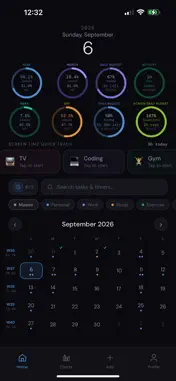
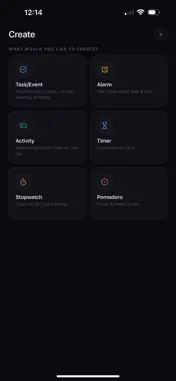
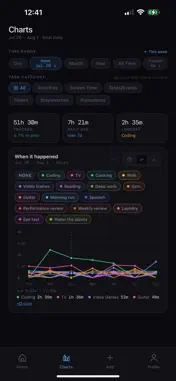
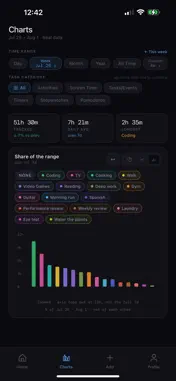
Porkly does two things: it keeps track of what you have to do, and it tracks where your time actually goes. Everything stays on your phone. No account, no sign-in, nothing uploaded — ever. ZERO DATA COLLECTED. ZERO DATA SOLD. Most productivity apps want your calendar, your habits and your hours before they will do anything at all. Porkly asks for nothing, because it sends nothing anywhere. There is no server — which means there is no server to breach. No account to steal. No password to leak. No database with your name in it, here or anywhere else. The data is self-custodial in the plainest sense of the word: it lives on your phone, it belongs to you, and you are the only one who can move it. That is not a privacy policy promising restraint. It is an app with nowhere to send anything. ONE TAP IS THE WHOLE APP The buttons on Home are Quick Track. Tap one and it starts counting. Tap it again and it stops. Sessions can overlap on purpose, so a show can run in the background while you work. The total above the row is today's screen time, and it's free for everyone. WHAT YOU CAN MAKE • Tasks and events — a title, a date, notes, tags, a location • Alarms you have to answer, with Stop and Snooze • Timers that count down, stopwatches that count up • Pomodoros that run focus and break cycles back to back • Activities — anything you want to log hours against: Reading, Gym, Guitar, Video Games • Repeating items, so a birthday gets entered once and reminds you every year FOR STUDENTS AND PROFESSIONALS Time management, time tracking and scheduling in one app, without the account that usually comes attached. Point a Pomodoro at an Activity and the focus time logs itself. Filter the calendar by tab, so classes, clients and personal don't sit in one pile. Tap any day to see what's due and what you actually tracked. YOUR HOME RINGS Eight rings at the top of Home, each showing whatever you point it at — a task's progress, a running timer, an Activity's budget, or how far through the year, month, week or day you are. TAKE YOUR DATA WITH YOU Export the lot as a single file whenever you like, and save it to iCloud Drive or send it straight to another device. Import restores a backup: it replaces what is in the app, tells you what will be removed, and asks first. Leaving is a two-tap export, not a support ticket. FREE, AND WHAT PREMIUM ADDS The free plan is a real app, not a trial: Quick Track, today's screen time, the calendar, reminders and alarms, 5 items, 3 activities, 3 tabs and 2 Home rings — no time limit, no ads. Premium is a one-time purchase, not a subscription: • Unlimited tasks, events, timers, activities and tabs • All eight Home rings • Budgets — set how long you meant to spend on something, and watch how much is left • A cap on your daily screen time • Charts — pie, line and bar for everything you track, over any range from a day to all time Buy it once, and it restores on any device signed in to your Apple Account.
Technical Analysis
Package Overview Basic metadata
Bundle ID
app.porkly Current Version 1.0
Minimum iOS 15.1
Package Size App Store Size
Package Metadata 0 / 0 version records
Detailed binary, privacy manifest, framework, and Info.plist results have not been indexed for this package yet. The verified App Store and archive metadata above remains available.
Developer Information
Known Version Records
0 version records with stored package metadata
Stored metadata does not guarantee a package is currently available to download.
| Details | Version / IDs | Version date | Action |
|---|