Preview





Description
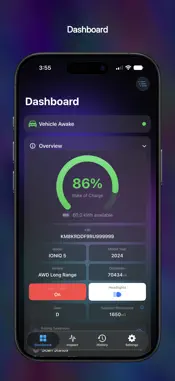
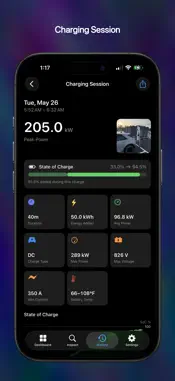
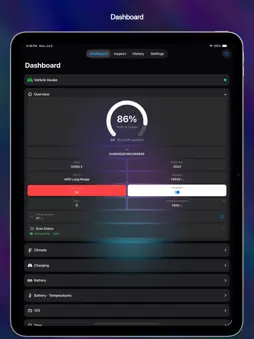
EV Dashboard is an independent OBD-II diagnostic tool for E-GMP electric vehicles: the Hyundai IONIQ 5, IONIQ 5 N, IONIQ 6 and IONIQ 9, the Kia EV3, EV6 and EV9, and the Genesis GV60. REQUIREMENTS - An ELM327-compatible BLE OBD-II adapter, OBDLink MX+, Vgate vLinker FS, or Vgate vLinker MS (see https://www.theburl.com/ioniq-app/support.html for tested adapters) - Signal coverage varies by model, year and trim CARPLAY - A dashboard of live tiles you arrange yourself — 2x8 in full screen, 2x4 in split screen, where supported - Power, state of charge, range, speed, elevation, tires, climate, battery health and more, each with its own Help page - A graphics-rich charging page appears when you plug in: session power, pack voltage and current - Full support for CarPlay's Dashboard — a live charger map beside two tiles of your choosing NAVIGATION & CHARGERS - More than 60,000 DC fast-charge sites ship inside the app — worldwide, instant, offline - Filter by power level or network operator, anywhere in the world - Turn-by-turn navigation to a charger or any address, with spoken guidance in a voice you choose - Turn directions in your instrument cluster and head-up display, where supported - Your estimated state of charge on arrival, so you know if you will make it - Optional live data sharing with ABRP (A Better Routeplanner) IN-DEPTH DATA - State of charge, available energy, voltage, current, power, regeneration, and 12V and DC-DC telemetry - Per-cell voltages and temperatures as color-coded heatmaps, with min, max and delta - Tire pressures and temperatures, with per-axle warnings from your door placard, temperature-compensated - Climate, humidity, motor RPM, gear, battery warmer and lighting indicators CHARGING - Charts for power, pack voltage, requested against delivered current and battery temperature - The charging station's published maximum power, voltage and current (J1772 + CCS) - Live "Time to 70°F / 21°C" battery ETA for DC fast charging HISTORY & ICLOUD - Every drive and charge recorded, with measured trip distance and efficiency - Journey maps each drive's route, colored by efficiency, speed, elevation, grade or power - 50+ signals on charts you can pinch, pan and scrub - Optional iCloud sync keeps your history and settings in step across iPhone, iPad and Mac - Attach a photo, share a report card, or export any session to CSV DIAGNOSTICS - Enhanced DTC Scan sweeps the whole vehicle bus, names every module that responds and reads its fault codes - Connection Report, ICCU Information, J1979 Scanner, ECU Finder and DID Range Scan, with CSV and image sharing PRIVACY BY DESIGN No analytics, ads or accounts. Vehicle data stays on your device and your private iCloud unless you turn on ABRP sharing, which sends live data from the app directly to ABRP. Logs are exported only when you tap Share. Privacy policy: https://www.theburl.com/ioniq-app/privacy.html NOT AFFILIATED EV Dashboard is not affiliated with, endorsed by or sponsored by Hyundai, Kia or Genesis. IONIQ, EV3, EV6, EV9 and GV60 are trademarks of their respective owners. This independent tool reads your own vehicle's data using open OBD-II and UDS standards (ISO 15031, ISO 14229). Charger data from Open Charge Map contributors (CC BY-SA 4.0) and the U.S. DOE / NRCan Alternative Fuels Data Center.
What's New
Version 3.5 2026-11-12
Version 3.5 NEW: Journey - Every drive now records its route on a map - Color the route by efficiency, speed, elevation, grade or power - Tap or scrub along th...Version 3.5 NEW: Journey - Every drive now records its route on a map - Color the route by efficiency, speed, elevation, grade or power - Tap or scrub along the route to read any stretch's efficiency, speed, grade and power - Export a drive as a GPX file; the journey also appears on the drive's share card - Turn recording off under Settings → Drive Sessions NEW: Bluetooth Classic adapters - The OBDLink MX+, Vgate vLinker FS, and Vgate vLinker MS are now supported - Pair once in iOS Settings → Bluetooth, then pick the adapter in the app - "Adapter Out of Reach" shows when your adapter is asleep or out of range, and the app reconnects on its own NEW: CarPlay tiles - Elevation, using your device's barometer on vehicles whose CarPlay sends no altitude - Internet Connection, with your data link's round-trip time and its last 10 minutes - Drive Session and Drive Time, for the drive in progress - Battery Health and Module Temps - Add them under Settings → CarPlay → Customize Tiles - The Speed tile now uses GPS when available CarPlay navigation - Switch between the map and your tiles while navigating - Directions stay on your next turn until you make it - Real roundabout, exit and fork symbols, in your head-up display(1) too - A remaining time that keeps counting down, and offers of a faster route - Arrival SoC in CarPlay's trip bar on iOS 27 - Rerouting starts in your direction of travel - Starting from a driveway or parking lot, guidance begins when you reach the route - Contacts in destination search, and a saved destination's pin can be manually adjusted - The charger filter lists every network in your country History - Charging sessions show where you charged on a map - Take a session photo with the camera - New charts: charge-port temperatures, Elevation and Ambient Temp, plus a Final Energy tile - Swipe between sessions; deleting one now asks first - Choose a vehicle if you've connected more than one - Uses up to 33% less storage Settings - NEW: Settings sync between your devices through iCloud - NEW: Share live data with ABRP (A Better Routeplanner) - NEW: MPGe efficiency unit - Tire settings for each of your vehicles, connected or not - A new Elevation screen Vehicles and charging - The North American Kia EV3 (2027) is now recognized - FIX: Genesis GV60 Headlights indicator - FIX: AC voltage on the IONIQ 9 and some 2022–2024 IONIQ 5s - FIX: a false 20kW peak at the start of some AC charges - FIX: charging from a household outlet no longer flips on and off - Charging current turns negative when your vehicle draws more than the charger supplies Look and reliability - Solid panels and smoother scrolling throughout the app - FIX: fewer false Adapter Interference alarms - FIX: a second device on your iCloud account no longer cuts a drive short - FIX: a finished charge no longer reopens hours later - Readings show a dash until your vehicle reports them (1) where supported by the vehicle MFi PPID: 221699-0001 (OBDLink MX+), 649626-099130 (Vgate vLinker FS, vLinker MS) Technical Analysis
Package Overview Basic metadata
Bundle ID
com.theburl.ioniq5 Current Version 3.5
Minimum iOS 26.0
Package Size App Store Size
Package Metadata 1 / 4 version records
Detailed binary, privacy manifest, framework, and Info.plist results have not been indexed for this package yet. The verified App Store and archive metadata above remains available.
Developer Information
Known Version Records
1 version record with stored package metadata • 4 known version records
Stored metadata does not guarantee a package is currently available to download.
| Details | Version / IDs | Version date | Action |
|---|---|---|---|
| 28.82 MB | v3.0 App Store ID: 887048627Build: 3.0 | 2026-08-27 21:09:55 | Paid / Arcade |
| Not archived | App Store ID: 886438601 | Unknown | Paid / Arcade |
| Not archived | App Store ID: 885302528 | Unknown | Paid / Arcade |
| Not archived | App Store ID: 883907263 | Unknown | Paid / Arcade |