
Preview






Description
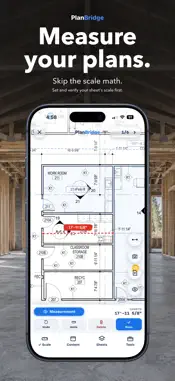
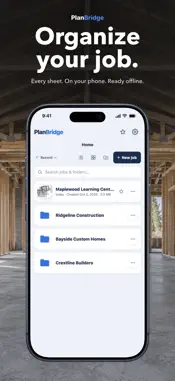
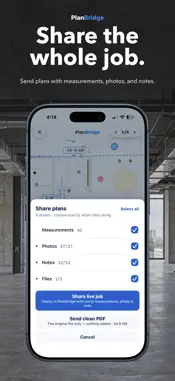
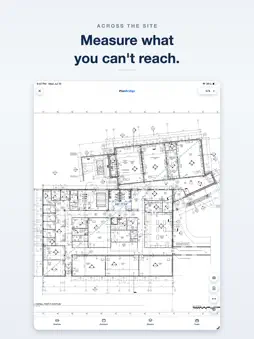
Every measurement you need is already drawn on the plans. PlanBridge pulls it off, right on your phone. THE OLD WAY Pull out the ruler. Find the sheet's scale. Lay it on the drawing. Read the number. Convert it in your head. Five steps, every measurement, all day. In PlanBridge it's two taps. MEASURE OFF THE PLANS • Open a plan PDF or a photo of a sheet • Set and verify the scale against a known dimension on each sheet. Results depend on the scale and drawing; verify critical dimensions on site • Tap two points for a real dimension. Trace an area for square footage • Feet and inches, or metric • Big sets stay in order, cover sheet to final page MARK UP THE PLAN • Take photos in the app, or import them from your camera roll • Pin photos and notes to the exact spot on the drawing • Photos save to the job, so the shots that matter stop drowning in your camera roll • Labels switch on and off, and any measurement shows its number with a tap, so the drawing stays readable • Checklists and numbered lists, with your own saved templates THE JOB KEEPS A MEMORY • Sort photos and notes into phases of the job: rough in, inspection, drywall, finish • Turn phases on and off to see any stage of the work • A year after the walls close up, open the plan and see what's behind them • Hand the record to the homeowner, the GC, or the next trade YOUR WORK STAYS YOURS • Plans and measurements are stored locally. Files can leave your device when you choose to export or share them. Keep a separate copy of important work • Works offline. No signal needed on site • No account required. Open the app and start measuring SHARE THE WHOLE JOB • Send a set to anyone by text, email or AirDrop, straight from the app • Your measurements, photos and notes ride along, at full plan quality • Recipients can view the PDF in a PDF reader. To keep working with a compatible job export, they import it into PlanBridge using the file's share or open options PRICING, STRAIGHT Try one set of plans free for 30 days. After your trial, or when you add a second set, unlock lifetime access with a one-time in-app purchase: $9.99 in the US. Unlimited jobs, plan sets, measurements and areas, with photos and notes pinned to your plans. No subscription. No automatic charge. The store shows your local price before you choose to purchase. After the trial expires, saved plans and markups remain viewable; measuring and editing require the unlock. Existing purchases remain valid, and existing trials keep their original expiration. Available device storage still applies. Built for electricians, plumbers, HVAC, framers, concrete, drywall, builders, estimators, architects, engineers, project managers, inspectors, and homeowners who read plans.
What's New
Version 1.1.7 2026-11-09
NEW Straight lines A new Straight button holds your measuring line to a straight angle. Start a measurement and it appears on the right, level with the round p...NEW Straight lines A new Straight button holds your measuring line to a straight angle. Start a measurement and it appears on the right, level with the round pin button. Tap it. Drop your first pin. The line then holds straight. The plan slides along that line as you drag. The small i button under it says the line locks to the nearest 15 degrees. Pick many files at once Tap Upload plans and pick many files at once. They all land in one job instead of one job each. If one file will not open, the rest still come in. Tappable links in notes A web address in a note or a photo caption is now a tappable link. Type getplanbridge.com in a note and it shows blue and underlined. A tap opens it in Safari. Sheet labels like A-5.4 and file names like plans.pdf stay plain. Read a note without the keyboard Tap a note pinned to the plan and it opens as text to read and scroll. The keyboard does not open. Tap the pencil at the top to type. A Home tab inside your plans A Home tab now sits first in the bottom bar inside a plan. Tap it to go to your jobs. If a measurement or a panel is open, the first tap closes that. The second tap takes you home. More Spanish More of the app reads in Spanish when your phone is set to Spanish. That covers Settings, App Updates, Archived and Purchases. Support and Feedback, the new job screen and the job menu read in Spanish too. So do Edit details, the move screen and the three delete warnings. BETTER Pinch zoom on the plan is smoother, most of all while you measure on an iPad. The magnifier stays sharp while you slide the plan under it. The picture inside it no longer goes soft as soon as you move. While a measuring tool is on and the plan is on screen, the app stops its background sheet reading. A big plan set stays steadier while you line up a point. The Search sheets box now sits under the Sheets title. It stays in place while you scroll the sheet list. If your phone clears the app's files, the app tells you on the next launch. A bar across the top of the jobs screen carries the support address. FIXED Your free trial and your first plan set During your free trial, a job with no plans in it blocked your first plan set. The purchase screen opened instead of the plans. There were two ways in. You made the job first and added plans after. Or you deleted the plan set in a job and added a different one. Both now import. A photo you send in from another app lands in that job too. The trial itself has not changed. It is still 30 days and one plan set. Starting a second job still asks for the purchase. Typing in the Search sheets box no longer locks up the app on a big plan set. The letters appear as you type. The list filters when you stop. A sheet you have scaled keeps its Scale set tick in the sheet list. It no longer flips back to Verify scale while the previews load. The Sheets panel stays on screen when the keyboard opens. The bottom bar hides when a panel inside a job opens. The round pin button appears in its final spot. It no longer lands low and then jumps. A plan that fails to open once is no longer dropped from the job. If the app's plan list goes missing, the app rebuilds it from the plans still on the phone. If a plan will not open right after you pay, the app says so. It tries again if you reopen the app within the hour. Technical Analysis
Package Overview Basic metadata
Bundle ID
com.gravityherostudios.planbridge Current Version 1.1.7
Minimum iOS 15.0
Package Size App Store Size
Package Metadata 0 / 0 version records
Detailed binary, privacy manifest, framework, and Info.plist results have not been indexed for this package yet. The verified App Store and archive metadata above remains available.
Developer Information
Known Version Records
0 version records with stored package metadata
Stored metadata does not guarantee a package is currently available to download.
| Details | Version / IDs | Version date | Action |
|---|