
Preview


Description
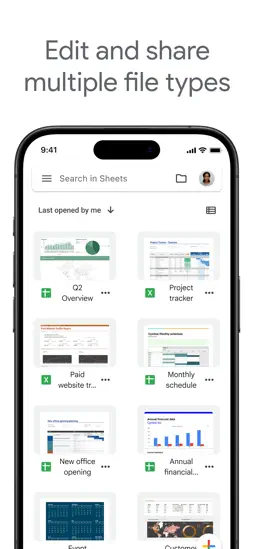
Create, edit, and collaborate on spreadsheets with the Google Sheets app. With Sheets you can: * Create new spreadsheets or edit existing ones * Share spreadsheets and collaborate with others in the same spreadsheet at the same time * Work anywhere, anytime - even offline * Format cells, enter/sort data, view charts, insert formulas, use find/replace, and more * Never worry about losing your work -- everything is automatically saved as you type * Open, edit, and save Excel files Google Sheets is part of Google Workspace: where teams of any size can chat, create, and collaborate. Google Workspace subscribers have access to additional Google Sheets features, including: * Easily add collaborators to projects, see changes as they occur, receive notifications for edits that happen while you’re away, and chat with colleagues in the same spreadsheet. All changes are automatically saved as you make them. And with offline access, you can create, view, and edit files wherever and whenever * Get insights fast, powered by Google AI * Work seamlessly across Sheets and Excel * Maintain control with enterprise-grade security * Analyze data from other business-critical tools * Build custom solutions
What's New
Version 1.2026.46104 2026-11-16
* Security improvements, bug fixes, and performance improvements. Version 1.2026.45103 2026-11-09
* Security improvements, bug fixes, and performance improvements. Version 1.2026.44103 2026-11-04
* Security improvements, bug fixes, and performance improvements. Version 1.2026.44102 2026-11-02
* Security improvements, bug fixes, and performance improvements. Version 1.2026.43103 2026-10-26
* Security improvements, bug fixes, and performance improvements. Version 1.2026.42100 2026-10-19
* Security improvements, bug fixes, and performance improvements. Version 1.2026.41100 2026-10-12
* Security improvements, bug fixes, and performance improvements. Version 1.2026.40103 2026-10-06
* Security improvements, bug fixes, and performance improvements. Version 1.2026.40102 2026-10-05
* Security improvements, bug fixes, and performance improvements. Version 1.2026.39101 2026-09-28
* Security improvements, bug fixes, and performance improvements. App Store User Reviews
discerning learner 2019-09-09
Great, but still needs features
Okay— it’s not ready for five stars I’m leaving my original review below, but the reason I am upgrading from 4 to 5 stars is that google continues to improve S...Okay— it’s not ready for five stars I’m leaving my original review below, but the reason I am upgrading from 4 to 5 stars is that google continues to improve Sheets so much that it really is starting to compete with Microsoft Excel. I still think the Microsoft VBA capabilities are superior to the scripting in sheets (few realize how much you can do with the VBA), but I have to admit you can do some pretty cool things with google’s scripting. Also must be admitted that Microsoft has allowed Excel to become bloated and slower compared to the simple snappy interface it had years ago. I hope Sheets avoids that fate. ====== original review ======= Very nice in terms of collaboration, but it's not Excel by any means. Since it's in development there are some obvious "seams" -- ie it's not seamless!! Examples: The mobile app has separate interfaces for viewing and editing, when you're in the editing app you can't chat with the others you're collaborating with, and since it's not Excel you can't work with Excel docs unless its the simplest of spreadsheets -- and even then you're forced to convert in order to be able to collaborate. Hopefully one day there really will be something as powerful as (the Windows version of) Excel (including macros of course!!!) and then that will be incredibly useful with all the collaboration features Google offers. By then however Microsoft might be smart enough to move into that territory to take this away from Google. Either way I'm waiting for that day to give up my five stars!!
Darklink99 2021-12-01
Google Sheets for IPad - Fundamentally Flawed
Google Sheets and other programs like it are flexible, able to be used for multiple purpose across many different fields. As such Google Sheets for IPAD may wor...Google Sheets and other programs like it are flexible, able to be used for multiple purpose across many different fields. As such Google Sheets for IPAD may work fine for you but for my job and how I use it I spend more time hitting roadblocks and having to open my computer to accomplish tasks than I should. It leads to the essential question of why even have an app if it will be missing so many core features and have many more that are broken or flawed. The most recent examples include freezing vertical columns doing the opposite of the intended function, the complete lack of in cell text formatting, the lack of advanced sorting features and the inability to open two windows of google sheets at the same time. These are just the broken or missing features that have interrupted my workflow today, I am sure that more will occur in the future. With an app this unfinished I would look to Excel or Apple’s Numbers as alternatives if my work didn’t rely on GSuite for the sharing functionality. If the only reason a user continues to use an app is being locked into the ecosystem, it is not a good app. If you are able avoid Google Sheets and all other Google apps to avoid getting trapped in their ecosystem, especially if you plan to try and use your IPAD as a main work device.
WhiteNight2023 2026-05-13
The Google Sheets app should be a full workforce version, instead of a fancy app which lacks major f
Google Sheets on the desktop is an absolute powerhouse for productivity, but the mobile app feels like a "lite" version designed only for viewing, not for actua...Google Sheets on the desktop is an absolute powerhouse for productivity, but the mobile app feels like a "lite" version designed only for viewing, not for actual heavy lifting. If Google wants this to be a serious workforce tool, they need to stop prioritizing the "fancy," minimalist mobile UI and actually port over the functional power of the desktop version. • Missing Core Features: You can’t bulk-add rows or columns efficiently, and major data tools like Pivot Table editing, Conditional Formatting rules, and Data Validation (dropdown) management are either hidden or completely non-existent. • Poor Navigation: Navigating frozen columns or large datasets is a nightmare compared to the desktop experience. The "fancy" touch interface often gets in the way of precision when selecting specific cell ranges. • No Apps Script Support: For a "workforce" app, the lack of ability to run or even view basic scripts on mobile is a huge bottleneck. I shouldn't have to wait until I’m back at a computer to trigger a simple automation. • Formatting Limitations: Basic things like custom fill colors or advanced chart customization are stripped out. It makes the app feel like a toy rather than a professional spreadsheet tool.
Cristyjewelry 2019-05-20
Unable to Edit Shared Sheets
I try to go as mobile as possible, because opening up a computer all the time sometimes is just too much of a hassle or takes way too much time for something th...I try to go as mobile as possible, because opening up a computer all the time sometimes is just too much of a hassle or takes way too much time for something that should be done so quickly, such as signing up for a meeting time. Whenever I try to edit a spreadsheet for something like signing up, there’s always an annoying pop-up that says I need to download the app in order to edit at all. And even when I already have it downloaded, I still have to press the only “accept” button on that pop-up, which says “get the app”. It takes me back to the app store, where I then have to press “open”, and opens up to the Google Sheets app, but the sheets I would be trying to edit wouldn’t automatically come up. Checking the “Shared with Me” tab doesn’t do anything, trying the process over again doesn’t do anything, and nor does completely closing the App Store or Google Sheets app then starting the process over again do anything. This practically makes the Sheets app useless for me, because this is pretty much the only reason I need it. When using Sheets, I’m usually just trying to open someone else’s Sheets page, which they linked somewhere, and edit it rather than creating one myself.
mckennaak 2021-07-16
Not mobile-friendly at all
I hate this app so much. I have been using it for more than two years, 2-3 hours a day to track my training, and it is always one of my largest headaches of the...I hate this app so much. I have been using it for more than two years, 2-3 hours a day to track my training, and it is always one of my largest headaches of the day. The offline mode is completely unreliable. I can be disconnected from wifi, using the app, lock my phone to do a set, unlock my phone, try to return to the app, and be unable to edit the worksheet I was just editing because I'm offline. 5 minutes later, it might magically work again. The selecting and editing tool, ugh. 4/5 times I edit a cell, I confirm the edit, then somehow the cell highlight gets dragged over additional cells and I have to make my edit again. This happens at least 2-3 times a training session depending on how closely I am tracking my session. Maybe this is a mobile memory limitation, but if I open 2 other apps, sheets completely loses which project I had open and which sheet. This is specifically annoying for my use case given I have separate sheets for each training week, which means they all look the same. When this happens, it's not unusual for me to forget to switch to the correct sheet after re-selecting my project, and update my session tracking numbers there. This means I often overwrite the wrong week, which means at least one week isn't accurate in tracking my program progress. Alternating between the alphabet keyboard and number keypad does not work. You can click the bubble to switch, but the keyboard will not switch until you've begun typing. I need to find another app, plainly. This app is not mobile-friendly on any account, and I find that for every operation I need to do in the app, there is something that makes it incredibly annoying with a high chance of having to redo it.
megalodab 2026-08-08
day 1000 of no paint format button. + fix these bugs, mobile UX can be better than this
1 - when typing in a cell, if u touch any other cell on the screen and the keyboard disappears, everything in the cell you were typing is gone and it reverts to...1 - when typing in a cell, if u touch any other cell on the screen and the keyboard disappears, everything in the cell you were typing is gone and it reverts to how it was before you were typing. fix this, i type things because i want them there. they shouldn’t disappear like this. if i wanted to delete what i wrote thats what the backspace key is for. 2 - after the sheet is open for a while or if u lock ur phone and reopen it a couple times, the zoom sheet gets stuck, and you can no longer zoom in and out, move around at all, or edit anything. when this happens, the little gray box that shows the zoom % which appears in the middle of ur screen while ur zooming in and out gets permanently stuck in the middle of the screen, and whenever u tap to select a cell, it selects a totally different cell like 6 rows below what i tapped. the only way to fix this is to completely restart the app and reopen the sheet. — also please add format painter button. it’s just missing on mobile. a box to type in hex color codes is also missing for setting cell/text colors.
joshfields.tbone 2023-05-01
Worst app on iPhone
EDIT: They have now added autocorrect. Except… not the standard autocorrect. No, that would be too simple. Instead, they have invented their OWN autocorrect, wh...EDIT: They have now added autocorrect. Except… not the standard autocorrect. No, that would be too simple. Instead, they have invented their OWN autocorrect, which replaces real words and things that make sense, with fake words and things that don’t. Best of all, it gives absolutely no sign that it’s going to change your word, and doesn’t actually change it until you’ve typed an addition sentence, and sometimes even hit enter to save the cell. How INSANE are these developers? Oh and most of the other problems… still exist. Only now you can’t use the dropdown data validation features that you’ve set up. Worst part is - they FORCE you to use this - you can’t use a browser. Something as simple as typing into a cell doesn’t work! First of all, no autocorrect. But worse, you can’t edit anything without google making up some random new rules about how your keyboard works, like mandating all-caps so that you have to hit shift before EVERY LETTER to turn it off. By far my most frustrating experience each day. An absolute embarrassment that this experience is happening in 2018. I vaguely remember stuff like this happening when iOS first starting allowing apps... a LONG time ago.
abjaaksm 2023-08-19
Why can’t I make a table here?????
To preface, I am an Excel girly so I’m already biased. I have to use Sheets for work, hence the move. Since college, I had to sell my laptop and only use an iPa...To preface, I am an Excel girly so I’m already biased. I have to use Sheets for work, hence the move. Since college, I had to sell my laptop and only use an iPad. Works pretty well for most things except some mobile apps… including, you guessed it, this one. Scene: I log into Google Sheets and click ‘New Spreadsheet’. Simple. I write in my heading. Done. Then I go to search for the ‘Table’ tab. You know, the one that pretty much every spreadsheet platform has since that’s what spreadsheets are built for. Well, apparently this spreadsheet platform has decided to skimp out on those tables because I cannot find it ANYWHERE. I google “how to make tables in Google Sheets app”. All the results say to highlight the cell, make the border bigger, set fill color to yada yada- MANUALLY making the table. Sir, if I wanted to manually make a table I would write it out on my notepad from ECON 1010. No one has manually made a table since before Britney was free. I long for the ‘Table’ tab. Please bring her back. Until then, I will be manually making tables like the indentured servant I apparently am.
Ryker X Gevaarlijk 2021-03-11
Getting There, But ….
My work uses sheets for all documentation and I WISH i could finally start using the iOS app for full functionality, but i can’t because of one issue that is no...My work uses sheets for all documentation and I WISH i could finally start using the iOS app for full functionality, but i can’t because of one issue that is not possible on iOS. For some of my work I use Cells for note taking, so seeing that i input a larg quantity of characters, I make edits all the time throughout the week. With the application, editing the cells shows a very small portion of whats in the cells. If i have 2 paragraphs of info in a cell, it takes FOREVER to “scroll” to the section i need to edit. This has completely turned me off of using the iOS application for any work input, only for viewing. The newest update got me excited, but then killed my excitement haha. Now when a cell is selected, there’s a pop up of the contents to view but only to view, to edit the cell, it goes back to the original way of editing. If there was a way to edit the contents within the pop up view of the contents, that would change everything. Please think about it!
zztopher 2025-06-08
#1 Must-Delete app from iPad
After using Google Sheets in a desktop browser for years, I thought it would be simple to migrate to an iPad. Well, if you have super-simple sheets, maybe. All ...After using Google Sheets in a desktop browser for years, I thought it would be simple to migrate to an iPad. Well, if you have super-simple sheets, maybe. All of the most powerful features are gone. Conditional formatting? Gone. Selecting disjoint ranges? Hah. Copy then Paste values, formulas, or formats only? Nope. Find and replace in formulas with RE2 regular expressions? No chance. Macros and functions? Triggers? Haha, what even are those? Keyboard shortcuts? Sigh. (And yes, iPad folks do use external keyboards.) Adding insult to injury, it’s nearly impossible to open a sheet in any browser on iPad (clearly Google hates Safari) and if you try…it keeps jumping you to the app. Deleted the app? Sends you to the App Store. Almost lying that the app is “better” when it is so fundamentally deficient. And if you manage to open the sheet in a browser, which you HAVE TO for all the stuff I listed above, then you’ll lose a 2-3 rows of your sheet to a message telling you to switch to the app. Good grief. If you have stupidly simple tabular data, go ahead, use this app. Or just use the Notes app, since it’s probably just as good.
Technical Analysis
Package Overview Basic metadata
Bundle ID
com.google.Sheets Current Version 1.2026.46104
Minimum iOS 17.0
Package Size App Store Size
Package Metadata 47 / 413 version records
Detailed binary, privacy manifest, framework, and Info.plist results have not been indexed for this package yet. The verified App Store and archive metadata above remains available.
Related Apps


More by Google


Developer Information
Known Version Records
47 version records with stored package metadata • 413 known version records
Stored metadata does not guarantee a package is currently available to download.
| Details | Version / IDs | Version date | Action |
|---|---|---|---|
 Not archived | App Store ID: 853664601 | Unknown | Request Version |
| Not archived | App Store ID: 853420163 | Unknown | Request Version |
| Not archived | App Store ID: 853350396 | Unknown | Request Version |
| Not archived | App Store ID: 853285279 | Unknown | Request Version |
| Not archived | App Store ID: 853152670 | Unknown | Request Version |
| Not archived | App Store ID: 852915524 | Unknown | Request Version |
| Not archived | App Store ID: 852632051 | Unknown | Request Version |
| Not archived | App Store ID: 852355031 | Unknown | Request Version |
| Not archived | App Store ID: 852093152 | Unknown | Request Version |
| Not archived | App Store ID: 852049735 | Unknown | Request Version |
| Not archived | App Store ID: 851633605 | Unknown | Request Version |
| Not archived | App Store ID: 851185967 | Unknown | Request Version |
| Not archived | App Store ID: 850869290 | Unknown | Request Version |
| Not archived | App Store ID: 850463905 | Unknown | Request Version |
| Not archived | App Store ID: 850135821 | Unknown | Request Version |
| Not archived | App Store ID: 849780129 | Unknown | Request Version |
| Not archived | App Store ID: 849310162 | Unknown | Request Version |
| Not archived | App Store ID: 849067827 | Unknown | Request Version |
| Not archived | App Store ID: 848783579 | Unknown | Request Version |
| Not archived | App Store ID: 848539713 | Unknown | Request Version |
| Not archived | App Store ID: 848244358 | Unknown | Request Version |
| Not archived | App Store ID: 847940217 | Unknown | Request Version |
| Not archived | App Store ID: 847642603 | Unknown | Request Version |
| Not archived | App Store ID: 847398759 | Unknown | Request Version |
| Not archived | App Store ID: 847140589 | Unknown | Request Version |
| Not archived | App Store ID: 846926828 | Unknown | Request Version |
| Not archived | App Store ID: 846648447 | Unknown | Request Version |
| Not archived | App Store ID: 846018877 | Unknown | Request Version |
| Not archived | App Store ID: 845736070 | Unknown | Request Version |
| Not archived | App Store ID: 845478821 | Unknown | Request Version |
| Not archived | App Store ID: 845122867 | Unknown | Request Version |
| Not archived | App Store ID: 845024797 | Unknown | Request Version |
| Not archived | App Store ID: 844951514 | Unknown | Request Version |
| Not archived | App Store ID: 844765882 | Unknown | Request Version |
| Not archived | App Store ID: 844561656 | Unknown | Request Version |
| Not archived | App Store ID: 844432329 | Unknown | Request Version |
| Not archived | App Store ID: 844179443 | Unknown | Request Version |
| Not archived | App Store ID: 843986594 | Unknown | Request Version |
| Not archived | App Store ID: 843805692 | Unknown | Request Version |
| Not archived | App Store ID: 843598615 | Unknown | Request Version |