
Preview








Description
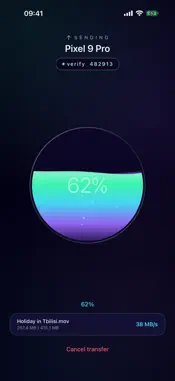
CrossDrop sends files directly between nearby devices over your own Wi-Fi — fast, private and free of accounts, clouds and ads. OPEN, TAP, SEND Devices around you appear on a live radar. Tap one, pick photos, videos or any files, and they fly across at Wi-Fi speed. The other side just taps Accept. BUILT FOR PRIVACY • Files never touch a server — they go straight from device to device. • End-to-end encrypted with X25519 + ChaCha20-Poly1305, with a 6-digit code to verify both sides. • No account, no sign-in, no analytics, no tracking, no ads. SMART AND RESUMABLE • Send the same file again and only the changed parts travel — an identical file transfers zero bytes. • Dropped connection? The transfer resumes where it stopped. • Watch it happen in a liquid-glass orb that fills as your files arrive. SEND TO ANYONE No app on the other side? Start "to anyone": CrossDrop shows a QR code and anyone on the same Wi-Fi can download your files in their browser — multiple files arrive as a single zip. WIRELESS DRIVE Turn your device into a network drive. Browse and download its files from Finder, Windows Explorer or any web browser, protected by an optional passcode and read-only by default. Mount other CrossDrop drives right inside the app. WORKS ACROSS YOUR DEVICES CrossDrop runs on iPhone, iPad, Mac and other platforms, and they all see each other. On Mac, drag files onto the window to send. TIPS • Keep CrossDrop open while sending or receiving — iPhone and iPad pause network activity in the background. • Both devices need to be on the same Wi-Fi network. Allow Local Network access when asked. • Received files stay in the app's Inbox until you open, export or delete them.
What's New
Version 1.4.0 2026-11-22
• Shared drives update live: when a file is added to a drive you are browsing, it appears within seconds, with no refresh needed. • On Mac, received files now s...• Shared drives update live: when a file is added to a drive you are browsing, it appears within seconds, with no refresh needed. • On Mac, received files now save to a CrossDrop folder inside Downloads. On iPhone and iPad they stay in the Files app under CrossDrop. Technical Analysis
Package Overview Basic metadata
Bundle ID
com.granturismo.crossdrop Current Version 1.4.0
Minimum iOS 16.0
Package Size App Store Size
Package Metadata 0 / 0 version records
Detailed binary, privacy manifest, framework, and Info.plist results have not been indexed for this package yet. The verified App Store and archive metadata above remains available.
Developer Information
Known Version Records
0 version records with stored package metadata
Stored metadata does not guarantee a package is currently available to download.
| Details | Version / IDs | Version date | Action |
|---|