
Preview
Description
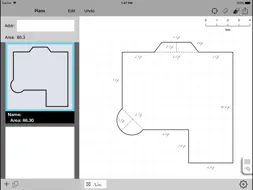
This version of FieldSketcher provides a simple, accurate tool used to sketch floor plans during a field inspection. FieldSketcher documents property inspections very fast the first time. Measurements and inspection notes are recorded in real time. Completed, fully documented sketches are available for reports back at the office. No repeated actions required. Target Users: Who benefits from FieldSketcher? Real estate appraisers, building inspectors, real estate agents, insurance agents, designers, buyers and sellers of real estate - anyone who wants to draw and document a floor plan in a format that can be directly uploaded to other computer programs. Actions: What does FieldSketcher do? Using an iPad and a measuring tape, an inspector directly draws property measurements on the surface of the iPad, using hand gestures and pop up menus. FieldSketcher is a sketching tool - not intended for drawing detailed blueprints. By carefully constraining the scope of the app, the user can map out a property without learning a complex new program - FieldSketcher is as direct and intuitive as using a pencil to draw on paper - only better because it calculates and imbeds information in the sketch itself. Gestures: Tap: A single tap activates an element on the screen. Drag: Placing a single finger on the screen and dragging it across the screen draws a line. The finger acts as if a pencil on the screen. Once an element is activated, its points can be dragged across the screen. Two-finger Scroll: Placing two fingers on the drawing area allows the drawing to scroll across the screen. Pinch: Pinching a line between two fingers changes the size of the image on the screen. Screen Organization Center:The center of the screen is a blank sheet of graph paper. Right sidebar: The sidebar is tabbed - like an old-fashioned notebook. When the lower right hand tab is tapped, the tab displays a set of options. One set of options is a library of common shapes and features such as a bay window or curve. Left sidebar: The address of the property is input into the top left-hand field of the sidebar. The size and all contents of the drawing are summarized in the left sidebar section. Top Command line: Icons on the top right hand of the screen include a Center, a Ruler, an Eraser, and an Upload icon. Tap the center to center the drawing. Tap the ruler to edit measurement settings for the grid lines. Tap the Eraser to select the delete the selected shape. Tap the Upload icon to send a .pdf copy of the plan to print the sketch or send it to your main computer. Bottom Command line: The grey bar at the bottom of the screen has a plus sign icon. Tap the plus sign to add another section to your drawing. Settings: Grid settings are expressed in inches and converted to square feet in area calculations on the left side of the screen. Measurement grids can be customized by tapping the “Ruler” icon. To input specific measurements, tap the line to activate and then tap the dimension to edit. A popup will be displayed that allows the user to type exact measurements. Tap off of dialog to accept. Definitions Points = Intersection of lines where walls meet and where features can be controlled. Line = A line is a straight edge from two points. A wall is a portion of a line. A wall can encompass an entire line. Shapes = Walls, turrets and bay windows are common architectural shapes. Common shapes are included in a tabbed sidebar on the right-hand side of the screen. Shapes can be selected with a tap, then dragged onto the screen and attached to a line. Dimensions can then be refined to match exact property measurement without first doing the algebra of the shape. Shapes are droppable features, or objects that can be dragged from the right panel onto existing drawings. Support URL: http://FieldSketcher.com.s3-website-us-east-1.amazonaws.com
What's New
Version 0.8.5 2022-04-28
Updated application to utilize SwiftUI for most of the application interface. Technical Analysis
Package Overview Basic metadata
Bundle ID
com.gobooie.fieldsketcher Current Version 0.8.5
Minimum iOS 15.2
Package Size App Store Size
Package Metadata 1 / 15 version records
5.0 / 5.0 (1 ratings)
Detailed binary, privacy manifest, framework, and Info.plist results have not been indexed for this package yet. The verified App Store and archive metadata above remains available.
Developer Information
Known Version Records
1 version record with stored package metadata • 15 known version records
Stored metadata does not guarantee a package is currently available to download.
| Details | Version / IDs | Version date | Action |
|---|---|---|---|
 1.34 MB | v0.8.5 App Store ID: 848645413Build: 1 | 2022-04-27 09:51:28 | Get Version |
| Not archived | App Store ID: 847598809 | Unknown | Request Version |
| Not archived | App Store ID: 847457438 | Unknown | Request Version |
| Not archived | App Store ID: 847335688 | Unknown | Request Version |
| Not archived | App Store ID: 847200919 | Unknown | Request Version |
| Not archived | App Store ID: 847181612 | Unknown | Request Version |
| Not archived | App Store ID: 841468160 | Unknown | Request Version |
| Not archived | App Store ID: 823789830 | Unknown | Request Version |
| Not archived | App Store ID: 811865791 | Unknown | Request Version |
| Not archived | App Store ID: 811565932 | Unknown | Request Version |
| Not archived | App Store ID: 736932692 | Unknown | Request Version |
| Not archived | App Store ID: 685573252 | Unknown | Request Version |
| Not archived | App Store ID: 668972654 | Unknown | Request Version |
| Not archived | App Store ID: 659332673 | Unknown | Request Version |
| Not archived | App Store ID: 639282660 | Unknown | Request Version |