Preview



Description
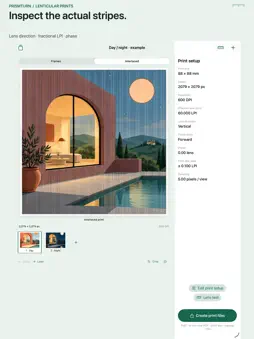
Prismturn prepares image files for small physical lenticular flip prints. Bring 2–8 pictures, arrange their order, adjust each crop and save a reusable project on your device. TEST THE LENS FIRST Generate a pitch-test PDF and band CSV before adding photos. Choose base pitch, step, DPI, direction and paper. Vertical and horizontal tests both use a roughly 100 mm raster span, with a separate exact 100 mm reference ruler. Print at 100% / actual size, compare the bands under your own physical lens, and explicitly choose a pitch to apply to your project or save as a named preset. Pitch values retain three decimals. This is a manual paper test, not automatic lens measurement. PREPARE THE IMAGE Set print size in millimeters, raster DPI and effective lens pitch in LPI. Choose vertical or horizontal lenses, reverse view order or adjust phase. Each output pixel selects a source view, including fractional lens pitches. Inspect the source sequence manually or view the actual interlaced raster. iPad adapts its source preview and print inspector to the available space. SHARE FIVE REAL FILES Export an interlaced PNG with print-resolution metadata, an actual-size A4 or US Letter PDF with crop marks, a pitch-test PDF, a settings CSV and an editable JSON backup containing source images. Share together or individually. The CSV and backup retain your manually chosen lens-test settings and note. Import a backup to restore a separate project copy. Save, apply and delete print presets. One upfront purchase includes every tool. No subscriptions, advertisements, accounts, analytics or developer data collection. Projects and pictures stay on your device unless you choose to share them. A separately obtained physical lenticular lens and suitable printer are required for the finished effect. Frames is a manual sequence preview, not a simulation or calibration of your lens. Lens pitch, viewing distance, printer precision, scaling and mounting affect results. Prismturn does not infer 3D depth, control printers, produce video or guarantee lens compatibility. Import images up to 20 MB and 100 megapixels; retained sources are resized to at most 1600 pixels per edge. Print sizes are 20–150 mm per edge at 300, 600, 720 or 1200 DPI; each output edge must remain at or below 4096 pixels. Each frame needs at least one output pixel per lens, so some DPI/pitch/frame-count combinations require adjustment. Pixel rounding is shown as actual print dimensions. Backups are imported up to 128 MB.
What's New
Version 1.1 2026-11-02
Test your lens before adding pictures. Generate a printable pitch test and band CSV, compare the sheet with your physical lens, then apply an exact band or save... Technical Analysis
Package Overview Basic metadata
Bundle ID
com.goblingcompany.prismturn Current Version 1.1
Minimum iOS 17.0
Package Size App Store Size
Package Metadata 0 / 0 version records
Detailed binary, privacy manifest, framework, and Info.plist results have not been indexed for this package yet. The verified App Store and archive metadata above remains available.
Developer Information
Known Version Records
0 version records with stored package metadata
Stored metadata does not guarantee a package is currently available to download.
| Details | Version / IDs | Version date | Action |
|---|