
Preview




Description
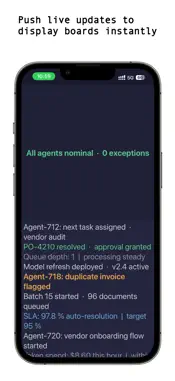
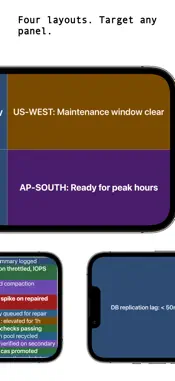
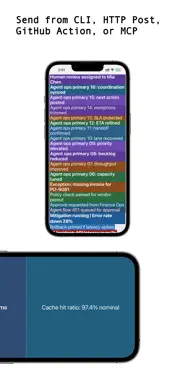
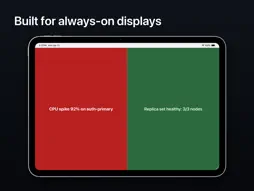
Push To Display turns any screen into a programmable display board. Send structured content from code, pipelines, AI agents, or no-code tools and see it rendered in real time — on iPhone, iPad, Android, or the web. WHAT IT DOES Create boards, bind display devices, issue API keys, and push content payloads via HTTP API, CLI, MCP, GitHub Action, n8n, Zapier, Raycast, or Power Platform. The app receives and renders each payload with display-focused layouts and panel-specific targeting. PUSH FROM ANYTHING • HTTP API — one endpoint, structured JSON, instant delivery • CLI (npx pushtodisplay) — send from the terminal, pipe scripts, manage boards • MCP Server — Claude Code, Cursor, Codex, and other AI agents push natively • GitHub Action — deployment status, build results, and alerts from CI/CD • n8n verified node — add a Send Update step to any workflow • Zapier — trigger updates from 7,000+ apps with no code • Raycast — send without leaving your keyboard on macOS • Power Platform — Power Apps, Power Automate, and Copilot Studio connectors FOUR LAYOUT PRESETS • Full Screen — one message fills the entire board • Stacked (Top + Bottom) — two horizontal panels • Side by Side (Left + Right) — two vertical panels • 2x2 Grid — four panels for multi-stream visibility PANEL-TARGETED ROUTING Target a specific panel (1–4) so one region updates without replacing the rest. Keep release status on the left and incident alerts on the right. WORKS WITH WHAT YOU ALREADY RUN Push To Display connects to CI/CD pipelines, monitoring tools, or anything that can make an HTTP request. Route AI agent output to a visible board through MCP, or use the CLI from any agent with shell access. Structured payloads support text blocks with alignment, size, weight, color, and background. KIOSK MODE Lock a device to one board and hide the controls. The screen shows only your content — no navigation, no exit. Built for unattended displays in lobbies, shop floors, and event spaces. REAL-TIME DELIVERY Messages arrive instantly over WebSocket. No polling, no delays. WHO IT'S FOR • DevOps and engineering — CI/CD status walls, deployment boards • AI agent operators — agent task states, approvals, exceptions • Operations — on-call rooms, queue and SLA displays • IT teams — shared awareness boards across offices • Manufacturing — shop-floor line status and alert boards • Healthcare — clinic flow, room readiness, queue guidance • No-code builders — n8n, Zapier, and Power Platform flows FREE TO START The Sandbox tier includes 1 board and 1,000 messages per month — no credit card required. Business plans are also available through Microsoft Azure Marketplace. HOW IT WORKS 1. Sign in — your first board is created and ready 2. Open the web playground to send a test update with no code 3. Connect API, CLI, MCP, n8n, Zapier, Raycast, or Power Platform 4. Content appears on the display in real time Manage boards, API keys, and devices from the app or the web at https://pushtodisplay.com. Full API documentation at https://pushtodisplay.com/docs. Terms of Use: https://pushtodisplay.com/terms Privacy Policy: https://pushtodisplay.com/privacy
What's New
Version 1.8 2026-11-09
Boards now refresh automatically when you return to the app, so messages sent while you were away appear right away. This update also includes behind-the-scenes...Boards now refresh automatically when you return to the app, so messages sent while you were away appear right away. This update also includes behind-the-scenes reliability improvements. Technical Analysis
Package Overview Basic metadata
Bundle ID
com.pushtodisplay Current Version 1.8
Minimum iOS 15.1
Package Size App Store Size
Package Metadata 0 / 3 version records
Detailed binary, privacy manifest, framework, and Info.plist results have not been indexed for this package yet. The verified App Store and archive metadata above remains available.
Developer Information
Known Version Records
0 version records with stored package metadata • 3 known version records
Stored metadata does not guarantee a package is currently available to download.
| Details | Version / IDs | Version date | Action |
|---|---|---|---|
| Not archived | App Store ID: 886552672 | Unknown | Request Version |
| Not archived | App Store ID: 886454402 | Unknown | Request Version |
| Not archived | App Store ID: 886328600 | Unknown | Request Version |