Glyph - Read, Summarize, Ask App Icon

Glyph - Read, Summarize, Ask

Book • Glyph LLC
12+ v1.2.0 Recorded price: Free App Store →
★★★★★
★★★★★
(1 App Store ratings)
IPA Analysis
Technical Specs
Bundle ID com.glyphapp.Glyph
Version 1.2.0
App Store Size 15.32 MB
Minimum iOS 26.0
Devices iPhone, iPad, iPod touch
Catalog release date 2026-07-08
Latest recorded version date 2026-08-01
Features & Support
Advisory 12+
Languages (1)
EN
Top In App Purchases
No In App Purchases Listed

Preview

Glyph - Read, Summarize, Ask screenshot 1 Glyph - Read, Summarize, Ask screenshot 2 Glyph - Read, Summarize, Ask screenshot 3 Glyph - Read, Summarize, Ask screenshot 4 Glyph - Read, Summarize, Ask screenshot 5 Glyph - Read, Summarize, Ask screenshot 6 Glyph - Read, Summarize, Ask screenshot 7 Glyph - Read, Summarize, Ask screenshot 8 Glyph - Read, Summarize, Ask screenshot 9 Glyph - Read, Summarize, Ask screenshot 10 Glyph - Read, Summarize, Ask screenshot 11 Glyph - Read, Summarize, Ask screenshot 12 Glyph - Read, Summarize, Ask screenshot 13 Glyph - Read, Summarize, Ask screenshot 14 Glyph - Read, Summarize, Ask screenshot 15 Glyph - Read, Summarize, Ask screenshot 16 Glyph - Read, Summarize, Ask screenshot 17 Glyph - Read, Summarize, Ask screenshot 18

Description

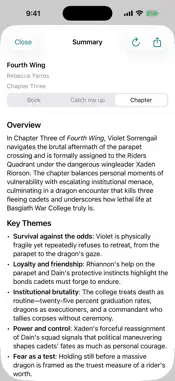
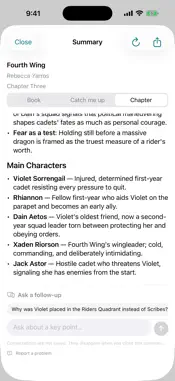
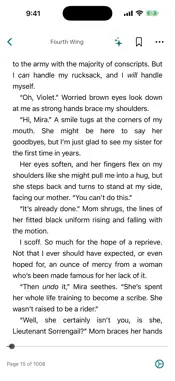
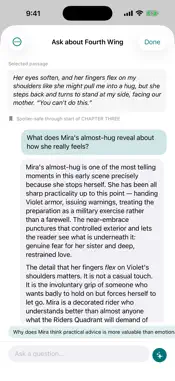
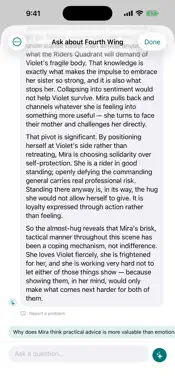
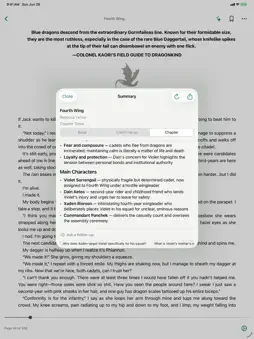
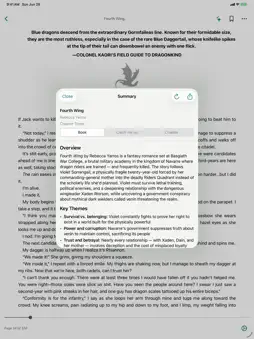
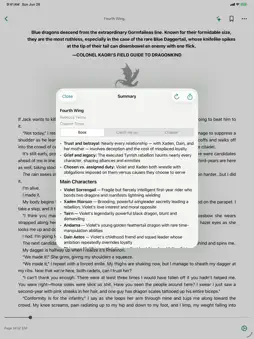
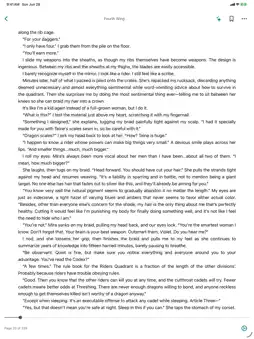
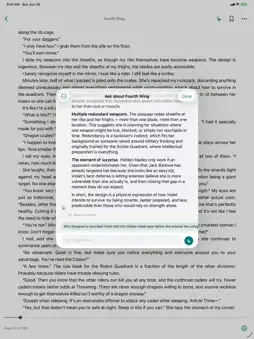
Turn any book into a conversation. Glyph is a reader with a companion built in. Whenever a chapter loses you, a passage tangles you up, or a question pops into your head, the companion is right there on the page, ready to summarize, explain, or answer, so you keep moving instead of putting the book down. A companion that reads along with you • Summarize a chapter or a whole book in seconds, so you can catch up or decide what to read next. • Highlight any passage and ask what it means. The companion keeps the surrounding text in context, so follow-up questions actually track what you're reading. • Stuck on a chart, diagram, or panel? Ask about the visuals on the page and get a plain answer. • Coming back to a series after a while? Get a spoiler-aware recap of where the story left off. A reader worth staying in • Adjust font size, line spacing, margins, text alignment, and brightness until the page feels right. • Read paged or in a continuous scroll, with light, dark, and warm themes. • Highlight, bookmark, and take notes, then jump back to any of them instantly. • Search the full text of a book to find that one line you remember. Bring the books you already have • Open EPUBs, PDFs, and CBZ comics from Files, email, or any app that can share them. • Scanned PDFs are read on device so you can search and summarize them like any other book. • Comics get their own reader: page spreads or vertical scroll, pinch to zoom, and right-to-left support. Picks up wherever you are • Your reading spot, bookmarks, highlights, and the companion's summaries and chats sync across your iPhone and iPad with just your iCloud account. • Switch devices mid-chapter and continue at the same spot. • Delete and reinstall, or re-add a book you had before, and everything comes back with it. Private by design • Your library stays in your own iCloud account. We don't sell your data and we don't use third-party trackers or advertising. Glyph Pro Glyph's reading companion is available with Glyph Pro: • Glyph Pro: $4.99 per month, with a 7-day free trial. • Generous daily limits, about 33× the free daily allowance, plus save and share every conversation. Your free trial converts to a paid monthly subscription unless you cancel at least 24 hours before it ends. Payment is charged to your Apple Account at confirmation of purchase. The subscription renews automatically each month unless auto-renew is turned off at least 24 hours before the end of the period. Manage or cancel anytime in Settings → Apple Account → Subscriptions. Terms of Use: https://www.apple.com/legal/internet-services/itunes/dev/stdeula/ Privacy Policy: https://glyphreader.app/privacy/ Download Glyph and never read alone again.

What's New

Version 1.2.0 2026-08-01
The Store is live. Browse books, comics, and documents by genre, author, or series, and send anything straight to your library. Everything you can download tod...The Store is live. Browse books, comics, and documents by genre, author, or series, and send anything straight to your library. Everything you can download today is free and public domain, with more to come. Series pages, author pages, and recommendations are all in there, so one good book leads to the next. Quiz yourself on any book. Ask Rune for a quiz on a whole book, the chapter you're on, or only the part you've read so far. Choose how many questions you want and whether they follow the book's order. A wrong answer shows you the right one, explains it, and names the page and paragraph it came from, so you can read the full passage or jump straight to it in the book. At the end you get your score, a breakdown by topic, and a study guide built around whatever you need to brush up on. Quizzes are saved in your Rune history, where you can retake one or share it so someone else takes the same questions. Rune answers faster. Rune now reads ahead while you do, so questions about your book are answered right away instead of pausing to gather context first. Leave a book open on Wi-Fi and it works through the whole thing, so even jumping to a later chapter answers instantly. Also in this version: Search your settings. Tap the search icon at the top right of Settings and type what you're after to jump straight to it, instead of hunting through the sections. Reading status chips in your library: Want, Reading (or how far in you are), Finished, or Archived. A guided walkthrough for quizzes, plus a Back button on every walkthrough card. Filter your Rune history by type to see just your asks, summaries, or quizzes. The Rune menu in a book is now three clear choices: Ask, Summarize, and Generate. You can start an ask from your library without opening the book. Fetching a book's details now answers from the Glyph catalog first, so a book in your library gets the same title, publisher, series, and cover art the Store shows. Book covers open instantly on the Store's book pages instead of waiting on a blank placeholder. Large library updates after installing a new version show progress, resume if interrupted, and can keep going in the background. Chapter titles, table of contents page numbers, and chapter taps in scroll mode are all more accurate. Book covers in the home screen widget are now all the same size.

Technical Analysis

Package Overview Basic metadata
Bundle ID com.glyphapp.Glyph
Current Version 1.2.0
Minimum iOS 26.0
Package Size App Store Size
Package Metadata 0 / 0 version records
Detailed binary, privacy manifest, framework, and Info.plist results have not been indexed for this package yet. The verified App Store and archive metadata above remains available.

Developer Information

Known Version Records

0 version records with stored package metadata

Stored metadata does not guarantee a package is currently available to download.

Details Version / IDs Version date Action