
Preview










Description
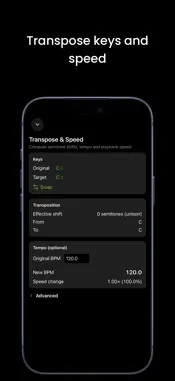
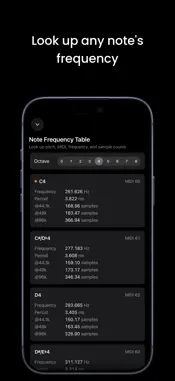
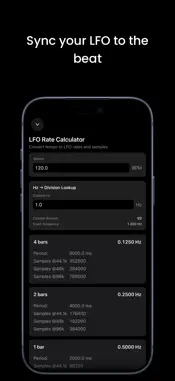
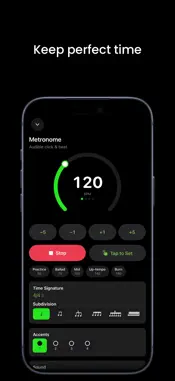
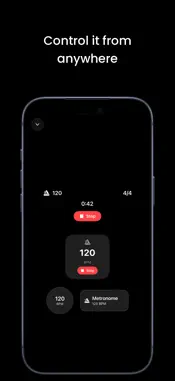
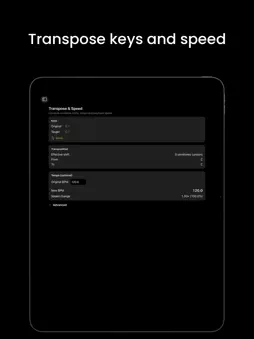
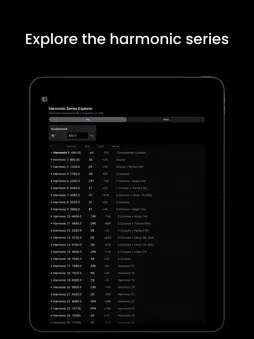
Metric is a pocket timing and frequency toolkit for iPhone and iPad, now with a built-in metronome. Whether you're keeping time, setting delay times in a mix, tuning an FM patch, syncing an LFO, or transposing a sample, Metric gives you instant, precise answers in one distraction-free app. Now with Siri, Shortcuts, widgets, and a Live Activity. METRONOME A precise metronome with a large tempo dial, tap-to-set tempo, adjustable time signatures and subdivisions, and a clear visual beat indicator. Background-safe timing keeps the click steady even with the screen locked. TAP TEMPO Tap anywhere on the large touch target to measure tempo. See instant BPM from your last tap and a rolling average over up to eight taps. Send either reading straight into the BPM Converter, Transpose, or LFO Rate tools with a single tap. Your tempo flows across every tool automatically. BPM → ms / Hz CONVERTER Enter a tempo and read straight, dotted, and triplet values for whole, half, quarter, eighth, and sixteenth notes. Every row shows milliseconds and frequency in Hz, so you can dial in delay, reverb pre-delay, or sidechain timing without reaching for a calculator. TRANSPOSE & SPEED Pick an original key and a target key to see the semitone shift, interval name, and exact DAW transpose value. Add an original BPM and Metric computes the new tempo and playback speed ratio. Fine-tune with a cents slider (±100) and a speed slider spanning two full octaves (±24 semitones). NOTE FREQUENCY TABLE Browse all 108 chromatic notes from C0 to B8. Each note shows its MIDI number, frequency in Hz, period in milliseconds, and sample counts at 44.1, 48 and 96 kHz. Middle C is flagged for quick reference. All values are based on A4 = 440 Hz. FM CALCULATOR Two modes in one tool. Ratio Explorer lets you set carrier and modulator ratios with a base frequency and choose from ten classic FM presets, from hollow octaves (1:1) to inharmonic bells (1:π). Pitch Correction mode works in reverse: pick a target note and get the exact carrier and modulator frequencies. Both modes show a sideband table with up to ten partials, their frequencies, nearest notes, and colour-coded amplitudes driven by a modulation index slider. LFO RATE CALCULATOR Convert any BPM into LFO rates across 17 musical divisions, from four bars down to 1/32 triplets. Each row displays Hz, period in milliseconds, and samples per cycle at 44.1, 48 and 96 kHz. Reverse lookup lets you enter any Hz value and find the closest matching musical division, with the error clearly shown. HARMONIC SERIES EXPLORER Start from a frequency or pick any note and see the first 32 harmonics listed with frequency, nearest note name, cents deviation, and interval label. Low-order harmonics are colour-coded for easy identification. Deviations greater than 30 cents are highlighted so you can spot inharmonic content at a glance. SIRI, SHORTCUTS & WIDGETS Drive Metric hands-free. Ask Siri to start or stop the metronome, set a BPM, tap a tempo, convert BPM to milliseconds, find a note frequency, or transpose a tempo. Every tool is a Shortcuts action too, and the BPM widget keeps your tempo on the Home and Lock Screen. TOOLS THAT TALK TO EACH OTHER Tap a tempo once and it appears everywhere: BPM Converter, Transpose, and LFO Rate all share the same live BPM. Note Frequency, FM Calculator, and Harmonics all use the same A4 = 440 Hz reference, so their numbers always agree. DESIGNED FOR PRODUCERS • Dark-mode aware interface • Adaptive layouts for iPhone and iPad • Three common sample rates: 44.1, 48 and 96 kHz ACCESSIBILITY Works with VoiceOver and Voice Control, follows your text size up to the largest accessibility sizes, and respects Reduce Motion. Try free for 7 days! After the trial, unlock full access with a one-time purchase — no subscriptions.
What's New
Version 1.3.1 2026-10-31
- Improved accessibility with VoiceOver, Voice Control and larger text sizes - A deeper green in light mode makes text and buttons easier to read - Typing a tem... Technical Analysis
Package Overview Basic metadata
Bundle ID
tools.harmonic.metric Current Version 1.3.1
Minimum iOS 17.6
Package Size App Store Size
Package Metadata 0 / 2 version records
Detailed binary, privacy manifest, framework, and Info.plist results have not been indexed for this package yet. The verified App Store and archive metadata above remains available.
Developer Information
Known Version Records
0 version records with stored package metadata • 2 known version records
Stored metadata does not guarantee a package is currently available to download.
| Details | Version / IDs | Version date | Action |
|---|---|---|---|
| Not archived | App Store ID: 883946930 | Unknown | Request Version |
| Not archived | App Store ID: 883260138 | Unknown | Request Version |