Preview






Description
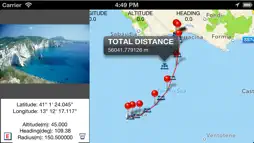
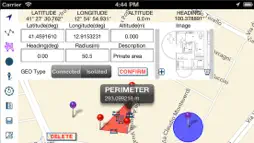
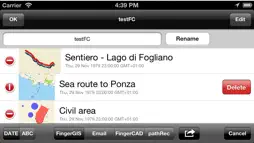
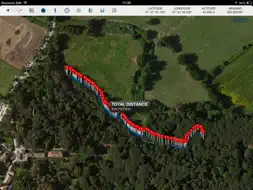
"FingerGIS" is the first GIS application (Geographical Information System) for iPad, iPhone, iTouch. With "FingerGIS" You can draw (georeferencing): - 2D shapes such as sites, lands, roads or paths explorable by car, plane or on foot (in the city, in the countryside, on a hill, in the mountains, at sea, etc...) - 3D shapes such as multiple surfaces in space, air routes, etc... The generic 2D and 3D shapes can be drawn over the maps (2D and 3D) of the globe, visualized by "FingerGIS" on the screen (Google Maps or Apple Maps), like when You draw using a CAD application. You can query the maps and the geographical points (manually inserted or automatically recorded) in order to obtain lengths, distances between geographic points, measure of areas and perimeters, total length of a path (polyline), etc... "FingerGIS" provides several automatic recording mode and/or manual input windows to insert the geographical points of interest; You will be able to: - save the current positions as a new geopoint, during the exploration of a site (using the GPS to get your current location and pressing the "save current location" button to save your current position as a new geopoint) - enter manually new geographical points using the manual input window (with latitude, longitude, altitude, heading (it uses the device's internal compass), radius, description: these geopoint's data (such as latitude, longitude, altitude, heading, etc…) can be entered automatically by touching with a finger the desired position in the displayed maps (by touching the screen of the device) or manually typing the numerical values / text using the keyboard of the device) - save images together with geographic points (You can insert images taken with the camera in real time or stored in the photo album of the device and join the images with the geopoints) - save an infinite number of isolated geographical points and / or circular areas of known radius, etc... - automatically record sites, activating the "automatic recording" function and walking on the perimeter of the site to be recorded - draw each type of 2D and 3D objects over the maps of the globe, using multiple layers, as You would normally do with common CAD / GIS / SIT for personal computers. All geographic points inserted over the maps, with their descriptions, measurements and images can be saved in the archive of documents of "FingerGIS" and may be shared with other applications installed on Your device or with cloud systems such as Dropbox. "FingerGIS" is able to export the saved geographical points using: - .csv file format (native "FingerGIS" file format) - in the native file format of "FingerCAD" (You can draw your CAD projects over geographic maps or over the geo-referenced sites recorded by "FingerGIS") - in the native file format of "pathRecorder" (navigation system with automated indications to reach destinations, following paths recorded or drawn) - as an email attachment (.zip compressed file, containing all the recorded geopoints, the informations, data, images, etc...) With "FingerGIS" You will have a complete GIS application in your mobile device. Sharing documents (IN/OUT) with: - DROPBOX (remote storage systems, cloud) - Open In - iTunes File Sharing - email attachment - FingerCAD (HD , WS , PRO) (using "Open In" - 3D data export/sharing) - pathRecorder - come back (using "Open In") Using FingerCAD together with FingerGIS: You can export the recorded sites using a .DXF file format (compatible with the CAD applications for MAC or PC) or a .OBJ file format (compatible with the 3D modeling applications for MAC or PC) or .PDF file format. Documents archive: - an infinite number of documents can be saved in the FingerGIS documents archive Display: - Retina display supported App type: - UNIVERSAL APP (You pay the app only once and it runs on all the devices)
What's New
Version 1.6 2026-06-09
* Minor bugs fixed Technical Analysis
Package Overview Basic metadata
Bundle ID
com.GianlucaNataliniNGCYBIT.FingerGIS Current Version 1.6
Minimum iOS 16.6
Package Size App Store Size
Package Metadata 0 / 8 version records
4.0 / 5.0 (1 ratings)
Detailed binary, privacy manifest, framework, and Info.plist results have not been indexed for this package yet. The verified App Store and archive metadata above remains available.
Developer Information
Known Version Records
0 version records with stored package metadata • 8 known version records
Stored metadata does not guarantee a package is currently available to download.
| Details | Version / IDs | Version date | Action |
|---|---|---|---|
| Not archived | App Store ID: 886682712 | Unknown | Paid / Arcade |
| Not archived | App Store ID: 856618789 | Unknown | Paid / Arcade |
| Not archived | App Store ID: 830207834 | Unknown | Paid / Arcade |
| Not archived | App Store ID: 824521856 | Unknown | Paid / Arcade |
| Not archived | App Store ID: 813798031 | Unknown | Paid / Arcade |
| Not archived | App Store ID: 608093547 | Unknown | Paid / Arcade |
| Not archived | App Store ID: 15770306 | Unknown | Paid / Arcade |
| Not archived | App Store ID: 15655691 | Unknown | Paid / Arcade |