
Preview


Description
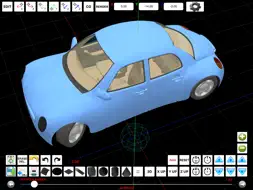
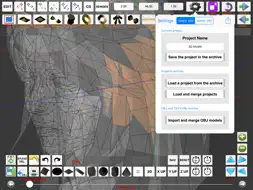
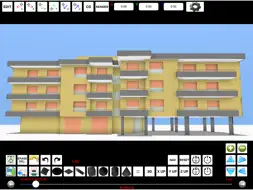
"Finger3D HD" trasforma il tuo dispositivo nel modellatore tridimensionale più piccolo esistente. Con "Finger3D HD" potrai realizzare qualunque forma/oggetto/modello tridimensionale, modellando gli oggetti 3D direttamente con le dita delle tue mani. Avrai a disposizione le primitive geometriche tridimensionali (sfere, cilindri, coni, cubi, piani, superfici, dischi, curve, ecc...) tipicamente utilizzate nei modellatori tridimensionali per PC o MAC. Potrai gestire i parametri relativi all'illuminazione (es. posizione lampada), il materiale (es. colore materiale, textures), la trasparenza degli oggetti, ecc... Potrai navigare il mondo 3D utilizzando le dita delle tue mani... avrai a disposizione la vista tridimensionale (3D), la vista dall'alto (Y UP), da destra (X UP), frontale (Z UP). Potrai modellare gli oggetti, scalarli, spostarli, ruotarli, spostare i vertici selezionati con le tue dita o utilizzare il puntatore sferico azzurro di selezione tridimensionale per trascinare i vertici selezionati. Potrai posizionare velocemente il puntatore tridimensionale nello spazio utilizzando le tre coordinate X, Y, Z o utilizzando le frecce di posizionamento del puntatore (lungo gli assi X, Y, Z). La dimensione degli oggetti tridimensionali può essere definita utilizzando, in fase di inserimento, il controllo "POINTER RADIUS" del puntatore sferico o successivamente utilizzando la funzione SCALE (in modalità di editing). Tramite il controllo "POINTER RADIUS" potrai selezionare uno o più vertici / oggetti / facce; aumentando le dimensioni del "POINTER RADIUS" potrai selezionare più componenti. Strumenti di modellazione tridimensionale: 0) CHARACTER MODELING using BACKGROUND IMAGES 1) MODELLARE con le dita: muovere i vertici toccati trascinando il dito sullo schermo 2) SUBDIVIDE: dividere una o più facce in 4 o più facce ciascuna 3) EXTRUDE: estrusione perpendicolare o obliqua di facce o vertici (direzione di estrusione: dal centro della faccia selezionata al centro del puntatore tridimensionale o lungo i tre assi X,Y,Z) 4) SMOOTH: utile per disegnare montagne 5) VLINK: unisce i vertici all'interno del puntatore tridimensionale spostandoli al centro del puntatore stesso (utile per realizzare punte, becchi di animali, parti anteriori di aerei, ali, ecc...) 6) COPY/PASTE 7) COPY MIRROR 8) ERASE VERTICES / FACES 9) FACES EDITING / VERTICES EDITING 10) REVOLVE 11) REVOLVE "SPIN" 12) REVOLVE "BASE FACE" (per creare personaggi con un click) 13) MOVE 14) Viste 3D e 2D 15) SMOOTH SHADING, FLAT SHADING, WIREFRAME 16) GROUP/UNGROUP 17) UNDO/REDO ecc… Il modello potrà essere salvato manualmente o automaticamente, esportato nel formato OBJ+MTL per poi essere inviato via email o caricato all'interno dei comuni modellatori tridimensionali per PC o MAC (es. Maya 3D, Blender, ecc...). RENDERING: l'immagine JPG/PNG generata secondo la politica "render what you see" verrà salvata nel photo album del dispositivo (o potrà essere inviata via e-mail se necessario). Proiezioni: ORTOGRAFICA e PROSPETTICA. Il "Projects Archive“ permette il salvataggio, la gestione, il caricamento e la fusione di progetti. La possibilità di applicare texture fotografate (con la fotocamera del dispositivo) al modello 3D vi daranno la sensazione di lavorare con modelli 3D reali. La grafica tridimensionale è stata realizzata interamente in OPENGL; il prodotto sfrutta quindi l'accelerazione grafica utilizzata nei videogiochi per PC. Utile per ogni tipo di utilizzo: per Ingegneri (informatici, meccanici, elettronici, chimici), Architetti (design e rendering), Chimici (design di molecole), Astronauti, Astronomi, Designers, Registi, Videogamers, Biologi, Interior Designers, ecc... Finger3D è stato disegnato per lavorare anche assieme a FingerCAD: potrai modellare in un mondo 3D un disegno iniziato con un CAD 2D, applicare textures al modello 3D, esplorarlo con la visuale in prima persona (3D CAD VIRTUAL REALITY), e creare immagini realistiche utilizzando la procedura di rendering.
What's New
Version 4.2.2 2025-06-24
* Minor bugs fixed TEXTURES: * Added the ability to assign a texture to the selected faces of the 3D objects * The 3D model is displayed using the texture also ... Technical Analysis
Package Overview Basic metadata
Bundle ID
com.GianlucaNataliniNGCYBIT.Finger3DHD Current Version 4.2.2
Minimum iOS 18.0
Package Size App Store Size
Package Metadata 1 / 22 version records
Detailed binary, privacy manifest, framework, and Info.plist results have not been indexed for this package yet. The verified App Store and archive metadata above remains available.
Developer Information
Known Version Records
1 version record with stored package metadata • 22 known version records
Stored metadata does not guarantee a package is currently available to download.
| Details | Version / IDs | Version date | Action |
|---|---|---|---|
| 3.91 MB | v4.2.2 App Store ID: 875809728Build: 4.2.2 | 2025-06-24 20:19:55 | Paid / Arcade |
| Not archived | App Store ID: 846893225 | Unknown | Paid / Arcade |
| Not archived | App Store ID: 829675350 | Unknown | Paid / Arcade |
| Not archived | App Store ID: 824487067 | Unknown | Paid / Arcade |
| Not archived | App Store ID: 15453703 | Unknown | Paid / Arcade |
| Not archived | App Store ID: 11736610 | Unknown | Paid / Arcade |
| Not archived | App Store ID: 11088433 | Unknown | Paid / Arcade |
| Not archived | App Store ID: 7670154 | Unknown | Paid / Arcade |
| Not archived | App Store ID: 7261907 | Unknown | Paid / Arcade |
| Not archived | App Store ID: 6939214 | Unknown | Paid / Arcade |
| Not archived | App Store ID: 6580880 | Unknown | Paid / Arcade |
| Not archived | App Store ID: 4647577 | Unknown | Paid / Arcade |
| Not archived | App Store ID: 4506062 | Unknown | Paid / Arcade |
| Not archived | App Store ID: 4364772 | Unknown | Paid / Arcade |
| Not archived | App Store ID: 4126820 | Unknown | Paid / Arcade |
| Not archived | App Store ID: 3722301 | Unknown | Paid / Arcade |
| Not archived | App Store ID: 3490678 | Unknown | Paid / Arcade |
| Not archived | App Store ID: 3190089 | Unknown | Paid / Arcade |
| Not archived | App Store ID: 3162352 | Unknown | Paid / Arcade |
| Not archived | App Store ID: 3078671 | Unknown | Paid / Arcade |
| Not archived | App Store ID: 3039414 | Unknown | Paid / Arcade |
| Not archived | App Store ID: 3005272 | Unknown | Paid / Arcade |