
Preview


Description
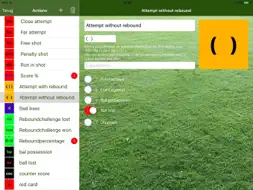
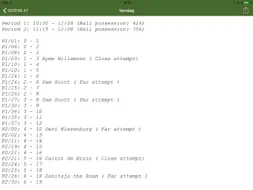
Sport/Team Statistics With this app, it is possible to track live statistics with minimal operations in an easy manner during a match or training. The app offers the possibility to create a list of your players (incl. Photo) and define the actions you want to keep track of during a match. Also, it is possible to define formulas (expressions) that perform live calculations using actions, for example: the successful goal attempts divided by the total number of attempts times 100. The app is not designed for specific sports, but widely applicable in team sports by its generic structure. If there are specific requirements that you'd like to see in the app, do not hesitate to contact us, we will do our best to realize it, if our eyes can also be a useful addition to the app. THE PLAYERS You can create the players list containing all the players yourself. A player consists of a name, a surname, comments, if the player is a substitute or not, and a picture (optional). Only the players that are not substitutes are displayed during a match. Players can be changed (substituted) by simply pressing the player that is currently playing, and choosing the player that will be substituted. ACTIONS You can define unlimited actions yourself that you want to keep track off during a match. Every action consists of a name, a colour and an abbreviation, the abbreviation will later be used for defining expressions. The abbreviations will also be on-screen during a match in the chosen colour, so they are easily recognised during a match. This way of keeping track of statistics takes some time to get used to, please keep that in mind! An action also consist of the following five checkboxes; - Point scored for own team - Point scored for opposing team - Ball possession after action - Ball loss after action - Disabled (ACTION is not shown on screen match, but statistics are still tracked) These checkboxes are used for keeping the score and ball possession. THE MATCH You can add an unlimited amount of matches to the “match”-screen, by giving in a name. The name can still be changed afterwards. During the match, all the non-substitute players are shown. Next to the players, all the actions are horizontally listed. If the list of actions is too long to display, you need to scroll horizontally. The list of actions can be decreased by turning certain actions off (See section ACTIONS) When the match starts (press play!), you can keep track of every action per player by simply pressing the appropriate action next to the appropriate player. A confirmation tone and an animation of the box, follow the touch of the action for confirmation. This makes it easier to see if a wrong action was pressed. To undo a wrong action, simply long-press the action that was wrong-pressed. The count of the action goes down by one, followed by a different tune for confirmation, as well as an animation. During the match, at the top of the match-screen, the ball possession and the score is displayed. If the match is finished, the stop button has to be pressed manually. The match is automatically stops if 150% of the pre-set time has expired. The pre-set time can be set in the options menu of the app THE REPORT Afterwards (or during) a match, you can let the app make a report of the match. The report includes the statistics of the match, plus the scoring timeline (including the players who scored), the substitutes, the percentage of ball-possession, and for every defined actions the statistical data. The statistical data in the report is shown per ACTION as well as per PLAYER. Also the best performing player per action is shown. NOTE: This is not per definition a good thing, if you define the ACTION: “counter score”, then this shows the player with the most counter scores. SETTINGS The app currently has two settings: - The number of periods per match - The playing time per period
What's New
Version 1.8 2025-01-28
bug fix for white menu bar Technical Analysis
Package Overview Basic metadata
Bundle ID
com.klwinkel.sportstats Current Version 1.8
Minimum iOS 11.0
Package Size App Store Size
Package Metadata 0 / 8 version records
Detailed binary, privacy manifest, framework, and Info.plist results have not been indexed for this package yet. The verified App Store and archive metadata above remains available.
Known Version Records
0 version records with stored package metadata • 8 known version records
Stored metadata does not guarantee a package is currently available to download.
| Details | Version / IDs | Version date | Action |
|---|---|---|---|
| Not archived | App Store ID: 872080960 | Unknown | Request Version |
| Not archived | App Store ID: 865414090 | Unknown | Request Version |
| Not archived | App Store ID: 838178979 | Unknown | Request Version |
| Not archived | App Store ID: 836829844 | Unknown | Request Version |
| Not archived | App Store ID: 828802987 | Unknown | Request Version |
| Not archived | App Store ID: 823950601 | Unknown | Request Version |
| Not archived | App Store ID: 817757246 | Unknown | Request Version |
| Not archived | App Store ID: 817065294 | Unknown | Request Version |