
Preview





Description
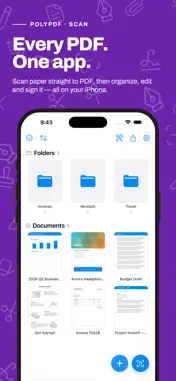
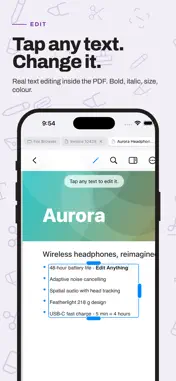
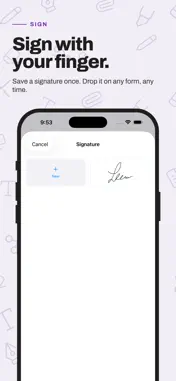
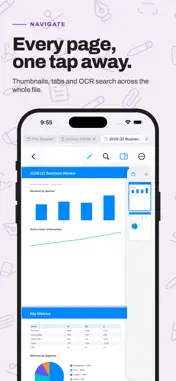
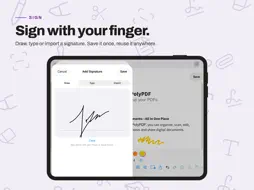
Poly-PDF — Scanner, PDF Editor & Annotator Pay once, own it forever — no subscriptions, no in-app purchases, no surprises. Poly-PDF is a complete PDF editor for iPhone and iPad. Edit text directly on the page, annotate documents, fill forms, sign, and organize your files. EDIT TEXT IN PLACE Tap any text on a PDF and start typing. PolyPDF lets you edit the actual content of a document right on the page, preserving the original font, size, and layout. Change a date, fix a typo, or rewrite a paragraph. ANNOTATE ANYTHING Add sticky notes, text boxes, shapes, arrows, and freehand ink drawings anywhere on a page. Highlight, underline, or strikethrough selected text. Every annotation is saved directly into the PDF so it opens correctly in any other app. FILL FORMS & SIGN Tap any form field to fill it in. Add your signature from a saved library or draw a new one. Insert images and stamps with a single tap. SHAPES & DRAWING Draw rectangles, ovals, lines, and arrows with full control over stroke color, fill color, and line width. Sketch freely with the pen tool or highlight with the highlighter. Smart alignment guides help you center and align objects on the page. ORGANIZE YOUR LIBRARY Keep your PDFs tidy with folders, search, and sort options. Drag a file onto a folder to move it instantly. Open PDFs directly from iCloud Drive and save changes back in place. SCAN DOCUMENTS Turn paper into PDFs with the built-in document scanner. Scan multi-page documents in seconds and save them straight to your library. POWERFUL PAGE TOOLS Reorder, rotate, insert, and delete pages. Export a clean flattened copy of any document. Redact sensitive information permanently with the redaction tool. BUILT FOR iPAD Open two documents side by side in split view with synchronized scrolling. Use the full-screen reading mode for distraction-free viewing. Keyboard shortcuts make editing faster than ever. MORE FEATURES · Table of contents navigation · Bookmarks and go-to-page · Full-text search across pages · Password-protected PDF support · Dark mode support · Undo and redo for all edits · Works entirely offline — no account required Poly-PDF is built for people who work with documents every day. Whether you're reviewing contracts, editing reports, filling out forms, or marking up study notes, Poly-PDF gives you the tools to get it done — right on your device.
What's New
Version 1.7 2026-11-13
Thank you for being a PolyPDF customer! -Your library is now a full file manager: a folder tree, Back, Forward and Up, Icons, List or Details views, Recents an...Thank you for being a PolyPDF customer! -Your library is now a full file manager: a folder tree, Back, Forward and Up, Icons, List or Details views, Recents and Favorites. Folders can hold other folders, and they're real folders you also see in the Files app. -Cut, Copy and Paste documents and folders. When a name is already taken, choose Replace, Keep Both or Skip. Undo takes back a move, copy, rename or delete. -Select several items at once, rename right in place, or rename many in one go. Dragging a selection moves all of it. -A deleted folder goes to the Trash with everything in it, and comes back the same way. -Locations: add folders from iCloud Drive or other places in the Files app, then browse, copy, rename and organize them without leaving PolyPDF. -Search now finds documents by the words inside them, scanned pages included, and shows the words around each match. Filter by kind, date, size or color, and keep a search in Saved Searches. -The folder tree now lists your color tags, and each one shows everything tagged with it. -Storage shows what takes up space, your largest documents and duplicate copies, with Keep One to clear the extras. -On iPhone: smaller tiles so more fits on screen, a Recents row you can fold away, swipe a row in List view to move or delete it, and touch and hold a document to preview it. -On iPad with a keyboard: shortcuts for copying, pasting, undoing, renaming and more. Hold Command to see them all. -Favorites are now included in your iCloud backup. -Fixes: when editing a page's text on iPhone, the keyboard bar's Done button is no longer hidden, and on iPad the Fill & Sign button on a form's banner now responds. If you run into any issues or have suggestions, we'd love to hear from you: tap Settings → Report a Bug inside the app. Technical Analysis
Package Overview Basic metadata
Bundle ID
com.tower.polypdf Current Version 1.7
Minimum iOS 17.0
Package Size App Store Size
Package Metadata 0 / 0 version records
Detailed binary, privacy manifest, framework, and Info.plist results have not been indexed for this package yet. The verified App Store and archive metadata above remains available.
Developer Information
Known Version Records
0 version records with stored package metadata
Stored metadata does not guarantee a package is currently available to download.
| Details | Version / IDs | Version date | Action |
|---|