Preview




Description
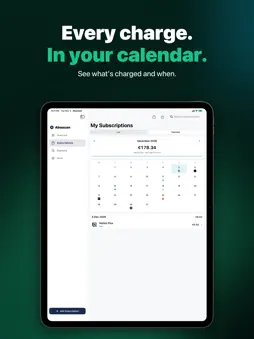
Streaming, cloud storage, fitness, insurance — subscriptions add up to more than you think. In just a few minutes, Aboscan gives you the full picture: what you're subscribed to, what it costs and when you need to cancel. Made for Germany, Austria and Switzerland. HOW IT WORKS 1. Import your bank statement: download your transactions in online banking — as CSV, PDF, CAMT or MT940 — or simply take screenshots of the transaction list in your banking app. No bank login, no credentials, no purchase required. For 16 banks in Germany, Austria and Switzerland, Aboscan shows you where to find the export — including Sparkasse, DKB, ING, N26, George and PostFinance. 2. Detect subscriptions automatically: Aboscan finds recurring payments, matches them to known providers (Netflix, Spotify, Adobe and many more) and sorts them into categories. Credits such as your salary are left out. 3. Stay on top: see all subscriptions with costs and upcoming payment dates — and get reminded in time, before anything renews. No bank statement? No problem: when you first open the app, tap the subscriptions you have and choose your plan. YOUR BENEFITS • Automatic subscription detection from bank statements, PDFs or screenshots • Reminders before payments, cancellation deadlines and the end of free trials • Monthly and yearly costs at a glance • A calendar of every charge this month, real logos for over 240 services • Subscription Check: a score from 0 to 100, free • Your subscription year: a year in review from December to share, free • Achievements and weekly goals for tidying up your subscriptions • Analysis with Pro: Subscription Check in detail, “What if …”, every charge for the next 12 months, ways to save, price increases, subscriptions and contracts kept apart • Cancellation info right on each subscription: link, email or postal address, plus notice period and contract number hints where available • Add them yourself: pause, fixed term, one-time, shared – in lists like Family and your own categories • Widgets, Siri and Spotlight, export as PDF and CSV • Optional iCloud sync through your private iCloud • In German and English PRIVACY FIRST • No bank login: Aboscan never connects to your bank account • No sign-up, no account, no email address needed • The analysis runs entirely on your iPhone — no transaction ever leaves your device • With Apple Intelligence even more accurate, on the device as well • GDPR-compliant • No ads, no selling of your data START FREE, UNLOCK ONCE Aboscan Basic is free — and the bank statement import is included: analyse, see the result, add up to 3 subscriptions or create them yourself. Reminders and cost overview included. Unlock Aboscan Pro with a one-time payment — not a subscription. Forever: add any number of subscriptions per import, track as many as you like, the analysis with Subscription Check, outlook and ways to save, contract document scanning, plus the Flow and Month Clock looks. An app against subscriptions shouldn't be one itself. If you prefer to pay monthly, Pro is also available as a monthly subscription. Get the full picture now — your first scan takes less than five minutes. SUBSCRIPTION & PRICES • Aboscan Basic is free forever (up to 3 subscriptions). • Aboscan Pro (Lifetime) is a one-time purchase for €24.99 — not a subscription, no recurring costs. • Aboscan Pro (Monthly) is a subscription for €2.99 per month. For the subscription: • Payment is charged to your Apple ID account at confirmation of purchase. • The subscription renews automatically for the same period at the same price unless it is cancelled at least 24 hours before the end of the current period. • Your account is charged for renewal within 24 hours before the end of the current period. • You can manage and cancel your subscription at any time after purchase in your Apple ID account settings. • Prices may vary by region and storefront. Terms of Use: https://aboscan.app/agb Privacy Policy: https://aboscan.app/datenschutz
What's New
Version 1.14 2026-11-18
New in 1.14: organise subscriptions the way your life is. • Lists: put subscriptions into lists like Personal, Family or Business – with a total per list on th...New in 1.14: organise subscriptions the way your life is. • Lists: put subscriptions into lists like Personal, Family or Business – with a total per list on the overview and in your list. • Custom categories on top of the built-in ones, for example “Kids”. They count in your statistics too. • Rename or remove them under More → Lists & categories, for every subscription at once. • Filters are remembered: category, list, payment method and contracts stay set the next time you open the app. • Screenshots from the UBS app are now read in the import. Technical Analysis
Package Overview Basic metadata
Bundle ID
app.aboscan.ios Current Version 1.14
Minimum iOS 18.0
Package Size App Store Size
Package Metadata 0 / 0 version records
Detailed binary, privacy manifest, framework, and Info.plist results have not been indexed for this package yet. The verified App Store and archive metadata above remains available.
Developer Information
Known Version Records
0 version records with stored package metadata
Stored metadata does not guarantee a package is currently available to download.
| Details | Version / IDs | Version date | Action |
|---|